

rekordbox for PC is professional DJ software for Windows developed by AlphaTheta Corporation. It helps DJs organize music libraries, analyze tracks, create playlists, set cue points, prepare beatgrids, and perform live mixes with compatible DJ equipment.
Designed primarily for Pioneer DJ and AlphaTheta hardware, rekordbox combines music management and DJ performance tools in one application. DJs can prepare their tracks on a computer and export playlists and settings to USB drives or SD cards for use with compatible DJ players.
Key Features
Music Library Management – Organize tracks into playlists, folders, tags, and intelligent collections.
Track Analysis – Analyze BPM, key, waveform, and beatgrid information to prepare tracks for mixing.
Hot Cues and Loops – Set cue points and loops before a performance for faster and more precise mixing.
Performance Mode – Mix tracks using virtual decks, jog controls, hot cues, effects, and other DJ performance tools.
USB and SD Export – Export prepared music and playlists to compatible storage devices for use with supported DJ equipment.
Cloud Library Sync – Synchronize supported music libraries and settings across compatible devices and services.
DVS Support – Use compatible turntables and control vinyl for traditional vinyl-style DJ performance.
Harmonic Mixing – Display track key information to help DJs select tracks that work well together.
Lighting Features – Supported versions can integrate track analysis with compatible lighting systems.
User Interface
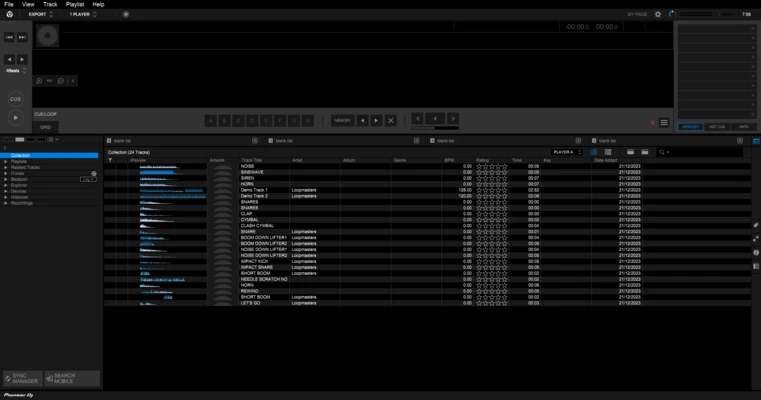
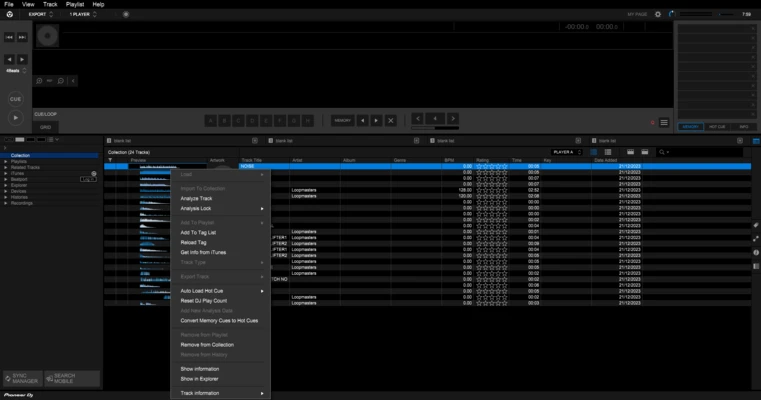
rekordbox uses a professional DJ-oriented interface with separate areas for music browsing, track information, waveforms, playlists, and virtual decks.
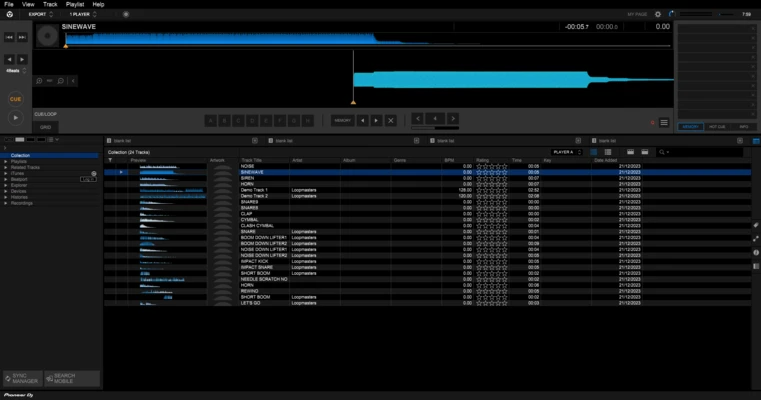
The detailed waveform display makes it easy to identify beats, breaks, vocals, and other sections of a track. Users can also customize the workspace to suit different preparation and performance workflows.
Installation and Setup
- Download the rekordbox installer for Windows.
- Run the installer and follow the setup instructions.
- Sign in or create an AlphaTheta account when required.
- Import music files into the library.
- Allow rekordbox to analyze BPM, key, waveform, and beatgrid information.
- Connect compatible DJ hardware and configure the audio and controller settings.
How to Use
Import Music: Add individual tracks or folders to the rekordbox library.
Analyze Tracks: Let the software analyze BPM, key, waveform, and beatgrid information.
Create Playlists: Organize tracks into playlists and folders for different performances.
Set Cues and Loops: Add hot cues, memory cues, and loops to prepare tracks before a performance.
Mix Tracks: Use Performance Mode with compatible DJ hardware or supported software controls.
Export Music: Transfer playlists and analyzed tracks to a USB drive or SD card for use with compatible Pioneer DJ equipment.
FAQ
Is rekordbox free?
Yes. rekordbox offers free functionality, while some advanced features and services require a paid plan or compatible hardware.
Can I use rekordbox without Pioneer DJ hardware?
Yes. You can use rekordbox for music organization and preparation without DJ hardware, although some performance features are designed specifically for compatible AlphaTheta/Pioneer DJ equipment.
What audio formats does rekordbox support?
Supported formats include common formats such as MP3, WAV, AIFF, FLAC, ALAC, and AAC. Availability can vary depending on the specific feature and version.
Can rekordbox export music to USB?
Yes. rekordbox can export compatible playlists and track information to USB storage devices for use with supported DJ players.
Can rekordbox be used for live DJ performances?
Yes. Performance features allow DJs to mix tracks in real time when using compatible hardware and supported features.
Alternatives
Traktor Pro – Professional DJ software with powerful mixing, effects, and performance tools.
Serato DJ Pro – Popular DJ software widely used for club, scratch, and turntable-based performances.
VirtualDJ – Feature-rich DJ software suitable for both beginners and experienced DJs.
Mixxx – Free and open-source DJ software with mixing, effects, and controller support.
Pricing
rekordbox provides a free version with basic music management and preparation features. Advanced performance, cloud, and professional DJ functions may require a paid subscription or compatible hardware.
Because plans and included features can change, check the current rekordbox pricing before purchasing a subscription.
System Requirements
- OS: Windows 10 or Windows 11 (64-bit)
- CPU: Intel or AMD processor
- RAM: 4 GB minimum
- Storage: At least 2 GB of available disk space, with additional space required for music files
- Graphics: Graphics hardware compatible with the required Windows and rekordbox features
- Internet: Required for software activation, updates, and some online features
PROS
- Excellent integration with AlphaTheta/Pioneer DJ hardware
- Powerful music library management
- Detailed waveform and track analysis
- USB and SD export capabilities
- Supports professional DJ workflows
- Available with free functionality
CONS
- Advanced features may require a subscription
- Best experience requires compatible DJ hardware
- Can be demanding when working with large music libraries
- Some professional features have additional requirements
Conclusion
rekordbox for PC is a powerful DJ application for organizing, preparing, and performing music on Windows computers. Its strong integration with AlphaTheta and Pioneer DJ equipment makes it particularly useful for DJs who regularly perform with compatible hardware.
For casual users, the free features are sufficient for basic library management and track preparation. Professional DJs can use its advanced performance, export, synchronization, and hardware integration features to build a complete DJ workflow.