
Go to Windows platform Display platforms icon
Go to Windows platform Go to Mac platform Go to Android platform
Rclone icon

Rclone

1.74.3
Nick Craig-Wood
5
28 MB size
0downloads

The command-line app for transferring files and synchronizing directories

Rclone Overview

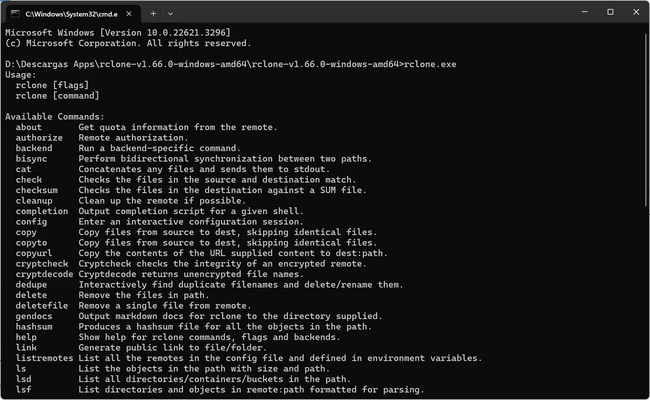
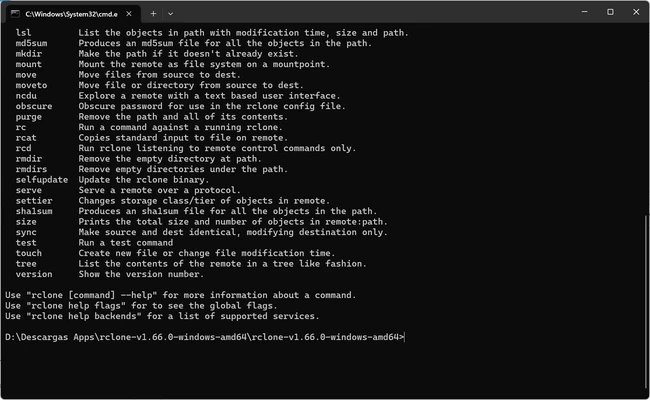
Rclone is a free and open-source command-line tool for managing, synchronizing, backing up, and migrating files across cloud storage services. Designed for power users, system administrators, and IT professionals, it provides a fast and flexible way to work with cloud storage from the command line.

Supporting more than 40 cloud storage providers, including Google Drive, OneDrive, Dropbox, Amazon S3, Backblaze B2, Box, and many others, Rclone allows users to transfer files between local systems and cloud services or directly between cloud platforms without requiring additional software.

The application offers advanced synchronization features, encrypted transfers, bandwidth control, incremental backups, and the ability to mount cloud storage as a local drive. Its extensive automation capabilities make it a popular choice for backup strategies, cloud migrations, and large-scale data management tasks.

Although primarily a command-line utility, Rclone can also be used with third-party graphical interfaces for users who prefer a more visual experience.

Key Features

  • Support for over 40 cloud storage providers

  • File synchronization and backup capabilities

  • Cloud-to-cloud data transfers

  • End-to-end file encryption

  • Mount cloud storage as a local drive

  • Incremental file transfers for improved efficiency

  • Bandwidth throttling and transfer scheduling

  • Automated scripting and task scheduler integration

  • Checksum verification and data integrity validation

  • Cross-platform support for Windows, Linux, and macOS

Pros

  • Free and open-source

  • Extensive cloud storage compatibility

  • Powerful synchronization and backup features

  • Secure encryption support

  • Lightweight and resource-efficient

  • Ideal for automation and advanced workflows

Cons

  • No built-in graphical user interface

  • Command-line usage may be challenging for beginners

  • Initial configuration requires some technical knowledge

Conclusion

Rclone is one of the most powerful cloud file management tools available today. With broad cloud storage support, advanced synchronization capabilities, secure encryption, and extensive automation options, it provides an efficient solution for backups, cloud migrations, and data management across multiple storage platforms.

Information about Rclone 1.74.3

License Free
Op. System Windows
Category Video
Language English
Author Nick Craig-Wood
permission icon Permissions Not applicable
Downloads 0
Date 2026-06-07
Size 28 MB
File type ZIP

Apps recommended for you

KMPlayer icon
KMPlayer for Windows is a versatile media player that supports a wide range of video and audio formats with advanced playback features.
go1984 icon
logiware gmbh
WonderFox Free HD Video Converter Factory icon
Convert your videos into 200 different formats
uView Player icon
Floating media player that plays online videos in picture-in-picture
DVDFab icon
DVDFab for Windows is a versatile media software that allows users to copy, rip, convert, and burn DVDs and Blu-rays easily.
Aiseesoft Screen Recorder icon
A powerful screen recording program for your Windows PC!
YTGrabber icon
YTGrabber for Windows is a simple tool that lets users download YouTube videos and playlists quickly in various formats.
Bandicam icon
Records everything that happens on your screen, even video games
AbyssMedia BPM Counter icon
Easily detect BPM values for WAV and MP3 files for PC!
Aiseesoft Screen Recorder icon
A powerful screen recording program for your Windows PC!
scrcpy icon
Control your smartphone and tablet from your computer
Kingshiper Screen Recorder icon
An easy-to-use Windows desktop screen recording software.
AVS Media Player icon
How to play your video and audio
myFFmpeg icon
OSBytes
HEVC Video Extensions from Device Manufacturer icon
Play HEVC (H.265) encoded videos on Windows
Zoom Player IPTV icon
Play your IPTV content
Movavi Video Editor icon
Movavi Video Editor for Windows is an easy-to-use video editing software that lets users create and enhance videos quickly.
PotPlayer Portable icon
A portable version of this excellent media player
Free Video to MP3 Converter icon
Extract audio from video files in a snap
Camtasia icon
Full-featured video edit toolpack
MKVToolnix icon
Convert and edit MKV videos
DispCam icon
Trial for Windows is a software tool that provides users with a temporary, limited-time version of a program to evaluate its features before purchase.
Movies & TV icon
Buy or rent movies and series without ads