Go to Windows platform Display platforms icon
Go to Windows platform Go to Mac platform Go to Android platform
Blue Iris 6.0.8.1 icon

Blue Iris 6.0.8.1

6.0.8.1
Ken Pletzer
5.0
130 MB size

Video Management Software (VMS) for your Windows PC

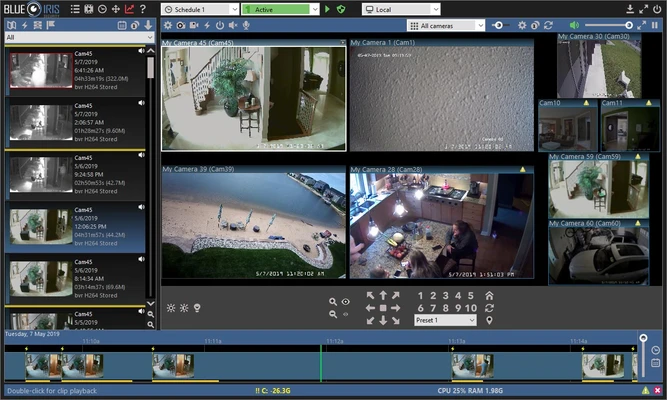
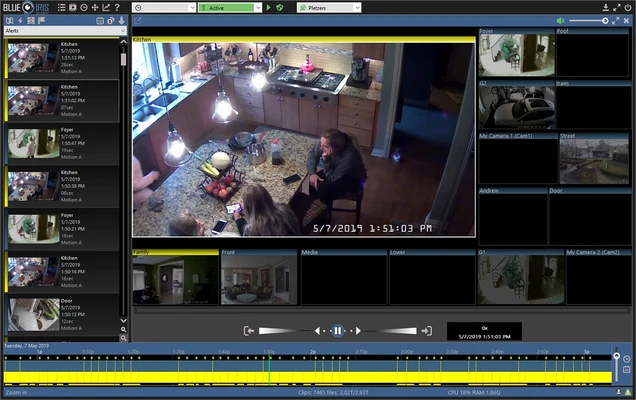
Blue Iris is a professional video surveillance and CCTV management software (VMS) for Windows that allows you to monitor, record, and manage up to 64 cameras simultaneously from a single PC. It is commonly used for home security, business monitoring, and asset protection.

The software supports a wide range of camera types including IP cameras, webcams, analog capture cards, and even desktop video sources. Users can record footage, capture snapshots, and manage all camera feeds in one centralized interface.

Blue Iris also includes remote access capabilities, allowing you to view live feeds and recorded videos from anywhere using a web browser or mobile device.


Key Features

Multi-Camera Support (Up to 64 Cameras)
Monitor multiple video sources at once, including IP cameras, webcams, and capture devices.

Recording & Storage Options
Supports continuous recording, scheduled recording, and motion-triggered recording. Video can be saved in MP4, AVI, JPEG, or Windows Media formats.

Motion Detection & Alerts
Advanced motion detection with customizable triggers. Receive alerts via email, sound notifications, FTP upload, or external scripts.

Remote Access (Web Server UI3)
Built-in web server allows remote viewing of live and recorded footage from any browser or device. Includes support for mobile and desktop access with authentication control.

Audio & Overlay Options
Add timestamps, logos, and overlays to video feeds. Optional audio recording is also supported.

Automation & Scheduling
Set recording schedules, arming timers, and automated actions based on specific events or conditions.

User Management & Security
Create multiple user profiles with permission-based access control for shared environments.


How It Works

Install Blue Iris on your Windows PC
Add cameras manually or use automatic camera detection
Configure recording modes (motion, continuous, or scheduled)
Set up alerts and notification methods
Access live or recorded footage through the UI or web interface
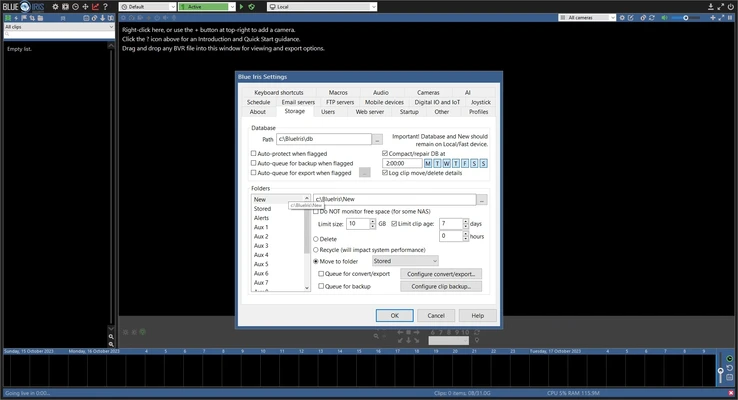
Adjust storage and retention settings as needed


System Requirements

  • OS: Windows 10 / 11 (64-bit)
  • CPU: Intel Core i7 recommended (Quick Sync support preferred)
  • RAM: 8 GB or higher
  • GPU: NVIDIA graphics recommended for smooth UI performance
  • Storage: SSD or 7200 RPM HDD or faster

Pros

  • Supports up to 64 cameras
  • Highly customizable recording and alert system
  • Remote access via browser or mobile
  • Powerful motion detection engine
  • Frequent updates and active development

Cons

  • High system resource usage
  • Paid software after 15-day trial
  • Mobile interface feels outdated
  • No built-in cloud storage option

Trial Information

Blue Iris offers a 15-day free trial, after which a paid license is required for continued use.

Information about Blue Iris 6.0.8.1

License Trial / Demo
Op. System Windows
Category Video
Language English
Author Ken Pletzer
permission icon Permissions Not applicable
Date 2026-06-20
Size 130 MB
File type Official Website

Apps recommended for you

Iriun Webcam icon
Turn your smartphone into a high-quality webcam with Iriun Webcam for Windows, the easy-to-use app for video calls, streaming, and online meetings.
Kdenlive icon
Kdenlive for Windows is a free and open-source video editing software that offers powerful features for video production and editing.
VSDC Free Video Editor 11.2.1.720 (64-bit) icon
Amazing program that allow you to create and edit video for Free!
REAPER 7.74 (64-bit) icon
Multitrack audio and MIDI recorder for your Windows PC
Zoom Player icon
Fast and free multiformat video player
Winxvideo AI icon
Enhance, upscale, compress, and convert videos with Winxvideo AI for Windows, the AI-powered video processing software for high-quality media editing.
K-Lite Codec Pack Full icon
Play all your audio and video files effortlessly with K-Lite Codec Pack Full for Windows, the comprehensive codec and media playback solution.
UkeySoft Music Converter icon
Best Tool to Convert Spotify Music to MP3/WAV/M4A/AAC
UltraMixer 6.4.8 icon
Mix & Enterain with Audio, Video, Visual & live camer for PC!
VSDC Free Video Editor 11.2.1.720 (64-bit) icon
Amazing program that allow you to create and edit video for Free!
Streamlabs OBS 1.21.4 icon
Fast Feature-Packed Broadcast Software Designed by Pro Streamers!
Wondershare Filmora 15.6.4 icon
Easy video editor everyone can use, support 800+ effects & 50+ formats!
Any Video Converter Free icon
Convert and edit videos easily with Any Video Converter Free for Windows, the versatile tool for fast video format conversion and basic video processing.
Streamlabs OBS icon
Stream, record, and broadcast high-quality content with Streamlabs OBS for Windows, the powerful live streaming and recording software for gamers and creators.
DVDFab icon
DVDFab for Windows is a versatile media software that allows users to copy, rip, convert, and burn DVDs and Blu-rays easily.
Iriun Webcam icon
Turn your smartphone into a high-quality webcam with Iriun Webcam for Windows, the easy-to-use app for video calls, streaming, and online meetings.
Icecream Video Editor icon
Edit and create new videos and photos in minutes
Winxvideo AI icon
Enhance, upscale, compress, and convert videos with Winxvideo AI for Windows, the AI-powered video processing software for high-quality media editing.
Wirecast icon
Wirecast for Windows is a live video streaming software that enables users to produce and broadcast professional-quality streams easily.
Aiseesoft Screen Recorder icon
A powerful screen recording program for your Windows PC!
Kdenlive icon
Kdenlive for Windows is a free and open-source video editing software that offers powerful features for video production and editing.
FFmpeg icon
One of the best open codecs for video playback
Subtitle Edit icon
Subtitle Edit for Windows is a powerful subtitle editor that allows users to create, edit, and synchronize subtitles with video files.
Free Video Rotator icon
rotate video clips 90,180,270 degree clockwise