
Go to Windows platform Display platforms icon
Go to Windows platform Go to Mac platform Go to Android platform
TechSmith Capture icon

TechSmith Capture

2.1.6.609
TechSmith
5
18.51 MB size

Take screenshots and record onscreenvideo easily

Nowadays, there are a lot of programs to take captures, but only a few are good enough and free. Jing is in the selected group.

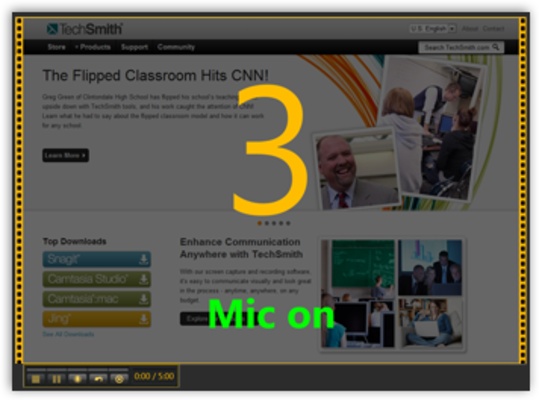
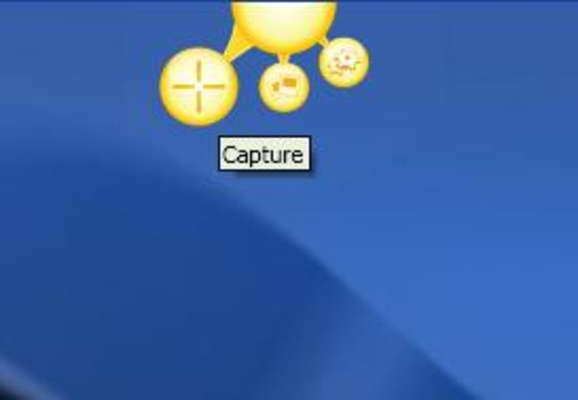
TechSmith Capture is an screenshot and onscreen video captor for Windows that sintegrates itself with the desktop perfectly.

Choose whether to take an screenshot or record onscreen video, then choose what to capture: fullscreen, active window or rectangular area.

The interface of the program is very intuitive, you won't have many progblems to get used to it.

Finally, it also includes some social features, so you can share your captures instantaneously if you want to.

If you use Twitter or Facebook and you need to share some screenshots, it's perfect.

Information about TechSmith Capture

License Free
Op. System Windows
Category Video
Language English
Author TechSmith
permission icon Permissions Not applicable
Date 2026-06-02
Size 18.51 MB
File type EXE

Apps recommended for you

YTGrabber icon
YTGrabber for Windows is a simple tool that lets users download YouTube videos and playlists quickly in various formats.
Rclone icon
The command-line app for transferring files and synchronizing directories
Vidigger icon
Vidigger for Windows is a video downloader that allows users to extract and download videos from popular streaming sites with ease.
WonderFox DVD Ripper icon
Rip your DVDs to save in any of the most common formats
WonderFox DVD Video Converter icon
A fine option for converting your DVDs into video files
bilibili icon
The official PC app for this Asian streaming platform
Vidyard for Chrome icon
Vidyard for Chrome is a video recording and sharing extension that allows users to create, share, and track videos directly from their browser.
Movavi Video Editor Plus 2026 26.17.0 icon
Powerful yet easy-to-use video processing program for Windows
UltraMixer 6.4.8 icon
Mix & Enterain with Audio, Video, Visual & live camer for PC!
VSDC Free Video Editor 11.2.1.720 (64-bit) icon
Amazing program that allow you to create and edit video for Free!
Streamlabs OBS 1.21.4 icon
Fast Feature-Packed Broadcast Software Designed by Pro Streamers!
Wondershare Filmora 15.6.4 icon
Easy video editor everyone can use, support 800+ effects & 50+ formats!
Any Video Converter Free icon
Convert and edit videos easily with Any Video Converter Free for Windows, the versatile tool for fast video format conversion and basic video processing.
Streamlabs OBS icon
Stream, record, and broadcast high-quality content with Streamlabs OBS for Windows, the powerful live streaming and recording software for gamers and creators.
DVDFab icon
DVDFab for Windows is a versatile media software that allows users to copy, rip, convert, and burn DVDs and Blu-rays easily.
Iriun Webcam icon
Turn your smartphone into a high-quality webcam with Iriun Webcam for Windows, the easy-to-use app for video calls, streaming, and online meetings.
Subtitle Edit icon
Subtitle Edit for Windows is a powerful subtitle editor that allows users to create, edit, and synchronize subtitles with video files.
DVDFab icon
DVDFab for Windows is a versatile media software that allows users to copy, rip, convert, and burn DVDs and Blu-rays easily.
Wondershare Filmora 15.6.4 icon
Easy video editor everyone can use, support 800+ effects & 50+ formats!
Clipchamp icon
Create stunning videos for YouTube, Instagram, and TikTok
Multiviewer icon
Watch multiple F1, Indycar and NASCAR streams at the same time
4k Video Downloader icon
4K Video Downloader for Windows allows users to download videos, playlists, channels, and subtitles from YouTube and other video-sharing sites in high quality.
OBS Studio icon
OBS Studio is a free, open-source software for video recording and live streaming, offering powerful features and customization options.
ShareX Portable icon
ShareX Portable for Windows is a lightweight, open-source screen capture tool that allows users to capture screenshots, record screen activities, and share media quickly.