

Mp3tag is a powerful and lightweight tag editor for Windows that helps users organize and manage digital music collections.
It allows you to edit metadata such as artist, album, title, genre, year, track number, and cover artwork. Mp3tag supports a wide range of audio formats and provides batch processing, file renaming, online metadata lookup, and customizable tag fields.
What's New
Recent versions of Mp3tag focus on improved format support, metadata handling, performance, and compatibility with newer Windows versions and online services.
Key Features
-
Edit metadata for multiple audio files at once.
-
Support for MP3, FLAC, AAC, WAV, M4A, OGG, WMA, Opus, and many other formats.
-
Retrieve album and track information from online databases.
-
Support for services such as Discogs and MusicBrainz.
-
Rename files automatically using tag information.
-
Edit and manage embedded album artwork.
-
Import and export metadata.
-
Create playlists and metadata reports.
-
Add custom user-defined fields.
-
Search and filter large music collections.
-
Support batch operations for large numbers of files.
-
Drag-and-drop support for quickly adding music files.
User Interface
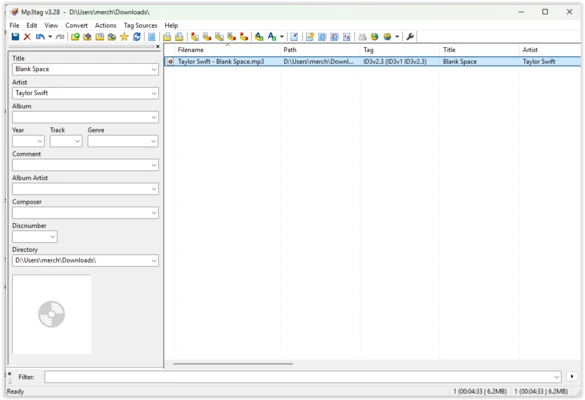
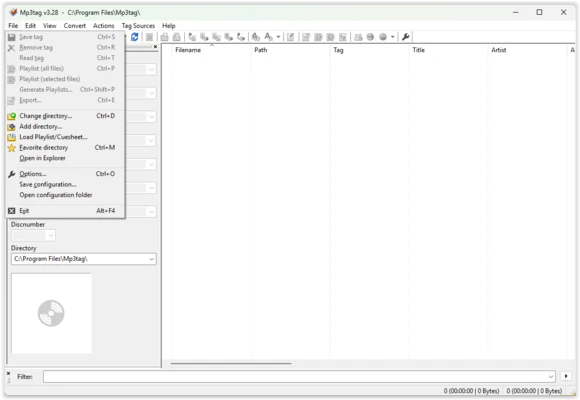
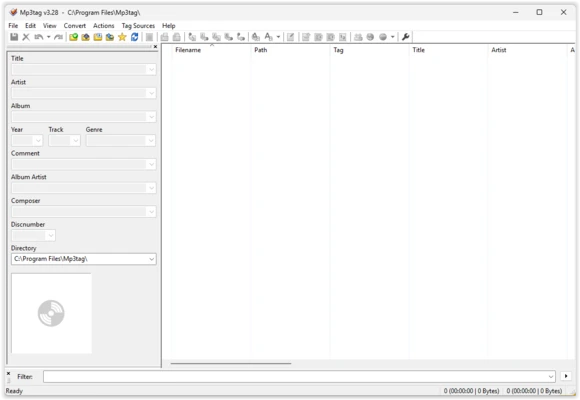
Mp3tag uses a classic Windows-style interface that focuses on efficiency rather than visual design.
The main window displays your selected files in a list with their metadata fields, while the tag panel provides quick access to common information such as artist, album, title, genre, and track number.
The interface may look dated compared with newer music management applications, but its straightforward layout makes it easy to work with large numbers of files.
Installation and Setup
Download and run the Mp3tag installer, then follow the on-screen instructions to complete the installation.
After launching the program, open a folder containing your music files or drag and drop files directly into the main window. You can then begin editing metadata or configure additional options through the preferences.
A portable version is also available for users who prefer to run Mp3tag without a traditional installation.
How to Use
-
Open a folder containing your music files.
-
Select one or multiple audio files.
-
Edit metadata using the tag panel.
-
Click Save to write the changes to the files.
-
Use batch editing to update multiple tracks simultaneously.
-
Retrieve missing information from supported online databases.
-
Add or change album artwork.
-
Rename files using tag-based naming patterns.
-
Use filters and searches to find specific tracks.
-
Export metadata or create playlists when needed.
FAQ
Is Mp3tag free?
Yes. Mp3tag is available as a free desktop application. A paid Microsoft Store version is also available.
Can Mp3tag edit multiple files at once?
Yes. Batch editing is one of its main features and allows users to modify metadata across large numbers of files simultaneously.
Does Mp3tag support album artwork?
Yes. You can add, remove, and replace embedded cover artwork.
Can Mp3tag download missing metadata?
Yes. It can retrieve metadata from supported online services, making it easier to identify and organize music files.
Does Mp3tag support FLAC files?
Yes. Mp3tag supports FLAC as well as many other popular lossless and lossy audio formats.
Alternatives
TagScanner: A free music tag editor with batch processing, metadata lookup, and file renaming tools.
MusicBrainz Picard: A music tagging application that uses the MusicBrainz database and acoustic fingerprinting to identify recordings.
MediaMonkey: A comprehensive music management application that includes tagging, organization, playback, and library management features.
foobar2000: A lightweight and highly customizable audio player with extensive metadata editing capabilities.
Pricing
Mp3tag is FREE for desktop use.
A paid version is also available through the Microsoft Store.
Supported Audio Formats
Mp3tag supports a wide range of formats, including:
-
MP3
-
FLAC
-
AAC
-
M4A / M4B / M4V
-
ALAC
-
WAV
-
AIFF
-
OGG
-
Opus
-
WMA
-
APE
-
DSF
-
MPC
-
TTA
-
WV
-
MKA / MKV
-
WebM
System Requirements
-
OS: Windows 7, Windows 8, Windows 10, and Windows 11
-
Processor: 1 GHz or faster
-
RAM: 512 MB minimum
-
Storage: Approximately 50 MB
Pros
-
Lightweight and fast
-
Powerful batch editing
-
Supports many audio formats
-
Online metadata lookup
-
File renaming based on tags
-
Album artwork management
-
Portable version available
-
Easy to use for large music collections
Cons
-
Interface looks dated
-
No built-in audio player
-
Some advanced automation requires configuration
-
Primarily focused on Windows desktop users
Conclusion
Mp3tag is an excellent choice for users who need a reliable way to edit and organize music metadata on Windows. Its combination of batch editing, online metadata lookup, file renaming, and album artwork management makes it particularly useful for maintaining large digital music libraries.
Although its interface is not especially modern, Mp3tag focuses on functionality and efficiency, making it a practical tool for both casual users and serious music collectors.