

GoldWave is a powerful digital audio editor for Windows that provides professional tools for audio recording, editing, restoration, and conversion.
Developed by GoldWave Inc., this lightweight audio editing software has been continuously updated for decades and is widely used by musicians, podcasters, broadcasters, and home users.
With support for multiple audio formats, advanced effects, noise reduction tools, and batch processing features, GoldWave offers a complete solution for editing and improving digital audio files.
Features
Advanced Audio Editing
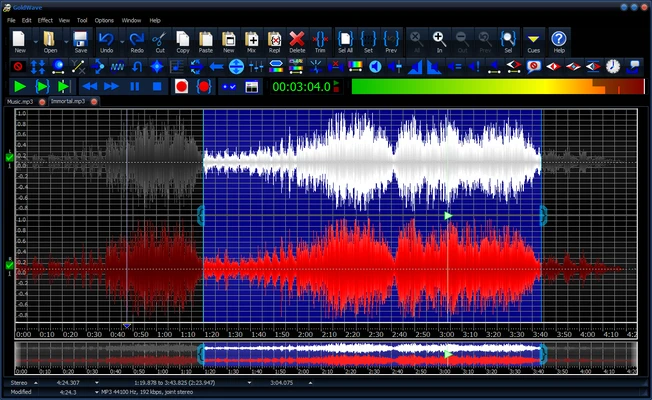
GoldWave provides a detailed waveform editor for precise audio manipulation, allowing users to:
- Cut, copy, paste, and trim audio
- Mix and combine recordings
- Adjust volume and channels
- Edit large audio files efficiently
Audio Recording
The software can record high-quality audio from various sources, including:
- Microphones
- Line-in devices
- External audio equipment
Audio Effects and Filters
GoldWave includes a wide range of built-in effects, such as:
- Equalizer
- Reverb
- Echo
- Compression
- Noise reduction
- Pitch adjustment
These tools help users enhance sound quality and create professional audio results.
Batch Processing
The batch processing feature allows users to convert multiple audio files and apply effects automatically, saving time when handling large collections of recordings.
Spectrogram Analysis
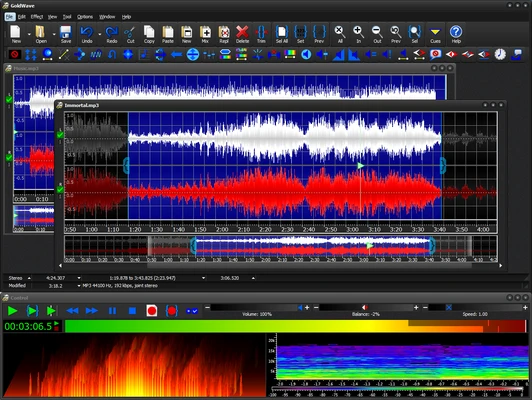
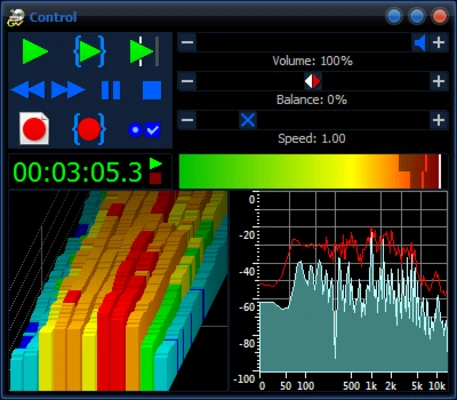
GoldWave includes visual audio analysis tools, allowing users to view frequency information and inspect audio quality in detail.
Format Support
Supports many popular audio formats, including:
- MP3
- WAV
- FLAC
- OGG
- AIFF
- AU
Voice Editing Tools
Includes voice enhancement and voice reduction features for improving recordings or creating karaoke-style audio tracks.
Customization and Automation
Users can create scripts and macros to automate repetitive editing tasks and improve workflow efficiency.
User Interface
GoldWave uses a traditional waveform-based interface focused on functionality and precision.
The layout provides quick access to editing tools, effects, and audio controls. While the design may appear older compared with modern DAW software, it remains efficient and easy to use for audio editing tasks.
FAQ
Is GoldWave free?
GoldWave provides a free trial version with limited functionality. A license is required to unlock the full version.
What audio formats does GoldWave support?
GoldWave supports many common formats, including MP3, WAV, FLAC, OGG, AIFF, and AU.
Can GoldWave edit podcasts?
Yes. It includes recording, noise reduction, equalization, and audio enhancement tools suitable for podcast editing.
Can GoldWave remove vocals from songs?
Yes. GoldWave includes voice reduction features that can help minimize vocals, although results depend on the original audio quality.
Does GoldWave support multi-track editing?
GoldWave is mainly a waveform-based editor. It supports mixing multiple audio files but does not work like a traditional multi-track DAW.
System Requirements
- Operating System: Windows 7/8/10/11
- Processor: 1 GHz or faster
- RAM: 2 GB minimum
- Storage: About 200 MB available space
- Sound card required for recording and playback
Pros
- Powerful audio editing features
- Supports many audio formats
- Extensive effects and filters
- Fast batch processing
- Lightweight and efficient
- Suitable for beginners and advanced users
Cons
- Interface looks outdated
- Limited multi-track editing features
- Not designed for full music production
- Some advanced features require a license
Conclusion
GoldWave is a reliable and feature-rich audio editor for Windows that combines powerful editing tools with a lightweight design.
With advanced recording, restoration, effects processing, and batch conversion capabilities, it is an excellent choice for users who need professional audio editing without the complexity of a full digital audio workstation.
Whether you are editing podcasts, restoring recordings, converting audio files, or processing sound effects, GoldWave provides a practical and affordable solution.