Go to Windows platform Display platforms icon
Go to Windows platform Go to Mac platform Go to Android platform
SnapDownloader icon

SnapDownloader

1.15.19
SnapDownloader
1
94.03 MB size

Download videos from any platform

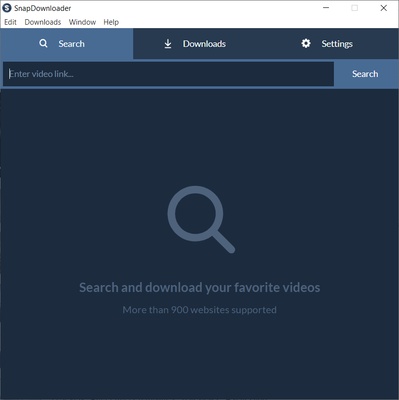
SnapDownloader is a program that lets you download videos from almost any webpage directly to your hard drive. The program is compatible with over 900 different webpages that you can download videos from hassle-free, and in just a few minutes.

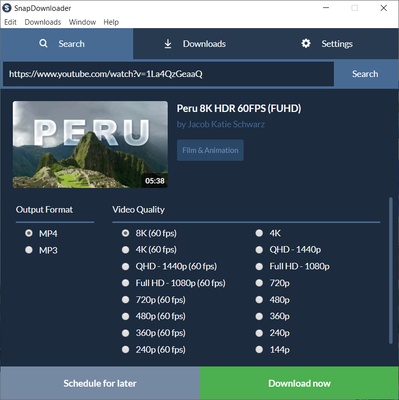
It is very easy to use SnapDownloader. The only thing you have to do is enter the URL of the video you want to download and, after a few seconds, the program will show you a preview of the video, along with the different options at your disposal. Firstly, you can choose the download format: MP4, MP3, AVI, WMA or AAC, among others. Secondly, you can choose the quality, which directly depends on the video. Lastly, if the video has subtitles, you can also download them.

Included in SnapDownloader is the very useful video trimmer tool. Thanks to this tool, you can cut exactly which part of the video you want to download. You can set the exact time you want the download to start and finish. Like this, you can cut out the intro or credits from any video. Using this app is very, very easy.

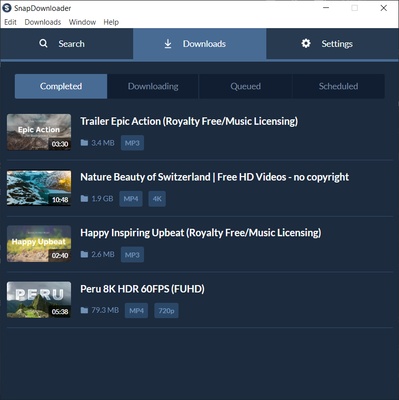
SnapDownloader is an excellent tool to download videos on Windows, thanks to which you can choose the format and quality for everything you download. The download speed usually depends on the webpage that contains the video, but it is generally quite quick.

Information about SnapDownloader

License Trial
Op. System Windows
Category Video
Language English
Author SnapDownloader
permission icon Permissions Not applicable
Date 2026-06-02
Size 94.03 MB
File type EXE

Apps recommended for you

Dragonframe icon
DZED Systems
Free Video Rotator icon
rotate video clips 90,180,270 degree clockwise
RecForth icon
IOForth
PlayerFab 7.0.6.0 icon
The World`s Best 4K UHD Media Player With Menu & HDR10 Support!
MP4 Player 6.4.17 icon
Play MP4, FLV, and WebM video files that downloaded from video sites!
uView Player icon
Floating media player that plays online videos in picture-in-picture
ShareX Portable icon
ShareX Portable for Windows is a lightweight, open-source screen capture tool that allows users to capture screenshots, record screen activities, and share media quickly.
MP4 Player 6.4.11 icon
Play MP4, FLV, and WebM video files that downloaded from video sites!
K-Lite Codec Pack Full 20.0.0 icon
Free package of media player codecs that can improve audio/video playback
VideoScribe 1.20.1 icon
Easy drag and drop animated video maker for beginners to professionals!
All My Movies 10.1 icon
Your Personal Movie Collection Cataloger and Organizer With IMDb Lookup!
Media Player Classic Home Cinema 2.8.2 (64-bit) icon
An extremely light-weight, open source media player for Windows
MP4 Player 6.4.21 icon
Play MP4, FLV, and WebM video files that downloaded from video sites!
MKVToolNix 102.0.0 (64-bit) icon
Create, modify and inspect Matroska (MKV) files for Windows PC
Subtitle Workshop 6.3.6 icon
Free software for creating, editing and converting text-based subtitle files
Blue Iris 6.1.1.3 icon
Video Management Software (VMS) for your Windows PC
Wondershare Filmora 15.6.4 icon
Easy video editor everyone can use, support 800+ effects & 50+ formats!
MediaInfo icon
MediaInfo for Windows is a lightweight tool that provides detailed information about video and audio files, including codecs, formats, and metadata.
Descript icon
A video editor based on the transcribed text
4k Video Downloader icon
4K Video Downloader for Windows allows users to download videos, playlists, channels, and subtitles from YouTube and other video-sharing sites in high quality.
Movies & TV icon
Buy or rent movies and series without ads
Vidyard for Chrome icon
Vidyard for Chrome is a video recording and sharing extension that allows users to create, share, and track videos directly from their browser.
MPV-EASY icon
422658476
PotPlayer 1.7.23118 (64-bit) icon
A pretty awesome and powerful free media player for Windows