Go to Windows platform Display platforms icon
Go to Windows platform Go to Mac platform Go to Android platform
HandBrake icon

HandBrake

1.9.2
Hawkman
3.7
23.16 MB size

Modify formatting and features for any DVD

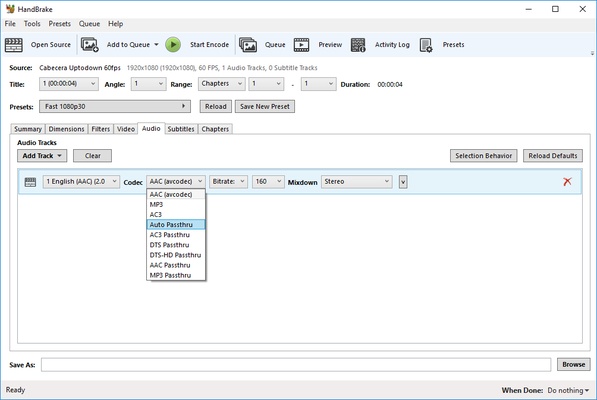
HandBrake is one of the best tools out there in terms of modifying videos that are locally stored on your hard drive. There's a nearly endless array of adjustments for you to tweak, from format to coding or audio tracks. If you need to convert any video you have stored into a specific format that's compatible with your PC, smartphone, iOS device, console or TV -- this is the right choice. Plus you can opt to extract and convert physical formats like DVDs or Blu-Ray discs.

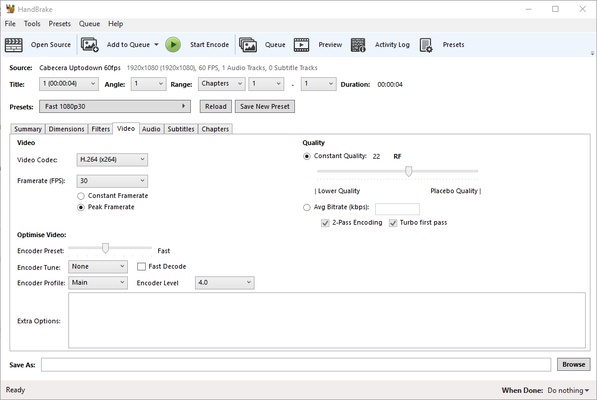
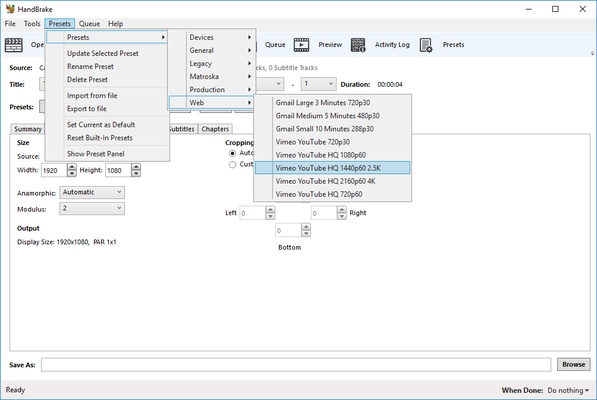
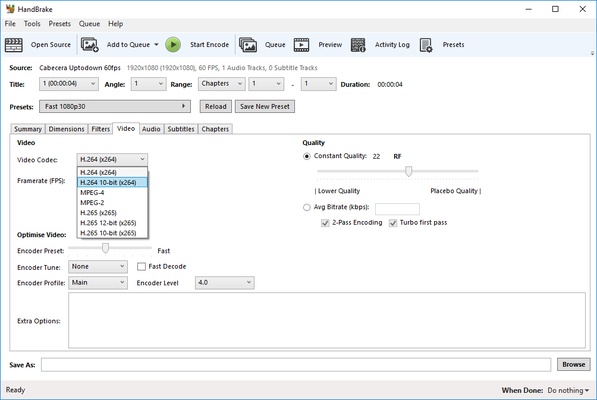
With loads of pre-set formats available for almost any standard: Android, Apple, Playstation, Vimeo, YouTube, Windows, and Matroska, among others, this app is capable of reworking videos at up to 4K resolution and almost any aspect ratio you need. The only drawback is that outside of presets, you have to adjust everything manually in order to set up dimensions, codecs, apply cuts, modify subtitling, bitrate, etc.

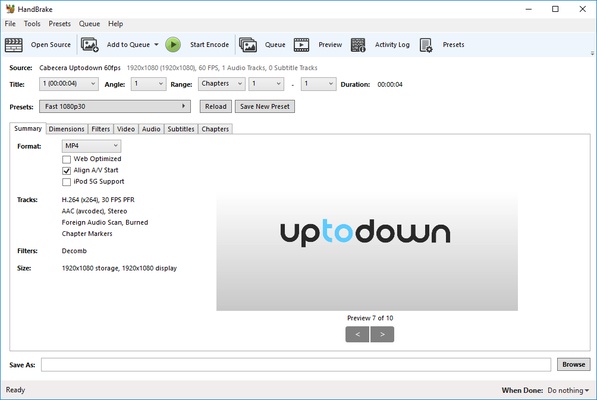
Once you've made these changes you'll get a full preview of your video, and can watch as the final version of your file is fully rendered and saved at within the route you preselected. Handbrake is no doubt one of the best free tools in this field. Its main appeal is that it offers you a minimalist interface with a whole arsenal of possibilities without overcomplicating things like other editing suites do.

Frequent questions

How do I add subtitles in HandBrake?

To add subtitles in HandBrake, you will first need to open the video you want to play. Once opened, click on settings > subtitles > import. Select the subtitle document you want to sync and finally click on 'start decoding'.

What output codecs are supported in HandBrake?

HandBrake supports the most popular audio and video codecs, including those belonging to MP4 (mpeg4, H264, x264), MOV (DivX, WMV, Mpeg2), AVI (Divx, Xvid), MKV (DivX, Xvid, H264, x264, H265, HEVC) or FLV (VP6 and H264 variants) formats.

How much space does HandBrake take up?

HandBrake is a very lightweight tool that takes up less than 20 MB. It has no special requirements and does not download extra data, but you will need to have space to save the videos you edit.

Information about HandBrake

License OpenSource
Op. System Windows
Category Video
Language English 5 more
Author Hawkman
permission icon Permissions Not applicable
Date 2026-06-02
Size 23.16 MB
File type EXE

Apps recommended for you

Movavi Video Editor Plus 2026 26.17.0 icon
Powerful yet easy-to-use video processing program for Windows
Shark007 Codecs icon
A complete audio and video codec package
iQIYI icon
Chinese streaming platform with movies, series and more
Orbit Video Downloader icon
Orbit Video Downloader for Windows is a fast and easy-to-use tool for downloading videos from various websites and saving them in different formats.
EaseUS Video Downloader icon
EaseUS Video Downloader for Windows allows users to download videos, playlists, and channels from popular websites like YouTube in high quality.
Rclone icon
The command-line app for transferring files and synchronizing directories
UltraMixer 6.4.8 icon
Mix & Enterain with Audio, Video, Visual & live camer for PC!
TunesBank Music Converter icon
Best Tool to Download any Spotify song to your computer
UltraMixer 6.4.8 icon
Mix & Enterain with Audio, Video, Visual & live camer for PC!
VSDC Free Video Editor 11.2.1.720 (64-bit) icon
Amazing program that allow you to create and edit video for Free!
Streamlabs OBS 1.21.4 icon
Fast Feature-Packed Broadcast Software Designed by Pro Streamers!
Wondershare Filmora 15.6.4 icon
Easy video editor everyone can use, support 800+ effects & 50+ formats!
Any Video Converter Free icon
Convert and edit videos easily with Any Video Converter Free for Windows, the versatile tool for fast video format conversion and basic video processing.
Streamlabs OBS icon
Stream, record, and broadcast high-quality content with Streamlabs OBS for Windows, the powerful live streaming and recording software for gamers and creators.
DVDFab icon
DVDFab for Windows is a versatile media software that allows users to copy, rip, convert, and burn DVDs and Blu-rays easily.
Iriun Webcam icon
Turn your smartphone into a high-quality webcam with Iriun Webcam for Windows, the easy-to-use app for video calls, streaming, and online meetings.
Winxvideo AI icon
Enhance, upscale, compress, and convert videos with Winxvideo AI for Windows, the AI-powered video processing software for high-quality media editing.
Wondershare Filmora icon
Create and edit impressive videos in the easiest way possible
Zerene Stacker icon
Zerene Stacker for Windows is a focus stacking software that combines multiple images to create sharp, high-depth-of-field photographs.
DVDFab icon
DVDFab for Windows is a versatile media software that allows users to copy, rip, convert, and burn DVDs and Blu-rays easily.
iQIYI icon
Chinese streaming platform with movies, series and more
FFMPEG Audio Encoder icon
A powerful and easy-to-use video and audio encoder
YTSage icon
YTSage for Windows is a tool that helps users search, download, and manage high-quality YTS torrent movies with ease.
Streamlabs OBS icon
Stream, record, and broadcast high-quality content with Streamlabs OBS for Windows, the powerful live streaming and recording software for gamers and creators.