
Go to Windows platform Display platforms icon
Go to Windows platform Go to Mac platform Go to Android platform
WavePad Sound Editor 24.33 icon

WavePad Sound Editor 24.33

24.33
NCH Software
5.0
3.6 MB size
1downloads

Free software to edit music, voice, wav, mp3 or other audio files

WavePad Sound Editor is a professional audio editing software for Windows and Mac that allows users to record, edit, and enhance music, voice, and other audio files. It supports a wide range of audio formats and provides tools for both basic and advanced audio editing tasks.

The software is designed for beginners and professionals who need a reliable tool for audio production, podcast editing, voice recording, and sound enhancement.


Key Features

Audio Editing Tools

Cut, copy, paste, trim, split, and adjust audio tracks with precision.

Audio Effects

Apply effects such as echo, amplification, equalization, reverb, and noise reduction to improve sound quality.

Noise Reduction and Restoration

Remove background noise, clicks, and pops to restore clean audio recordings.

Batch Processing

Edit multiple audio files at once to save time on large projects.

Format Support

Supports a wide range of formats including MP3, WAV, FLAC, AAC, WMA, OGG, and more.

Audio Recording

Record voice or music directly using a microphone or input device.

Spectral Analysis

Analyze audio frequencies using FFT-based visualization tools.

File Conversion

Convert audio files between different formats easily.

VST Plugin Support

Extend functionality with third-party audio plugins.


User Interface

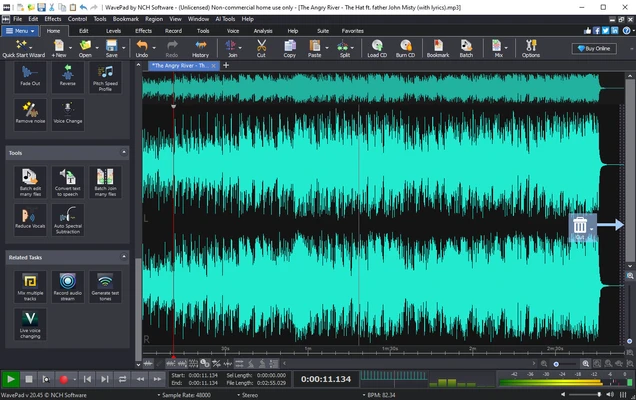
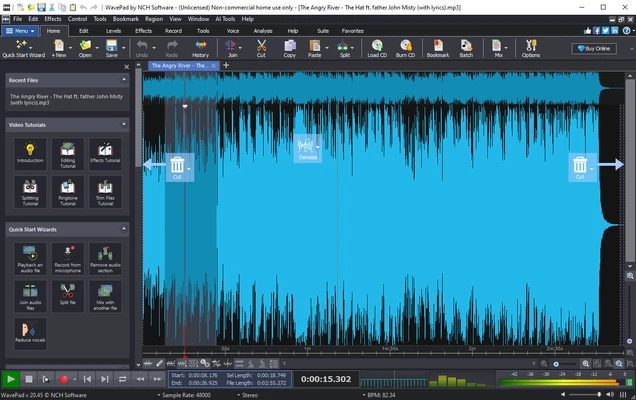
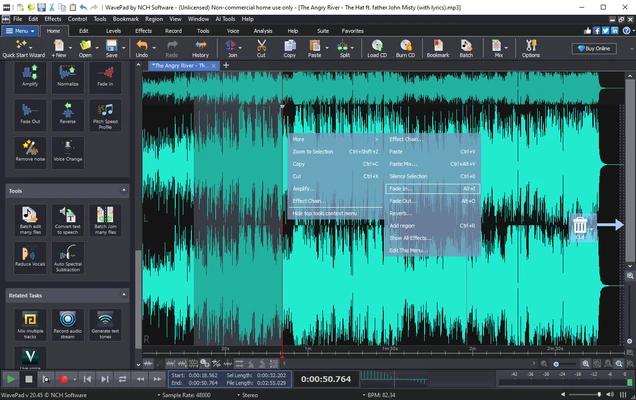
WavePad Sound Editor features a traditional audio editing interface with waveform visualization. The layout is designed for efficient editing, with tools and effects accessible from the main toolbar. It supports both simple editing tasks and advanced audio production workflows.


How to Use

  • Install and launch the software
  • Import or record an audio file
  • Use editing tools to cut, trim, or adjust audio
  • Apply audio effects and enhancements
  • Preview changes in real time
  • Export the final audio file in your preferred format

Installation and Setup

  • Download the installer from the official website
  • Run the setup file
  • Follow installation instructions
  • Choose default or custom settings
  • Launch the application and start editing

Alternatives

  • Audacity – Free and open-source audio editor
  • Adobe Audition – Professional-grade audio editing software
  • FL Studio – Advanced music production software

System Requirements

  • OS: Windows 7 / 8 / 10 / 11 or macOS
  • CPU: 1 GHz or higher
  • RAM: 1 GB minimum
  • Storage: 100 MB free space

Pros

  • Supports many audio formats
  • Easy-to-use editing tools
  • Built-in noise reduction
  • Batch processing support

Cons

  • Advanced features require paid version
  • Interface is functional but not modern

Conclusion

WavePad Sound Editor is a versatile audio editing tool suitable for both basic and professional use. It provides essential editing, recording, and audio enhancement features in a lightweight and easy-to-use package for Windows and Mac users.

Information about WavePad Sound Editor 24.33 24.33

License Trial / Demo
Op. System Windows
Category Video
Language English
Author NCH Software
permission icon Permissions Not applicable
Downloads 1
Date 2026-06-09
Size 3.6 MB
File type Official Website

Apps recommended for you

Zerene Stacker icon
Zerene Stacker for Windows is a focus stacking software that combines multiple images to create sharp, high-depth-of-field photographs.
TunesBank Music Converter icon
Best Tool to Download any Spotify song to your computer
Descript icon
A video editor based on the transcribed text
Vidyard for Chrome icon
Vidyard for Chrome is a video recording and sharing extension that allows users to create, share, and track videos directly from their browser.
Plex Media Server icon
Play your movies and series on any device
Streamlabs Desktop icon
Broadcast online with all the frills
MP4 Downloader icon
MP4 Downloader for Windows is a tool that enables users to download MP4 videos from various websites and save them in high quality.
K-Lite Codec Pack (Full) icon
A complete collection of codecs for your videos
Kdenlive icon
Kdenlive for Windows is a free and open-source video editing software that offers powerful features for video production and editing.
Winxvideo AI icon
Enhance, upscale, compress, and convert videos with Winxvideo AI for Windows, the AI-powered video processing software for high-quality media editing.
REAPER 7.74 (64-bit) icon
Multitrack audio and MIDI recorder for your Windows PC
HandBrake 1.11.2 icon
Free tool for converting video from nearly any format
Movavi Video Editor Plus 2026 26.17.0 icon
Powerful yet easy-to-use video processing program for Windows
K-Lite Codec Pack Full icon
Play all your audio and video files effortlessly with K-Lite Codec Pack Full for Windows, the comprehensive codec and media playback solution.
Pianoteq 9.2.0 icon
Virtual Windows Desktop Piano and Physically Modelled Acoustic
Rclone icon
The command-line app for transferring files and synchronizing directories
Jellyfin icon
A cross-platform and open source media center
HEVC Video Extensions from Device Manufacturer icon
Play HEVC (H.265) encoded videos on Windows
Emby Server icon
The Emby Theater server
Clipchamp icon
Create stunning videos for YouTube, Instagram, and TikTok
HandBrake icon
Modify formatting and features for any DVD
AnyRec Screen Recorder icon
AnyRec Screen Recorder for Windows is a lightweight tool that allows users to capture screen activity, audio, and webcam video easily.
WonderFox DVD Ripper icon
Rip your DVDs to save in any of the most common formats
SnapDownloader icon
Download videos from any platform