



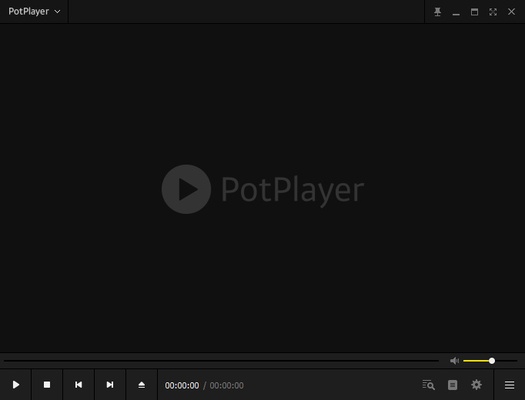
PotPlayer 64-bit is a free multimedia player for Windows that supports a wide range of video and audio formats. Developed by Daum Communications, it is designed to provide smooth playback while offering extensive control over video, audio, subtitles, and playback settings.
One of PotPlayer's biggest advantages is its built-in codec support, which allows users to play many common media formats without installing a separate codec pack. It also supports hardware acceleration technologies such as DXVA, CUDA, and Intel Quick Sync for improved playback performance.
With support for subtitles, 3D and 360-degree video, multiple audio tracks, customizable skins, and advanced playback controls, PotPlayer 64-bit is a versatile choice for Windows users who want more features than a basic media player provides.
Key Features
Wide Format Support – Play a wide variety of video and audio formats without installing additional codec packs in most cases.
Hardware Acceleration – Supports DXVA, CUDA, and Intel Quick Sync to improve playback performance and reduce CPU usage on compatible systems.
Built-in Codec Support – PotPlayer includes support for many commonly used codecs and also provides OpenCodec support for additional formats.
Advanced Subtitle Support – Supports SRT, SMI, ASS, SSA, VobSub, Blu-ray subtitles, and other subtitle formats. Users can adjust subtitle position, size, style, and synchronization.
3D and 360° Video – Play supported 3D and 360-degree video content with several available viewing and output options.
Playback Customization – Adjust playback speed, aspect ratio, video processing, audio output, subtitle timing, and other playback parameters.
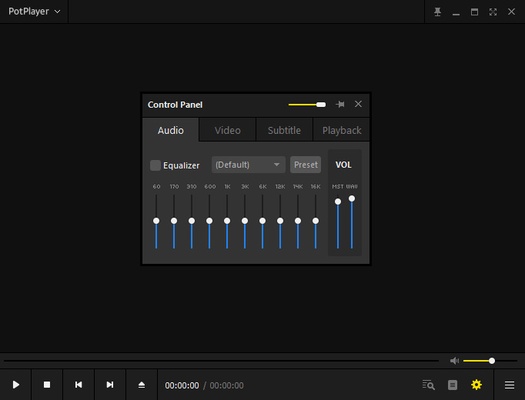
Audio Equalizer – Built-in audio controls allow users to adjust equalizer settings and choose different audio output devices.
Customizable Interface – Change skins, layouts, menus, and other interface elements to create a personalized playback environment.
Bookmarks and A-B Repeat – Bookmark specific scenes or chapters and repeat selected sections of a video or audio file.
Multiple Display and Audio Device Support – Advanced configurations allow users to work with multiple monitors and sound cards.
User Interface
PotPlayer features a compact interface that keeps the basic playback controls easily accessible while providing a large number of advanced options through its menus and context menu.
The interface can be customized with different skins and layouts. Users can also adjust how playlists, subtitles, playback controls, and other elements are displayed.
While the large number of settings may take some time for new users to learn, experienced users will appreciate the level of control available.
Installation and Setup
Installing PotPlayer 64-bit is straightforward:
- Download the installer and run it on your Windows PC.
- Follow the installation wizard and select the preferred installation location.
- Choose the file types you want PotPlayer to open by default.
- Launch PotPlayer after installation.
- Configure video, audio, subtitle, and playback settings according to your preferences.
Once installed, you can simply drag media files into the player or use the Open command to start playback.
How to Use
Play a Video or Audio File – Open PotPlayer and select a media file, or drag the file directly into the player window.
Change Subtitles – Right-click the playback window to select subtitle tracks and adjust synchronization or display settings.
Select an Audio Track – If a video contains multiple audio tracks, you can choose the desired track from the playback menu.
Adjust Playback Speed – Change playback speed when watching tutorials, lectures, or other content where slower or faster playback is useful.
Use A-B Repeat – Select two points in a video to repeatedly play a specific section.
Customize Playback – Explore the preferences menu to configure hardware acceleration, video processing, audio output, subtitles, and other options.
FAQ
Is PotPlayer 64-bit free?
Yes. PotPlayer is available as a free multimedia player for Windows.
What formats does PotPlayer support?
PotPlayer supports a broad range of video and audio formats. Its built-in codec support allows many files to be played without installing separate codec packs.
Does PotPlayer support subtitles?
Yes. It supports numerous subtitle formats, including SRT, SMI, ASS, SSA, VobSub, and Blu-ray subtitles.
Does PotPlayer support 4K and HDR video?
Yes. PotPlayer can play high-resolution content, including 4K video, when the computer hardware and required codecs support it. Hardware acceleration can also improve playback performance.
Can PotPlayer play 3D videos?
Yes. PotPlayer includes support for various 3D formats and output methods.
Does PotPlayer work on macOS or Linux?
No. PotPlayer is designed for Windows and does not have official macOS or Linux versions.
Does PotPlayer support online streaming?
PotPlayer is primarily designed for local media playback. It should not be considered a dedicated online streaming service or streaming platform.
Alternatives
VLC Media Player – A popular open-source multimedia player with broad format support and versions for Windows, macOS, and Linux.
KMPlayer – A feature-rich media player with support for many formats, subtitles, and advanced playback controls.
GOM Player – A Windows media player offering extensive subtitle support and compatibility with various media formats.
MPC-HC – A lightweight Windows media player focused on fast and straightforward local media playback.
Pricing
PotPlayer is free to download and use.
There is no subscription required for normal media playback and customization features.
System Requirements
- Operating System: Windows 7, Windows 8, Windows 10, or Windows 11
- Processor: Intel Pentium 4 or equivalent
- Memory: 1 GB RAM or more
- Storage: Approximately 100 MB of free disk space
- Graphics: A compatible GPU is recommended for hardware-accelerated playback
PROS
- Free to use
- Supports a wide range of media formats
- Built-in codec support
- Hardware acceleration
- Excellent subtitle support
- Supports 3D and 360° video
- Highly customizable interface
- Extensive playback controls
- Relatively lightweight
CONS
- Windows only
- Large number of settings can be confusing for beginners
- Some advanced features require manual configuration
- Not designed primarily for online streaming
Conclusion
PotPlayer 64-bit is a powerful and highly customizable media player for Windows. Its broad format support, built-in codecs, hardware acceleration, subtitle options, and advanced playback controls make it suitable for both everyday users and enthusiasts.
Unlike simpler media players, PotPlayer gives users extensive control over how video and audio are processed and displayed. Although its large number of settings can be overwhelming at first, users who take the time to explore them can create a playback environment tailored to their needs.
For Windows users looking for a free, lightweight, and feature-rich multimedia player, PotPlayer remains a solid option for playing movies, music, high-resolution video, subtitles, and other local media files.