Go to Windows platform Display platforms icon
Go to Windows platform Go to Mac platform Go to Android platform
Mp3tag 3.35 icon

Mp3tag 3.35

3.35
Florian Heidenreich
5.0
5.23 MB size

The universal Tag editor for various audio formats

Mp3tag is a user-friendly tag editor for Windows designed to manage and organize music collections by editing audio file metadata (ID3 tags).

It supports a wide range of audio formats including MP3, AAC, FLAC, WAV, WMA, and OGG, making it suitable for most music libraries.

Mp3tag is widely used for batch editing, allowing users to update tags for multiple files at once. It also supports automatic tagging using online databases such as MusicBrainz, Discogs, and freedb.

The software can rename files based on tag information, helping users keep music libraries consistently structured. It also supports album artwork management, including adding, removing, and editing cover images.


Key Features

  • Batch tag editing for multiple files
  • Support for MP3, FLAC, AAC, WAV, OGG, WMA, and more
  • Online metadata lookup (MusicBrainz, Discogs, freedb)
  • File renaming based on tag data
  • Album cover art management
  • Import/export tag data (CSV, playlists)
  • Custom user-defined metadata fields
  • Advanced search and filtering tools

Interface

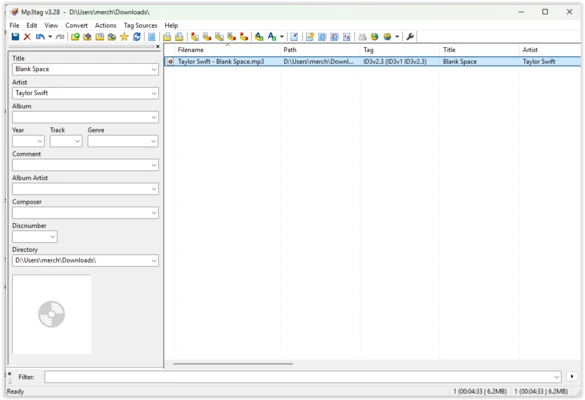
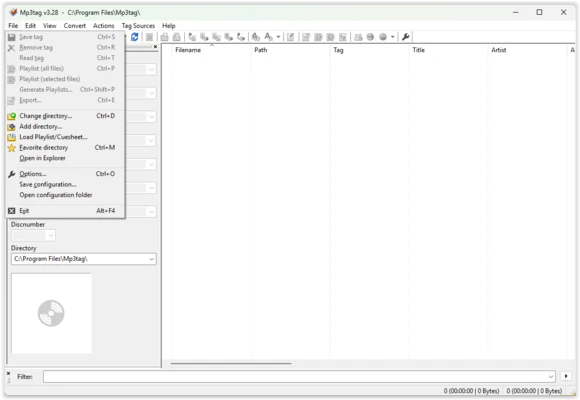
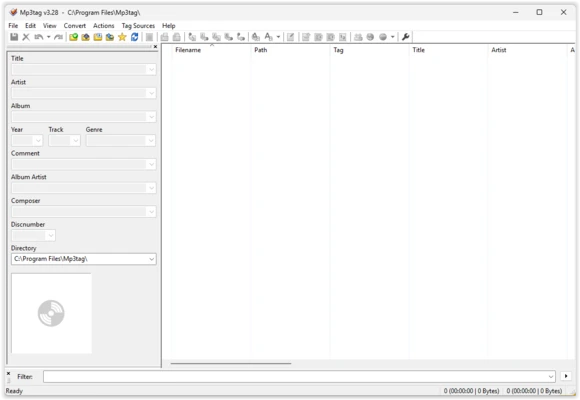
Mp3tag features a simple Windows-style interface with a file list panel and a tag editing panel. Users can select files on the left and edit metadata on the right, with quick access to batch operations via the toolbar.

Despite its minimal design, it is highly efficient and built for fast workflow handling.


How to Use

  • Install and launch Mp3tag
  • Drag and drop audio files into the window
  • Select one or multiple files
  • Edit tags in the tag panel
  • Use batch tools or online lookup for automatic tagging
  • Save changes to update metadata

Pros

  • Very fast batch processing
  • Supports many audio formats
  • Powerful tagging and renaming tools
  • Lightweight and stable

Cons

  • Basic visual interface
  • Requires manual setup for advanced workflows
  • Limited to audio metadata management

Best for

Users who want a fast, reliable tool to organize, tag, and clean up large music libraries on Windows.

Information about Mp3tag 3.35

License Freeware
Op. System Windows
Category Video
Language English + more
Author Florian Heidenreich
permission icon Permissions Not applicable
Date 2026-06-20
Size 5.23 MB
File type Official Website

Apps recommended for you

Media Player Classic - Home Cinema (MPC-HC) icon
An all-round great multimedia player
Movavi Video Editor Plus 2026 26.17.0 icon
Powerful yet easy-to-use video processing program for Windows
RecForth icon
IOForth
ActivePresenter icon
Create professional screencasts, e-learning courses, and video tutorials with ActivePresenter for Windows, the all-in-one screen recording and video editing software.
JRiver Media Center icon
JRiver Media Center for Windows is a versatile media player and organizer that supports audio, video, and image management for a seamless media experience.
Kingshiper Screen Recorder icon
An easy-to-use Windows desktop screen recording software.
OBS Studio icon
OBS Studio is a free, open-source software for video recording and live streaming, offering powerful features and customization options.
Zoom Player IPTV icon
Play your IPTV content
Blue Iris 6.0.8.1 icon
Video Management Software (VMS) for your Windows PC
UltraMixer 6.4.8 icon
Mix & Enterain with Audio, Video, Visual & live camer for PC!
VSDC Free Video Editor 11.2.1.720 (64-bit) icon
Amazing program that allow you to create and edit video for Free!
Streamlabs OBS 1.21.4 icon
Fast Feature-Packed Broadcast Software Designed by Pro Streamers!
Wondershare Filmora 15.6.4 icon
Easy video editor everyone can use, support 800+ effects & 50+ formats!
Any Video Converter Free icon
Convert and edit videos easily with Any Video Converter Free for Windows, the versatile tool for fast video format conversion and basic video processing.
Streamlabs OBS icon
Stream, record, and broadcast high-quality content with Streamlabs OBS for Windows, the powerful live streaming and recording software for gamers and creators.
DVDFab icon
DVDFab for Windows is a versatile media software that allows users to copy, rip, convert, and burn DVDs and Blu-rays easily.
Any Video Downloader icon
Any Video Downloader for Windows allows users to download videos from various websites in different formats and resolutions for offline viewing.
Apple TV Preview icon
Enjoy streaming on Apple TV
Multiviewer icon
Watch multiple F1, Indycar and NASCAR streams at the same time
bilibili icon
The official PC app for this Asian streaming platform
Kdenlive icon
Kdenlive for Windows is a free and open-source video editing software that offers powerful features for video production and editing.
DispCam icon
Trial for Windows is a software tool that provides users with a temporary, limited-time version of a program to evaluate its features before purchase.
AVS Media Player icon
How to play your video and audio
Subtitle Workshop icon
Add subtitles to your movies