Blue Iris is a Windows-based video management and surveillance software designed to monitor, record, and manage multiple cameras from a single PC. It supports up to 64 cameras, including network IP cameras, webcams, and other compatible video sources.
The software provides tools for continuous and scheduled recording, motion detection, alerts, remote camera access, video playback, and user permission management. Its built-in web server also allows users to view live cameras and recorded footage remotely from supported desktop and mobile devices.
Blue Iris can be used for home security, small businesses, offices, and other environments that require centralized video surveillance.
What's New
Recent versions of Blue Iris focus on improving camera compatibility, recording performance, motion detection, remote access, user interface functionality, and overall stability.
Updates may also include improvements to hardware-accelerated video decoding, web-based remote viewing, alert handling, and support for newer Windows systems and camera technologies.
Key Features
Multi-Camera Support: Manage and record up to 64 cameras from a single Windows PC, depending on available system resources and the selected configuration.
IP Camera Support: Connect compatible network cameras and manage their live feeds and recordings from one interface.
Webcam Support: Use supported webcams and other compatible video sources for surveillance.
Video Recording: Record camera footage continuously, according to a schedule, or in response to events such as motion detection.
Motion Detection: Detect movement and trigger recording or alerts based on configurable conditions.
Audio Recording: Record audio when supported by the connected camera or capture device.
Snapshots: Capture individual frames as JPEG images in addition to video recordings.
Flexible Recording Formats: Store recordings using supported video formats and recording configurations.
Alerts and Notifications: Configure alerts for motion, camera conditions, and other events. Notifications can be delivered through supported methods such as email or external programs and scripts.
Remote Access: Access live camera feeds, recorded clips, and alerts remotely through the built-in web interface.
User Permissions: Create user accounts and assign different permissions for accessing cameras, recordings, and other functions.
Digital Zoom and Pan: Remotely zoom and pan supported camera views for closer inspection.
Scheduled Operation: Use timers and schedules to control when cameras are armed, recorded, or monitored.
Windows Service: Run Blue Iris as a Windows service for continuous operation without requiring the main desktop session to remain active.
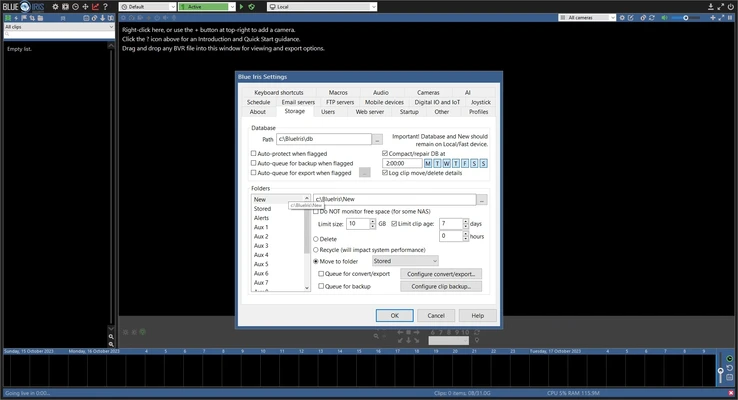
Storage Management: Configure recording locations, retention settings, and storage behavior to manage available disk space.
User Interface
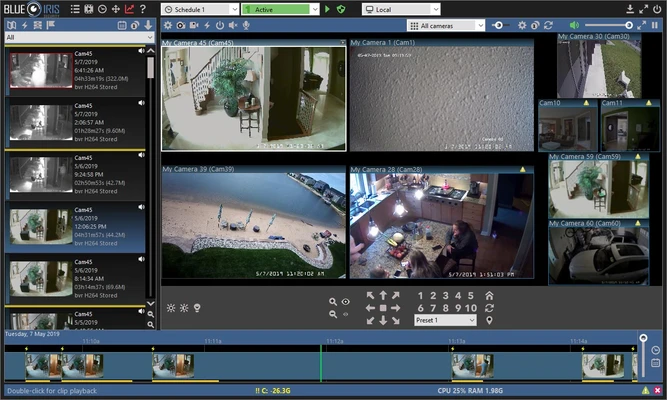
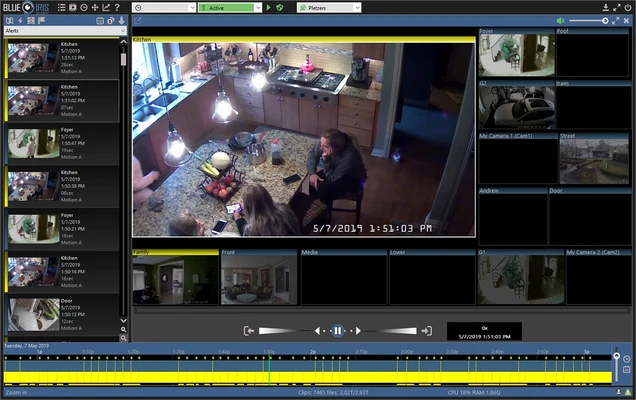
Blue Iris provides a centralized interface for managing multiple camera feeds, recordings, alerts, and system settings.
The main interface displays connected cameras and provides quick access to live viewing and recording controls. Users can switch between cameras, review recorded footage, and access event and alert information.
The software also includes a browser-based interface known as UI3, which allows users to remotely access live and recorded video from compatible web browsers. User authentication and permission controls can be configured to restrict access to specific cameras or functions.
Installation and Setup
Download the Blue Iris installer and run the setup program on a compatible Windows PC.
After installation, activate the software using a valid license or start the available trial period. Add your cameras manually or use the available camera discovery tools where supported.
Once cameras are connected, configure recording schedules, motion detection, storage locations, alerts, and user permissions according to your requirements.
For remote access, configure the built-in web server and make sure the network environment allows secure remote connections.
How to Use
-
Launch Blue Iris and activate the software or start the trial version.
-
Add compatible cameras manually or use camera discovery tools.
-
Configure the resolution, frame rate, recording mode, and storage location for each camera.
-
Set up motion detection and other event triggers.
-
Configure alerts and notifications for important events.
-
Create user accounts and assign appropriate access permissions.
-
Use the timeline and alerts sections to locate and review recorded footage.
-
Access live and recorded video remotely through the web interface.
-
Configure storage retention settings to prevent recordings from consuming all available disk space.
-
Regularly update the software to receive security, compatibility, and stability improvements.
FAQ
How many cameras can Blue Iris support?
Blue Iris supports up to 64 cameras in a single installation. The practical number of cameras depends on the computer's processor, hardware acceleration, camera resolution, frame rates, and recording configuration.
Can Blue Iris record IP cameras?
Yes. Blue Iris is designed to work with a wide range of compatible network IP cameras.
Can I use webcams with Blue Iris?
Yes. Compatible webcams can be added as video sources alongside supported network cameras.
Can I access Blue Iris remotely?
Yes. The built-in web interface allows users to remotely view supported live camera feeds, recorded clips, and alerts.
Does Blue Iris support motion detection?
Yes. Motion detection can be configured to trigger recording, alerts, and other actions.
Can Blue Iris send alerts?
Yes. Depending on the configuration, Blue Iris can generate notifications through supported methods such as email and external applications or scripts.
Can multiple users access Blue Iris?
Yes. User accounts and permission settings allow administrators to control access to cameras and other features.
Does Blue Iris have a mobile app?
Blue Iris supports remote access through its web interface and has companion mobile applications for supported platforms.
Does Blue Iris require a powerful computer?
The hardware requirements increase significantly as more cameras are added or when using high-resolution video, high frame rates, continuous recording, and advanced processing features. Hardware-accelerated video decoding can help reduce CPU usage on supported systems.
Is Blue Iris free?
No. Blue Iris is commercial software, but a trial version is available for evaluation before purchasing a license.
Alternatives
Agent DVR: A flexible video surveillance platform that supports IP cameras, recording, motion detection, and remote monitoring.
ZoneMinder: An open-source video surveillance platform designed for monitoring and recording camera feeds.
iSpy: A video surveillance application that supports cameras, motion detection, recording, and remote monitoring.
SecuritySpy: A professional video surveillance solution designed primarily for macOS systems.
Pricing
Trial Version
Blue Iris provides a limited trial period for users who want to evaluate the software before purchasing.
Paid Version
A paid license is required for continued use after the trial period. Licensing options may vary depending on the edition and current pricing.
System Requirements
Blue Iris is designed for 64-bit versions of Windows.
Recommended hardware depends heavily on the number and resolution of cameras being used.
-
OS: Windows 10 64-bit or Windows 11
-
Processor: Intel Core i7 or equivalent recommended
-
RAM: 8 GB or more recommended
-
Graphics: Compatible NVIDIA GPU or integrated graphics with hardware video decoding where supported
-
Storage: SSD and/or high-speed hard drives recommended
-
Network: High-speed network connection recommended for multiple IP cameras
-
Additional Storage: Required for recorded video and long-term retention
Actual requirements can be considerably higher for installations with many high-resolution cameras.
Pros
-
Supports up to 64 cameras
-
Wide range of camera compatibility
-
Powerful recording and scheduling options
-
Motion detection and configurable alerts
-
Remote access through a web browser
-
User accounts and permission management
-
Flexible storage and retention settings
-
Supports hardware-accelerated video processing
-
Regular software updates
Cons
-
Requires a paid license after the trial period
-
Can consume significant system resources with multiple cameras
-
Initial configuration can be complex
-
Storage requirements can become substantial with continuous recording
-
Advanced features may require more powerful hardware
-
Mobile experience may not be as polished as some newer cloud-based surveillance platforms
Conclusion
Blue Iris is a comprehensive Windows video management solution for users who want to monitor and record multiple cameras from a single PC. With support for up to 64 cameras, motion detection, scheduled recording, alerts, remote access, user permissions, and flexible storage options, it can handle both home surveillance and more demanding multi-camera installations.
Its extensive configuration options make it particularly suitable for users who want detailed control over their surveillance system. However, running multiple high-resolution cameras can require substantial CPU, GPU, network bandwidth, and storage resources, so appropriate hardware planning is important.
A trial version allows users to evaluate the software before committing to a paid license.