

DiskDigger is a lightweight file recovery application for Windows that can scan storage devices for deleted and lost files. It can recover photos, videos, documents, audio files, and other common file types from hard drives, USB drives, memory cards, and other supported storage media.
The software provides two scanning modes, file preview, filtering, and a portable version for users who prefer not to install the application.
What's New
Recent updates have focused on compatibility, file recovery support, scanning performance, and improvements to the recovery process.
Key Features
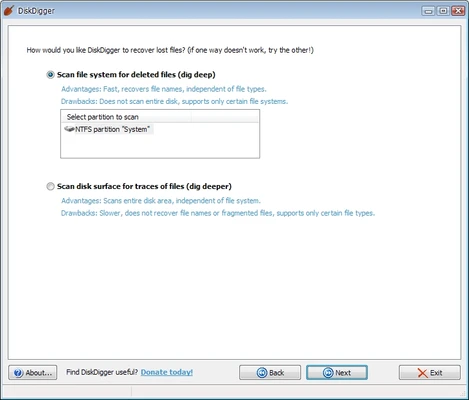
Two Recovery Modes: Use Dig Deep for standard recovery or Dig Deeper for a more thorough scan.
Multiple File Types: Recover images, videos, documents, audio files, archives, and other supported formats.
Multiple Storage Devices: Scan hard drives, USB drives, memory cards, and other supported storage media.
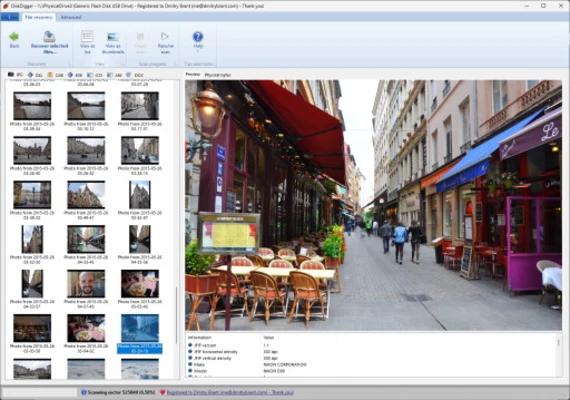
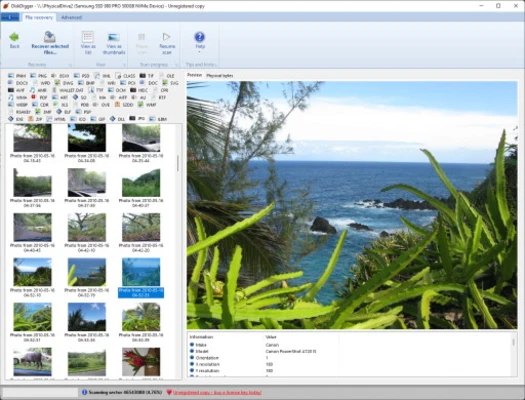
File Preview: Preview recoverable files before restoring them.
File Filtering: Filter scan results by file name, size, and other available criteria.
Portable Version: Run the software without installing it on the computer.
User Interface
DiskDigger uses a simple wizard-style interface. Users select a storage device, choose a recovery mode, and start the scan. The straightforward layout makes the software relatively easy to use, although its interface looks dated compared with newer recovery applications.
Installation and Setup
-
Download and install DiskDigger.
-
Launch the application and select the drive or storage device to scan.
-
Choose the appropriate recovery mode.
-
Start the scan and wait for the results.
-
Select the files you want to recover and save them to another storage location.
The portable version can be used without a traditional installation.
How to Use
Select a Drive: Choose the storage device containing the lost files.
Choose a Recovery Mode: Start with Dig Deep for a standard scan or use Dig Deeper when a more thorough search is required.
Scan for Files: Allow the software to scan the selected storage device.
Preview Results: Check available file previews to determine whether files are recoverable.
Recover Files: Select the required files and save them to a different drive or storage device.
Important: Avoid writing new data to the drive containing deleted files, as new data can overwrite recoverable information.
FAQ
Can DiskDigger recover permanently deleted files?
It can recover some permanently deleted files if their data has not been overwritten. Recovery is not guaranteed.
Is DiskDigger free?
A free version is available, while the Pro version provides additional recovery functionality.
Does DiskDigger support external drives?
Yes. It can scan supported external hard drives, USB drives, and memory cards.
Can it recover files from SSDs?
It can scan SSDs, but recovery may be limited when TRIM has already removed deleted data.
Can recovered files be saved to the same drive?
It is strongly recommended to save recovered files to a different drive to avoid overwriting other recoverable data.
Alternatives
Recuva – A user-friendly Windows recovery tool with standard and deep scanning options.
Wondershare Recoverit – A data recovery application with support for various storage devices and file types.
EaseUS Data Recovery Wizard – Provides advanced recovery and disk scanning features.
Stellar Data Recovery – A recovery tool for deleted, formatted, and inaccessible files.
MiniTool Power Data Recovery – Offers file recovery for various Windows storage devices.
Pricing
DiskDigger offers a free version with limitations. DiskDigger Pro is available as a paid license with additional recovery features.
Pricing may change over time.
System Requirements
-
Operating System: Windows 7, Windows 8, Windows 10, or Windows 11
-
Processor: Intel or AMD processor
-
Memory: 512 MB RAM minimum
-
Storage: Approximately 10 MB for the application, plus additional space for recovered files
-
Additional Software: Some versions may require Microsoft .NET Framework
Pros
-
Lightweight and easy to use
-
Two recovery modes
-
Supports various file types
-
Works with multiple storage devices
-
File preview before recovery
-
Portable version available
Cons
-
Outdated-looking interface
-
Free version has limitations
-
Deep recovery can take considerable time
-
Recovery success depends heavily on whether deleted data has been overwritten
-
Windows-focused software
Conclusion
DiskDigger is a simple and lightweight file recovery tool for Windows users who need to recover accidentally deleted or lost files. Its two scanning modes, broad file support, portable version, and straightforward interface make it suitable for basic recovery tasks.
For the best chance of recovery, stop using the affected storage device as soon as possible and save recovered files to a different drive.