

Droid Transfer is a Windows application that works with the free Transfer Companion app for Android, allowing users to transfer and manage data between an Android phone and a Windows PC. It supports both USB and local Wi-Fi connections, making it convenient for backing up messages, contacts, photos, music, calendars, and other files.
The software is particularly useful for users who want to back up SMS and MMS messages to their computer. Messages can be saved in PDF, HTML, or text formats while retaining attachments such as photos, videos, emojis, and message timestamps.
It also provides tools for managing Android content from a Windows PC, making it easier to move data when switching phones or creating a local backup.
Key Features
SMS and MMS Backup: Back up text messages and multimedia messages from Android devices to a Windows PC, including attachments, dates, and timestamps.
Message Export: Save conversations as PDF, HTML, or text files, or print messages directly from the application.
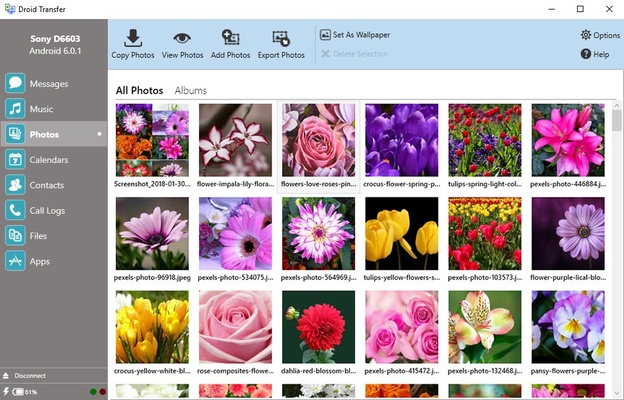
Photo and Video Transfer: Copy photos and videos between an Android phone and a Windows computer.
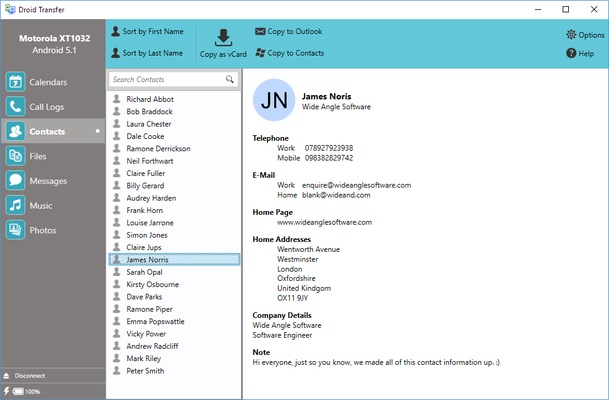
Contact Management: Back up contacts and save them as VCard or CSV files. Contacts can also be transferred to another Android or iPhone.
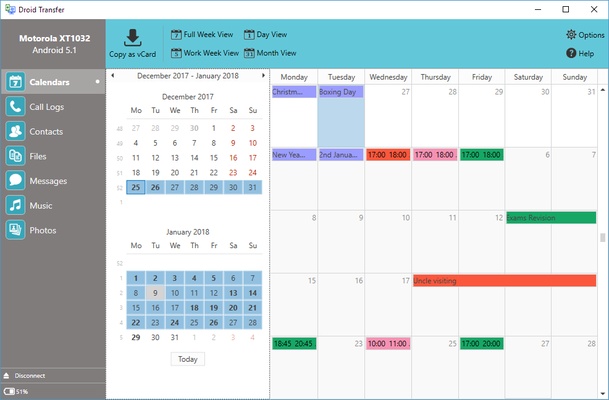
Calendar Backup: Back up Android calendar information and export calendar data for use with other applications.
Music Transfer: Transfer music between Android devices and Windows PCs, including synchronization with iTunes.
File Management: Browse files stored on an Android device and transfer individual files or entire folders.
Wi-Fi and USB Connectivity: Connect an Android device through a USB cable or wirelessly over the same local Wi-Fi network.
Call Log Backup: Save and print Android call history for record keeping.
Main Features
- Backup Android phones to a PC via USB or Wi-Fi
- Transfer SMS and MMS messages with media and timestamps
- Export messages to PDF, HTML, or text
- Print text messages with dates and times
- Save photos, videos, and other attachments
- Transfer music between Android and PC
- Sync music with iTunes
- Manage photos from a Windows computer
- Back up and manage Android contacts
- Export contacts as VCard or CSV
- Transfer contacts to another Android or iPhone
- Transfer files wirelessly
- Manage Android files from a PC
- Back up Android calendars
- Export calendar information
- Save and print Android call history
How to Connect Droid Transfer via Wi-Fi
Droid Transfer can communicate with an Android phone over a local wireless network.
- Connect the Windows PC and Android phone to the same Wi-Fi network.
- Install and launch Droid Transfer on the Windows computer.
- Open the Transfer Companion app on the Android phone.
- Select the option to scan the Droid Transfer QR code.
- Scan the QR code displayed on the computer.
- Once connected, the Android device will appear in Droid Transfer.
Both devices must be connected to the same local network for Wi-Fi transfers to work.
How to Transfer Files from PC to Android
- Connect the PC and Android device using Wi-Fi or USB.
- Open the Files section in Droid Transfer.
- Select the destination folder on the Android device.
- Choose Add from PC.
- Select Add Files or Add Folders.
- Choose the files or folders you want to transfer.
- Confirm the transfer.
How to Transfer Android Contacts to PC
- Connect your Android phone to Droid Transfer.
- Open the Contacts section.
- Select Save as VCard or Save as CSV.
- Choose a location on the PC.
- Save the contact data.
This makes it easy to create a separate backup of your phone book or move contacts between different services and devices.
User Interface
Droid Transfer uses a straightforward interface organized around different types of Android content. Users can switch between messages, contacts, files, photos, music, calendars, and call logs without needing to navigate complicated menus.
The software displays the connected Android device and provides dedicated tools for browsing, transferring, backing up, and exporting information.
Pricing
The full version costs $35 for a lifetime license covering 2 Windows PCs.
The license includes:
- Lifetime software access
- Full functionality on 2 Windows PCs
- Support for Android phones and tablets
- One-time purchase
- No recurring subscription
Free Trial Limitations
The trial version allows users to preview Android content before purchasing. However, some transfer and export functions are restricted.
- Up to 100 free music or photo copies
- Full calendar functionality
- Only the first 5 messages in a conversation can be exported
- Limited call-log exports
- Messages, contacts, files, and other content can be browsed
- Full copying and saving functionality requires activation
Connectivity
Droid Transfer requires the Windows application and Transfer Companion Android app to communicate with each other.
Wi-Fi: The Android device and Windows PC must be connected to the same Wi-Fi network.
USB: Connect the Android device directly to the Windows PC with a compatible USB cable.
Wi-Fi is convenient for wireless transfers, while USB can be preferable when transferring larger amounts of data or when the local network is unreliable.
System Requirements
Windows PC
- Windows 10 or Windows 11
- Microsoft .NET Framework 4
- Available USB connection or local Wi-Fi network
The installer can detect whether the required .NET Framework component is installed.
Android
- Android 5 (Lollipop) or later
- Transfer Companion app required
- No device limit
The software works with Android phones and tablets from major manufacturers, including Samsung, Google, Xiaomi, OnePlus, Oppo, Huawei, Motorola, Sony, Lenovo, ASUS, Realme, TCL, ZTE, and others.
PROS
- Easy Android-to-PC data transfer
- Supports USB and Wi-Fi connections
- Excellent SMS and MMS backup capabilities
- Preserves photos, videos, emojis, and timestamps
- Multiple export formats
- Contact and calendar management
- Supports a wide range of Android devices
- Lifetime license with no subscription
CONS
- Windows-only PC application
- Requires a separate Android companion app
- Some useful features are restricted in the trial version
- Full functionality requires a paid license
Conclusion
Droid Transfer is a practical Android data management and backup tool for Windows users. Its strongest feature is the ability to back up and export SMS and MMS conversations while retaining associated media and timestamps.
It also goes beyond messaging by supporting contacts, photos, music, files, calendars, and call history. The combination of USB and Wi-Fi connectivity, broad Android compatibility, and a one-time lifetime license makes it a useful option for users who want more control over their Android data.
Note: Requires an Android smartphone or tablet with the Transfer Companion app installed.