

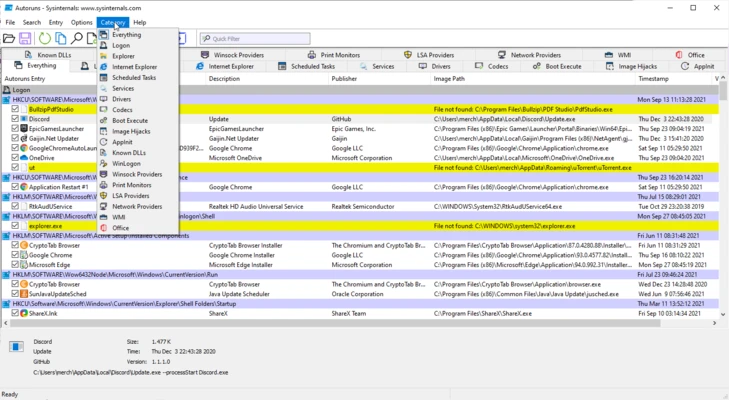
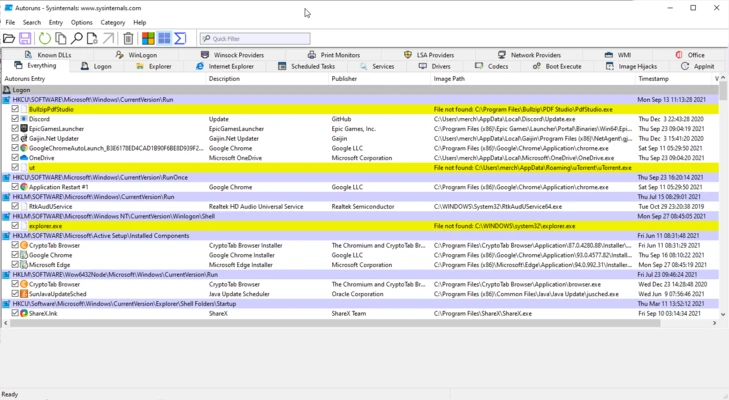
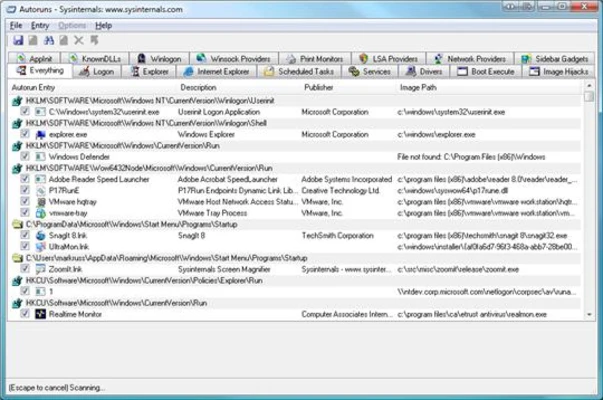
Autoruns is a powerful startup management utility developed by Microsoft Sysinternals that provides a complete view of all programs, services, drivers, scheduled tasks, and other components configured to start automatically with Windows.
Unlike the standard Startup tab in Task Manager, Autoruns reveals every auto-start location in the operating system, making it an essential tool for troubleshooting startup issues, improving boot performance, and identifying potentially unwanted or malicious software.
Designed primarily for advanced users, IT administrators, and security professionals, Autoruns delivers deep visibility into the Windows startup process.
Key Features
Complete Startup Analysis
View all auto-start entries across Windows, including:
- Startup folders
- Registry Run keys
- Services
- Drivers
- Scheduled Tasks
- Explorer extensions
- Browser add-ons
- Codecs
- AppInit DLLs
- Boot execution processes
Startup Optimization
Disable unnecessary startup items to reduce boot times and improve overall system performance.
Malware Investigation
Identify suspicious programs that automatically launch with Windows and detect hidden persistence mechanisms often used by malware.
Digital Signature Verification
Verify file signatures to help distinguish trusted software from unknown or potentially unsafe applications.
Hide Microsoft Entries
Filter out native Windows components to focus on third-party software and startup items.
Color-Coded Results
Quickly identify:
- Missing files
- Unsigned files
- New startup entries
- Potentially suspicious items
Scheduled Task Monitoring
View and manage all tasks configured to run automatically in Windows Task Scheduler.
Command-Line Support
Automate startup audits and administrative tasks using command-line options.
Why Choose Autoruns?
- Displays far more startup entries than Task Manager
- Developed by Microsoft Sysinternals
- Excellent troubleshooting tool
- Useful for malware analysis
- Completely free
- Portable application with no installation required
Pros
- Extremely detailed startup analysis
- Reveals hidden startup locations
- Portable and lightweight
- Digital signature verification
- Helpful for performance tuning
- Excellent malware investigation tool
Cons
- Not beginner-friendly
- Large amount of technical information
- Improper changes may affect system stability
- No built-in explanations for many advanced entries
System Requirements
Operating System
- Windows 10
- Windows 11
- Windows Server editions
Hardware
- No special hardware requirements
Permissions
- Administrator privileges recommended for full functionality
Conclusion
Autoruns is one of the most powerful startup management tools available for Windows. By exposing every auto-start location used by the operating system, it gives advanced users and IT professionals unmatched visibility into system behavior. Whether you're optimizing boot performance, troubleshooting startup problems, or investigating suspicious software, Autoruns remains an essential utility in any Windows maintenance toolkit.