


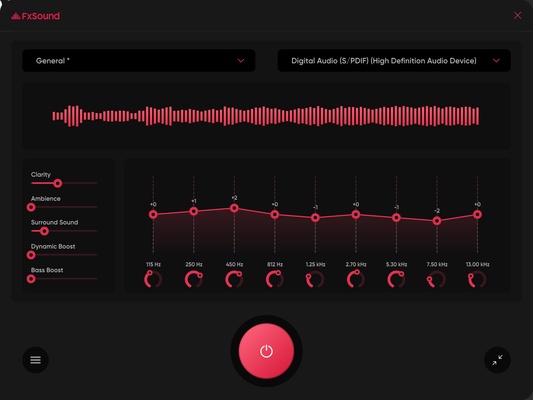
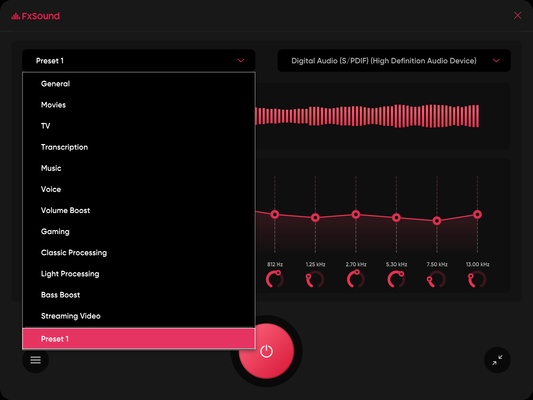
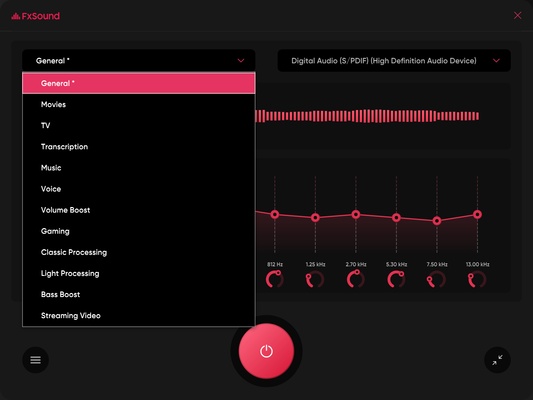
FxSound is a free audio enhancement software for Windows that improves the sound output from speakers and headphones. It provides audio processing, equalizer controls, presets, and effects designed for music, movies, games, and other audio applications.
The software works in real time and can enhance bass, clarity, volume, and overall sound balance without requiring users to replace their existing audio hardware. It is suitable for both beginners who want a simple preset and advanced users who prefer to adjust audio settings manually.
What's New
- Improved audio processing and playback stability.
- Enhanced equalizer and effect controls.
- Improved compatibility with Windows audio applications.
- Performance and resource usage optimizations.
- Updated presets and audio profiles.
- Various bug fixes and stability improvements.
Features
Audio Enhancement
Enhances sound clarity, bass, volume, and overall audio balance in real time.
Equalizer
Use the built-in equalizer to adjust individual frequency bands and create a customized sound profile.
Audio Presets
Choose from predefined profiles for different listening situations, such as music, movies, gaming, and voice content.
Bass and Clarity Enhancement
Adjust bass and clarity levels to improve the perceived depth and detail of audio.
Surround Sound Effects
Provides virtual surround effects for a wider and more immersive listening experience.
Real-Time Processing
Processes audio while it is playing, allowing changes to take effect immediately.
System-Wide Audio Enhancement
Works with audio from supported Windows applications, including music players, video players, games, and communication software.
Lightweight Design
Runs in the background without requiring significant system resources on most computers.
Installation and Setup
- Download and install FxSound.
- Follow the installation instructions.
- Launch the application after installation.
- Select an audio preset or create a custom profile.
- Adjust the equalizer and audio effects as needed.
- Keep FxSound running in the background while using your preferred audio applications.
How to Use
Select a Preset
Choose a preset that matches your activity, such as music, movies, gaming, or voice playback.
Adjust the Equalizer
Fine-tune individual frequency bands to change the sound according to your preferences.
Adjust Audio Effects
Modify bass, clarity, and other available effects to achieve the desired sound.
Create Custom Profiles
Save customized settings for different headphones, speakers, or types of content.
Enable or Disable Processing
Turn audio enhancement on or off to compare the processed sound with the original output.
FAQ
Is FxSound free?
Yes. FxSound is available as free software and provides core audio enhancement features without requiring a paid subscription.
Does FxSound work with Windows 10 and Windows 11?
Yes. FxSound is designed for modern Windows versions, including Windows 10 and Windows 11.
Does FxSound work with headphones?
Yes. It can enhance audio output through compatible headphones, earbuds, and speakers.
Does FxSound work with games?
Yes. It can process audio from games and may improve effects, dialogue, bass, and overall clarity.
Can I adjust the equalizer manually?
Yes. Users can manually adjust the available frequency bands and audio effects.
Does FxSound improve audio quality?
It can change the perceived sound by applying real-time processing and equalization. The results depend on the source audio and the speakers or headphones being used.
Alternatives
- Equalizer APO – Free and open-source system-wide equalizer for Windows.
- Voicemeeter Banana – Advanced virtual audio mixer with extensive routing and processing controls.
- Boom 3D – Audio enhancement software with virtual surround sound and equalizer features.
- Dolby Access – Provides spatial audio and other audio enhancement features on supported systems.
Pricing
FxSound is available as free software with its core audio enhancement functionality included.
System Requirements
- Operating System: Windows 10 or Windows 11
- Processor: Modern Intel or AMD processor
- RAM: 2 GB or more
- Storage: Approximately 50 MB of free disk space
- Audio Device: Compatible speakers, headphones, or other Windows audio output device
PROS
- Free to use
- Easy-to-use interface
- Real-time audio enhancement
- Built-in equalizer and presets
- Works with many Windows audio applications
- Low system resource usage
- Suitable for music, movies, gaming, and voice audio
CONS
- Audio improvements depend on the quality of the source and output device
- Virtual surround effects may not suit everyone
- Advanced audio users may prefer more detailed equalizer controls
- Some effects can make audio sound unnatural when used excessively
Conclusion
FxSound is a simple and effective audio enhancement tool for Windows users who want to improve their computer's sound without replacing their speakers or headphones. Its presets and real-time processing make it easy for beginners to improve audio quickly, while the equalizer provides additional control for users who want to fine-tune their sound.
It is particularly useful for improving the perceived bass, clarity, and overall balance of music, movies, games, and other audio played on a Windows PC.