



Replay Music is an audio recording tool for Windows designed specifically for capturing music from online radio stations, websites, music videos, streaming services, and other PC-based audio sources. It records audio as high-quality MP3 files and can automatically identify and organize songs with metadata such as artist, album, genre, album artwork, and lyrics.
The software can separate recordings into individual tracks, filter out unwanted system sounds, and automatically add recorded songs to supported music libraries. It is designed for users who want to save music from different audio sources and keep their collections organized.
What's New
-
Improved high-quality audio recording.
-
Enhanced automatic song identification and tagging.
-
Improved album artwork and lyrics retrieval.
-
Refined track splitting for recorded music.
-
Improved support for online audio sources.
-
Enhanced cloud upload options.
-
Various performance and stability improvements.
Key Features
High-Quality MP3 Recording: Captures music from supported websites, online radio stations, music videos, streaming services, and PC-based audio players.
Automatic Song Tagging: Identifies recorded tracks and adds metadata such as artist, song title, album, genre, and other available information.
Album Artwork and Lyrics: Automatically adds available album artwork and lyrics to supported music files.
Track Splitting: Detects individual songs and separates longer recordings into individual tracks.
System Sound Filtering: Helps reduce unwanted system sounds and background audio during recording.
Built-in Media Guide: Provides access to music and media information to help identify songs and organize recordings.
Music Library Integration: Can automatically add recorded tracks to supported music libraries such as Windows Media Player.
Cloud Upload: Supports uploading recordings to cloud storage services such as Dropbox, Google Drive, and OneDrive.
Music File Tagging: Can update and organize metadata for existing music files.
User Interface
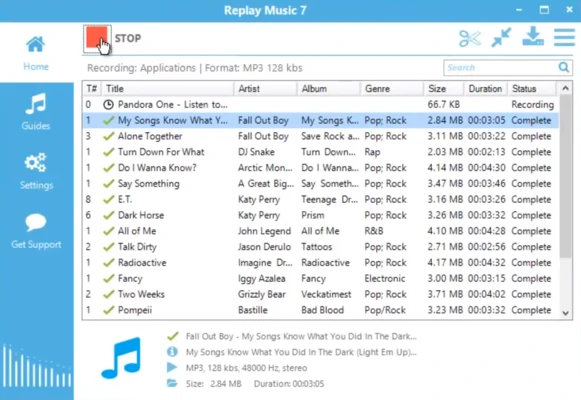
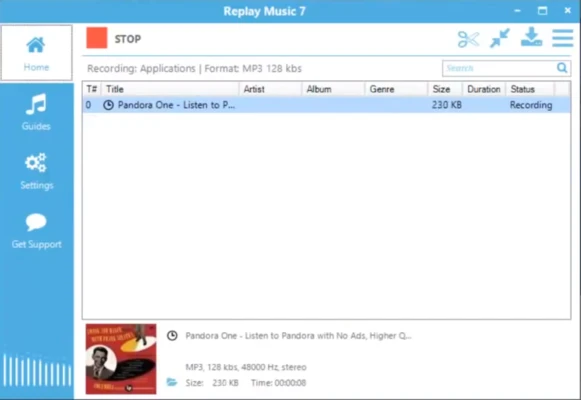
Replay Music uses a straightforward interface centered around recording, song identification, and music management. Users can start or stop recordings, view detected tracks, and review song information from the main window.
The software is designed to automate much of the recording and tagging process, so users can play music from a supported source while Replay Music handles track detection and metadata.
Installation and Setup
Download the Replay Music installer and run it on a compatible Windows computer. Follow the on-screen instructions to complete the installation.
After launching the software, configure the preferred recording and output settings. You can then start playing music from a supported website, streaming service, online radio station, or PC application and begin recording.
How to Use
-
Download and install Replay Music.
-
Launch the application.
-
Select the desired recording and output settings.
-
Start playing music from a supported audio source.
-
Start recording in Replay Music.
-
Allow the software to identify and separate individual tracks.
-
Review the detected song information.
-
Save the recordings as MP3 files.
-
Upload or transfer the files to your preferred music library or cloud storage.
FAQ
What can Replay Music record?
Replay Music can record audio from supported websites, online radio stations, music videos, streaming services, and other PC-based audio sources.
Does Replay Music automatically identify songs?
Yes. The software can identify recorded tracks and automatically add available metadata such as artist, title, album, genre, artwork, and lyrics.
Can Replay Music save songs as MP3 files?
Yes. Replay Music is designed to save recorded music as MP3 files and organize individual tracks automatically.
Can Replay Music record YouTube videos?
It can capture audio from supported video playback and save the resulting music as audio files. Recording and downloading content should comply with the applicable service terms and copyright laws.
Can Replay Music separate songs automatically?
Yes. Its track-splitting feature can detect individual songs in a recording and save them as separate tracks.
Is Replay Music available for Mac?
No. Replay Music is designed for Windows and does not provide a native macOS version.
Is Replay Music free?
Replay Music offers a free trial with limited functionality. The demo version allows users to record and tag up to 25 tracks, while the paid version provides extended recording capabilities.
Alternatives
Audials One – A comprehensive media recording application that supports music, radio, video, and other online content.
Ashampoo Music Studio – A music management and audio editing suite with recording, conversion, editing, and disc creation tools.
Replay Radio – A Windows application focused on recording and scheduling Internet radio programs.
Pricing
Replay Music offers a free trial with limitations. The trial version allows up to 25 recorded and tagged tracks. A paid license is required for unlimited recording and tagging.
System Requirements
-
Operating System: Windows 7, 8, 10, and 11
-
Processor: Compatible Windows processor
-
Memory: 2 GB RAM or more recommended
-
Storage: Additional free space required for recorded music
-
Internet Connection: Required for online music sources and automatic metadata retrieval
Pros
-
High-quality music recording
-
Automatic song identification
-
Automatic metadata tagging
-
Supports album artwork and lyrics
-
Automatic track splitting
-
Can filter unwanted system sounds
-
Supports multiple online audio sources
-
Cloud upload support
-
Easy-to-use interface
Cons
-
Free version has recording limitations
-
Occasional metadata identification errors
-
Windows-only
-
Requires Internet access for some features
-
Recording quality depends on the original audio source
Conclusion
Replay Music is a practical Windows audio recorder designed specifically for capturing and organizing music from online and PC-based audio sources. Its automatic song identification, track splitting, metadata tagging, album artwork, and lyrics features make it more convenient than a basic audio recorder.
The free trial provides an easy way to test the software, while the paid version removes the main recording limitations. For Windows users who regularly record online music and want their recordings automatically organized into individual MP3 tracks, Replay Music offers a convenient solution.