Go to Windows platform Display platforms icon
Go to Windows platform Go to Mac platform Go to Android platform
Syncplay icon

Syncplay

1.7.4
Syncplay
0
19.66 MB size

Watch videos at the same time with your friends

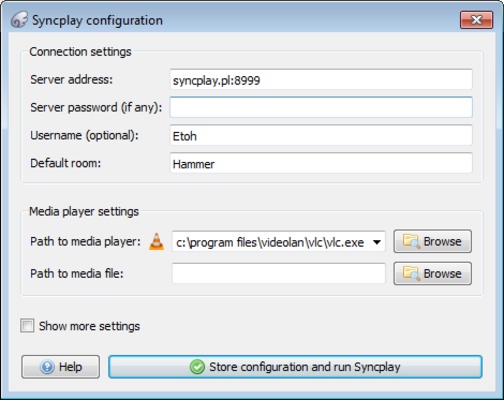
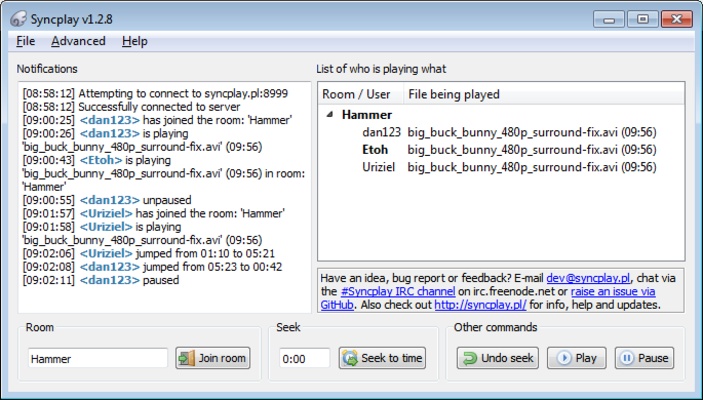
Syncplay is a program for Windows for syncing some of the video players that you and your friends or family both have installed. Doing this allows you to easily play any content in sync on each computer.

Playing a movie or TV series in sync on multiple computers is Syncplay's main function. To do this, you just have to run the player you want to watch your content on. After this, the other people must enter the same server you created so it starts playing at the same time on each computer.

One of the strengths of Syncplay is that the program is fully compatible with several widely used players such as VLC. In addition to this, the program is also able to run on different platforms, such as Mac or Linux, so that any user can connect without a problem.

Syncplay is one of those programs that are very useful for enjoying movies with your friends even if you're watching in different houses. The fact that you can enjoy watching at the same time means that you can create virtual cinema sessions where all your devices are in sync.

Information about Syncplay

License Free
Op. System Windows
Category Audio
Language English
Author Syncplay
permission icon Permissions Not applicable
Date 2026-06-02
Size 19.66 MB
File type EXE

Apps recommended for you

FamiStudio icon
Create NES-style music
Replay Music icon
Record what you listen to as mp3 file on the fly
Neovim icon
Enhanced text editor based on Vim
Equalizer APO icon
Equalizer for Windows speakers and headphones
Volumouse icon
Control the volume of your PC with the mouse wheel
Universal Media Server icon
Turn your PC into a multimedia center
MP3Tag icon
Edit audio file metadata
QQ Music icon
Play hundreds of songs on your PC
Ocenaudio icon
Ocenaudio is a user-friendly audio editing software that offers powerful features for recording, editing, and analyzing audio files with ease.
TIDAL Desktop icon
Listen to high-fidelity music and manage your playlists with TIDAL Desktop for Windows, the premium streaming service offering lossless audio and exclusive content.
MP4 Player icon
MP4 Player is a simple media player that allows users to play MP4 video files with ease and high-quality playback.
ProgDVB icon
ProgDVB for Windows is a versatile software that allows users to watch and record satellite, cable, and IPTV broadcasts on their PC.
ASIO4ALL icon
ASIO4ALL for Windows is a universal audio driver that improves sound quality and reduces latency for audio applications on systems without native ASIO support.
Pianoteq icon
Create realistic piano sounds and virtual instruments with Pianoteq for Windows, the advanced physically modeled piano software for musicians and producers.
Balabolka Portable icon
Convert text to speech effortlessly with Balabolka Portable for Windows, the lightweight text-to-speech software with support for multiple voice engines and audio formats.
Deezer Desktop icon
Deezer Desktop for Windows is a music streaming app that lets users listen to millions of tracks, create playlists, and enjoy personalized music recommendations.
mp3DirectCut icon
Cut, fade, split and record compressed mpeg audio
Ashampoo Music Studio icon
Music software to edit, convert and mix audio files
EnergyGrabTube icon
EnergyGrabTube – Easily Download Videos and Music
AVS Audio Editor icon
Online Media Technologies
Turbo Play icon
All in one Image/Audio/Video editor and Sequence with AI features
GOM Audio icon
GOM & Company
Ultimate Vocal Remover icon
Separate the vocals in any song
Volumouse icon
Control the volume of your PC with the mouse wheel