

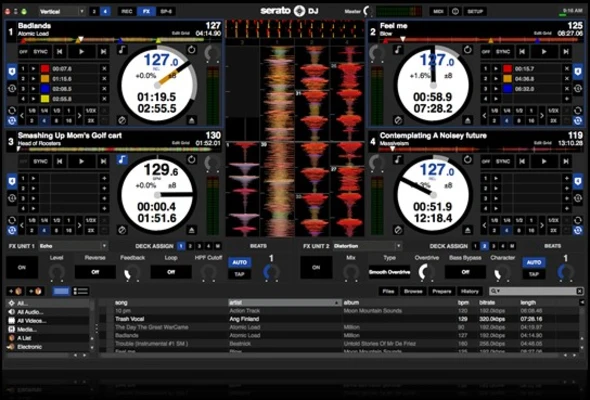
Serato DJ Pro is a professional DJ software for Windows that delivers industry-leading performance, exceptional audio quality, and seamless integration with hundreds of supported DJ controllers and mixers. Trusted by club DJs, touring professionals, and beginners alike, it offers everything needed for live mixing, including advanced beatmatching, creative performance tools, real-time effects, recording, and support for major music streaming services.
Designed with reliability in mind, Serato DJ Pro combines an intuitive workflow with powerful features, making it one of the most popular DJ applications available.
Key Features
Extensive Hardware Compatibility
- Plug-and-play support for controllers and mixers from:
- Pioneer DJ
- AlphaTheta
- RANE
- Denon DJ
- Numark
- Hercules
- Roland
- And many others
Professional Audio Engine
- High-quality 64-bit audio processing.
- Low-latency playback.
- Stable performance for live events and club environments.
Advanced Music Library
- Smart Crates for automatic playlist organization.
- Fast search.
- BPM and key detection.
- Cue points and beat grids.
- Library filtering and tagging.
Beatmatching & Sync
- Automatic BPM synchronization.
- Manual beatmatching.
- Key Lock (Master Tempo).
- Precise waveform alignment.
Performance Features
- Hot Cues.
- Auto Loops.
- Manual Loops.
- Slip Mode.
- Sampler.
- Roll mode.
- Performance Pads support.
Professional Effects
Powered by iZotope, including:
- Echo
- Reverb
- Flanger
- Phaser
- Delay
- Filter
- Distortion
- More professional FX expansions available.
DVS Support
Control digital music using:
- Timecode vinyl
- Timecode CDs
- Professional turntables
- CDJs
Ideal for scratch DJs and traditional vinyl workflows.
Recording & Streaming
- Record live DJ sets.
- Stream performances.
- Supports integration with multiple online music services.
Practice Mode
Mix music without connecting DJ hardware, making it perfect for practicing, preparing playlists, or learning.
Music Streaming Support
Serato DJ Pro supports direct integration with:
- TIDAL
- SoundCloud Go+
- Beatport LINK
- Beatsource LINK
This allows DJs to perform using millions of online tracks without maintaining a massive local library.
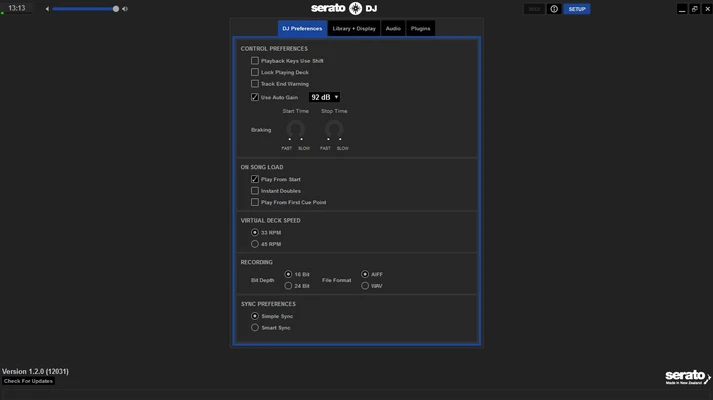
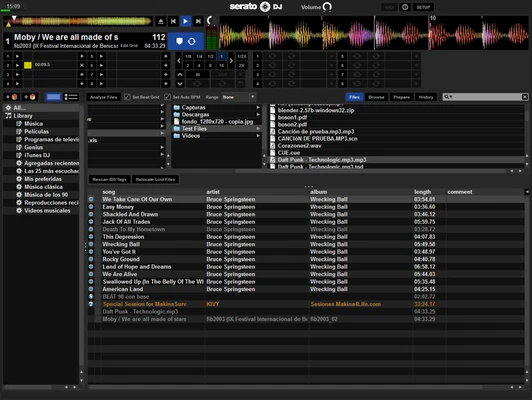
User Interface
Serato DJ Pro features a clean, dark interface optimized for live performance.
Highlights include:
- Dual-deck layout.
- High-resolution colored waveforms.
- Vertical and horizontal waveform views.
- Customizable layouts.
- Responsive touchscreen support.
- Clear access to effects, sampler, loops, and cue controls.
The interface is designed to minimize distractions during performances while providing quick access to essential controls.
How to Use
- Install Serato DJ Pro.
- Connect a supported DJ controller or mixer.
- Import your music library.
- Drag tracks onto either deck.
- Match BPM manually or use Sync.
- Set cue points and loops.
- Apply effects during transitions.
- Mix using EQ, channel faders, and crossfader.
- Record or broadcast your performance if desired.
Pricing
Serato DJ Pro
- $9.99/month
- $249 one-time purchase
Includes:
- Full Serato DJ Pro software
- Regular updates during subscription or maintenance period
Serato DJ Suite
- $14.99/month
- $449 one-time purchase
Includes:
- Serato DJ Pro
- Serato Play
- Serato FX
- Serato Flip
- Serato Pitch 'n Time DJ
- Serato Club Kit
- Serato DVS
- Serato Video
A 14-day free trial is available.
System Requirements
- Operating System: Windows 10 or Windows 11
- Processor: Intel Core i3 or faster
- Memory: 4 GB RAM minimum (8 GB recommended)
- Storage: 5 GB available disk space
- Display: Minimum 1280 × 720 resolution
- USB: USB 2.0 or newer for supported DJ hardware
Pros
- Excellent sound quality and low-latency performance
- Huge range of supported DJ controllers
- Stable enough for professional live performances
- Intuitive interface suitable for beginners and professionals
- Powerful iZotope effects
- Built-in Practice Mode
- Streaming service integration
- Regular feature updates
Cons
- Full version requires a paid license
- Some advanced features require additional paid expansions
- More limited MIDI customization than some competitors
- Higher hardware requirements than lightweight DJ software
- No built-in music production tools
Conclusion
Serato DJ Pro is one of the world's leading professional DJ applications, offering an outstanding combination of performance, reliability, and ease of use. Its exceptional hardware compatibility, high-quality audio engine, intelligent library management, and creative performance features make it equally suitable for bedroom DJs, mobile entertainers, club performers, and touring professionals.
Although the software requires a paid license to unlock its full capabilities, its stability, continuous development, and comprehensive feature set make it a worthwhile investment for anyone serious about DJing.
Note: A 14-day free trial is available.