Go to Windows platform Display platforms icon
Go to Windows platform Go to Mac platform Go to Android platform
Apktool icon

Apktool

2.11.1
iBotPeaches
5
23.42 MB size

Modify, compile and decompile APK files in Windows

Apktool is an app for editing, compiling and decompiling APK files on Android. In essence, it lets you reverse engineer an APK file to extract all the information from the app, allowing you to, for example, find out if it's hiding some kind of malicious activity, or simply to verify its code.

Decompress APK files

One of the most useful features of Apktool is that you can decompile the entire code of an APK file. You can view the source code (assuming it isn't too complex) and its internal structure. This is useful not only to analyze the legitimacy of an APK but also to learn how to develop apps using other apps as a reference.

Modify and recompile

In addition to being used for security analysis and to look for possible bugs or suspicious behavior in an app, Apktool is widely used to develop mods and patches for apps and games. With these, additional features can be added to games, and hidden elements can be unlocked. In the case of a ROM, it is also possible to modify system apps and other apps to improve performance on the device. It also allows you to localize apps to other languages and add them directly in the APK. After modifying the code with the changes you wanted to make, you can recompile the APK, although the signature will be different.

How to use Apktool on Windows

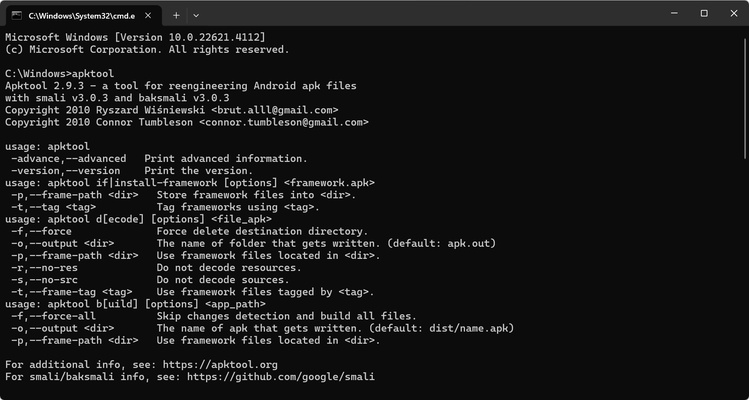
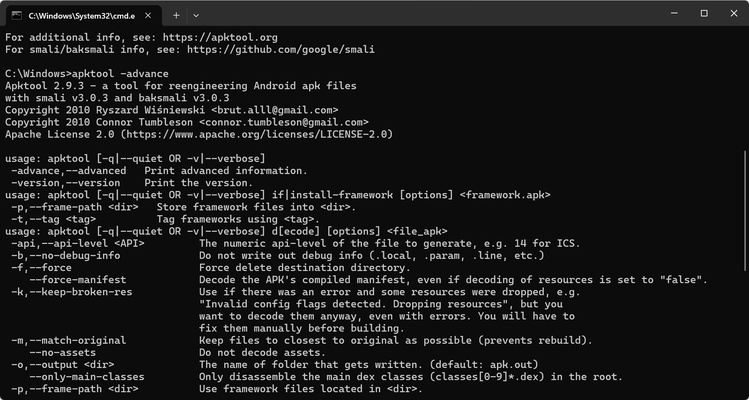
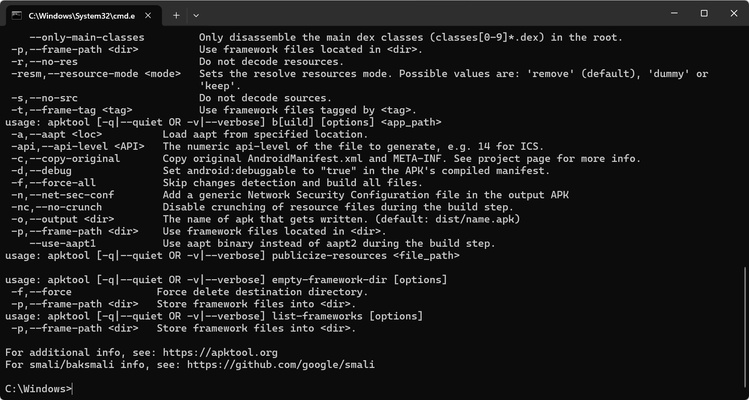
When you download Apktool, you get two files: apktool.bat and apktool.jar. Both should be copied to the C:/Windows folder. After that, you'll have to go to Command Prompt (CMD) and execute the command "apktool" followed by the action you want to perform on a particular file.

Download the Apktool APK and use one of the best tools for modifying and unzipping APK files on Windows.

Information about Apktool

License Free
Op. System Windows
Category Development
Language English 47 more
Author iBotPeaches
permission icon Permissions Not applicable
Date 2026-06-02
Size 23.42 MB
File type JAR

Apps recommended for you

TablePlus 26.10.2 Build 394 icon
Modern, native, and friendly GUI tool for relational databases!
FMSLogo Files icon
FMSLogo Files for Windows is a simple logo programming environment designed for learning basic programming concepts through visual graphics and commands.
Apache Tomcat 11.0.25 icon
Amazing comprehensive web development software for PC
Microsoft Edge WebView2 icon
Web content integration for native apps
Unreal Engine icon
A powerful and professional tool for creating video games
Rapid CSS Editor icon
Edit your style sheets in a clear and organized way
HTMLPad 2025 18.9 icon
Intelligent HTML, CSS, JavaScript editor for Windows PC
Vim 9.2.0670 icon
A highly configurable text editor built to creating and changing any text
Codex 26.1103.4239.0 icon
OpenAI's official companion for programming with ChatGPT
Beekeeper Studio 6.2.1 icon
A modern, elegant, and open source SQL client
InnoExtractor 12.2.0.187 icon
Complete GUI for Inno Setup.
Orca 1.4.246 icon
An environment for coordinating multiple AI agents
cc-switch 4.0.4 icon
Manage multiple AI models from one place
Twine 2.12.1 icon
A tool to create non-linear interactive stories
Codex 26.930.3930.0 icon
OpenAI's official companion for programming with ChatGPT
Python 3.14.8150.0 icon
Accessible multi-paradigmatic programming language
PSeInt icon
Learn logic programming in a different way
TablePlus 26.9.8 Build 388 icon
Modern, native, and friendly GUI tool for relational databases!
HTMLPad 2025 18.9 icon
Intelligent HTML, CSS, JavaScript editor for Windows PC
Vim 9.2.1021 icon
A highly configurable text editor built to creating and changing any text
Codex 26.1103.4239.0 icon
OpenAI's official companion for programming with ChatGPT
SciTE (SCIntilla) icon
SciTE is a lightweight and fast text editor based on the Scintilla engine, designed for programmers with syntax highlighting and scripting support.
VirtualBox 7.2.16 Build 174877 icon
Test, Develop, and Demonstrate Across Multiple Platforms on one Machine
Notepad++ icon
Notepad++ is a free and open-source text and code editor for Windows that supports multiple languages, syntax highlighting, and powerful editing features for developers.