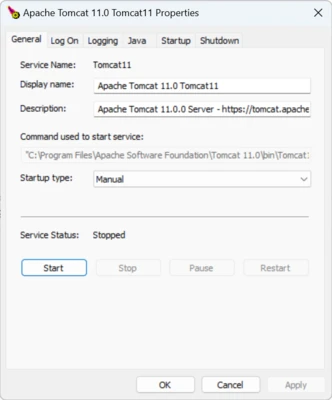
Apache Tomcat is an open-source web server and servlet container designed to run Java-based web applications.
Developed by the Apache Software Foundation, Tomcat supports Java Servlet, JavaServer Pages (JSP), WebSocket, and related technologies. It is widely used by developers to deploy and test Java web applications on Windows and other platforms.
Tomcat is lightweight, configurable, and suitable for development environments as well as production applications.
Key Features
Java Web Application Support – Runs applications based on Java Servlet, JSP, and WebSocket technologies.
Lightweight and Fast – Uses fewer system resources than many full-featured Java application servers.
WebSocket Support – Enables real-time communication for applications that require persistent connections.
Security – Supports SSL/TLS, authentication, authorization, and access control.
Flexible Configuration – Configure ports, connectors, applications, and other server settings through configuration files.
Web Application Deployment – Deploy WAR files directly through the webapps directory or Tomcat Manager.
Cross-Platform – Runs on Windows, Linux, macOS, and other platforms that support Java.
Open Source – Free to use and distributed under the Apache License 2.0.
Installation and Setup
- Download the appropriate Apache Tomcat package.
- Install a supported Java runtime or JDK.
- Set the JAVA_HOME environment variable.
- Extract Tomcat to a directory such as
C:\ApacheTomcat. - Open the
bindirectory. - Run
startup.batto start the server. - Open
http://localhost:8080in a web browser to verify the installation.
How to Use
Start and Stop Tomcat – Use startup.bat and shutdown.bat from the bin directory.
Deploy Applications – Copy a WAR file to the webapps directory to deploy a Java web application.
Change Server Settings – Edit server.xml and other configuration files to change ports, connectors, and server options.
Manage Applications – Use Tomcat Manager to deploy, start, stop, and remove web applications.
Configure Security – Configure users, roles, authentication, and access permissions according to your application requirements.
FAQ
What is Apache Tomcat used for?
Apache Tomcat is used to run Java web applications based on technologies such as Servlets, JSP, and WebSocket.
Is Apache Tomcat free?
Yes. Apache Tomcat is free and open-source software distributed under the Apache License 2.0.
Does Tomcat require Java?
Yes. Tomcat requires a compatible Java runtime environment to run.
How do I deploy a WAR file in Tomcat?
Copy the WAR file to the webapps directory. Tomcat can automatically deploy the application.
How do I change the default Tomcat port?
Edit the server.xml configuration file and change the connector port.
Does Apache Tomcat support Windows?
Yes. Tomcat provides packages that can be used on Windows systems.
Alternatives
Jetty – A lightweight Java web server and servlet container suitable for embedded applications.
WildFly – A full-featured application server for enterprise Java applications.
GlassFish – An open-source application server with support for Jakarta EE technologies.
Payara Server – An enterprise-oriented application server based on GlassFish.
System Requirements
- Operating System: Windows 10, Windows 11, and supported Windows Server versions
- Java: A compatible JDK or Java runtime
- RAM: 512 MB minimum; 1 GB or more recommended
- Storage: At least 100 MB for the server installation
- CPU: Modern x86 or x64 processor
PROS
- Free and open-source
- Lightweight and efficient
- Supports Servlets, JSP, and WebSocket
- Easy WAR file deployment
- Highly configurable
- Cross-platform support
CONS
- Requires Java
- Configuration can be complex for beginners
- Limited compared with full enterprise application servers
- Advanced performance tuning requires technical knowledge
- Web-based management tools are relatively basic
Conclusion
Apache Tomcat is a reliable and lightweight solution for running Java web applications. Its support for Servlets, JSP, WebSocket, and WAR deployment makes it a popular choice for Java developers.
It is particularly suitable for developers who need a simple and flexible Java web server without the overhead of a full enterprise application server.
Note: Requires a compatible Java runtime or JDK.