Go to Windows platform Display platforms icon
Go to Windows platform Go to Mac platform Go to Android platform
Vim 9.2.0670 icon

Vim 9.2.0670

9.2.0670
Bram Moolenar
5.0
19.1 MB size

A highly configurable text editor built to creating and changing any text

Vim for Windows is a high-performance, keyboard-driven text editor designed for developers, system administrators, and advanced users who need fast and precise text manipulation.

It is based on the classic UNIX editor Vi, extended with powerful modern features while keeping a focus on speed, efficiency, and minimal resource usage.

Unlike typical GUI editors, Vim uses a modal editing system, which separates actions into different modes to enable extremely fast workflows once mastered.


Key Features

Modal Editing System

Vim operates in multiple modes:

  • Normal Mode – navigate and execute commands
  • Insert Mode – write and edit text
  • Visual Mode – select and manipulate text blocks
  • Command-line Mode – run commands and scripts

This design allows complex operations with very few keystrokes.

Keyboard-Driven Workflow

  • Nearly all operations are performed via keyboard shortcuts
  • Eliminates dependency on mouse interaction
  • Optimized for speed and repetitive editing tasks

Powerful Customization

  • Fully configurable via .vimrc
  • Supports scripting and automation
  • Highly extensible through plugins

Syntax Highlighting

  • Supports hundreds of programming languages
  • Improves readability and code structure

Advanced Search & Replace

  • Regular expression-based search
  • Global or selective replacements across files

Multi-File Editing

  • Split windows for side-by-side editing
  • Tab support for managing multiple files

Undo Tree System

  • Non-linear undo/redo history
  • Allows reverting to any previous editing state

Plugin Ecosystem

  • Extend functionality with plugins
  • Popular managers: Vim-Plug, Pathogen, Vundle

Lightweight Performance

  • Extremely fast startup
  • Works smoothly even on low-spec systems

User Interface

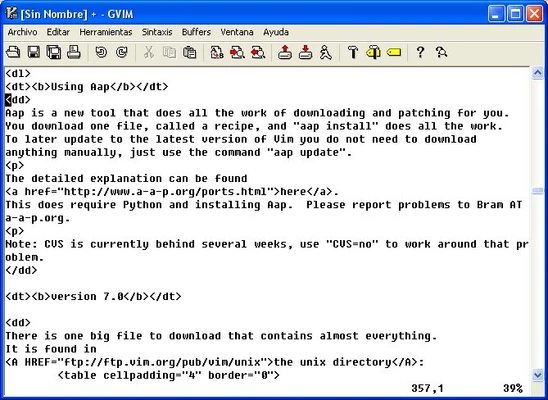
Vim primarily runs in a terminal-based interface, emphasizing efficiency over visual design.

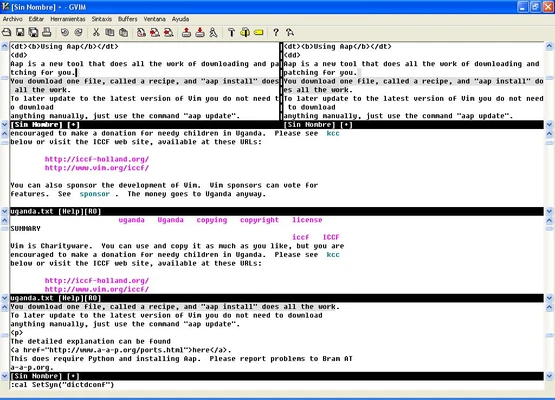
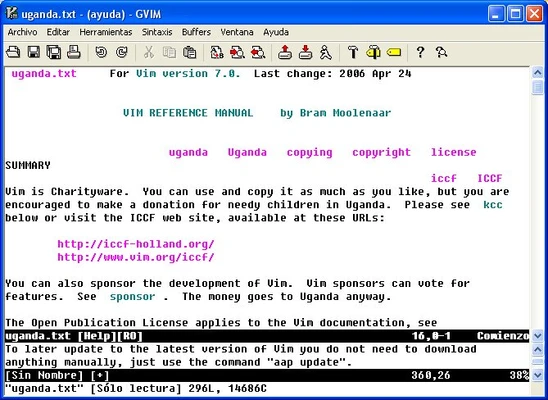
For users who prefer a GUI, GVim (Graphical Vim) is available with:

  • Menus
  • Toolbar buttons
  • Mouse support

Despite its minimal interface, Vim is widely respected for its productivity potential once mastered.


Installation & Setup (Windows)

  • Download Vim for Windows from the official site or a trusted distribution
  • Run the installer and follow setup instructions
  • Optionally add Vim to system PATH for command-line access
  • Install GVim for a graphical interface version
  • Configure settings via the .vimrc file in your user directory
  • Extend functionality using plugin managers like Vim-Plug

Best For

  • Programmers and software developers
  • System administrators
  • Power users who prefer keyboard workflows
  • Users working on remote servers via SSH

Pros

  • Extremely fast and lightweight
  • Highly efficient keyboard workflow
  • Powerful customization and automation
  • Available on virtually all platforms
  • Excellent for coding and text processing

Cons

  • Steep learning curve for beginners
  • No modern GUI by default
  • Requires memorizing commands
  • Not beginner-friendly out of the box

Conclusion

Vim for Windows is a powerful, efficiency-focused text editor built for users who value speed and control over visual simplicity. While it takes time to learn, it becomes one of the most productive editing environments available once mastered.

Information about Vim 9.2.0670

License Freeware
Op. System Windows
Category Development
Language English
Author Bram Moolenar
permission icon Permissions Not applicable
Date 2026-06-18
Size 19.1 MB
File type Official Website

Apps recommended for you

WYSIWYG Web Builder icon
Easy to use web page builder with built-in FTP client
UltraEdit icon
Everything a programmer expects from an editor
Mono icon
Mono for Windows is an open-source framework that enables developers to run .NET applications on Windows with cross-platform compatibility.
BYOND icon
Develop your own games and play games from others
NTLite icon
NTLite is a powerful Windows customization tool that allows users to customize, streamline, and automate the installation of Windows operating systems.
RubyInstaller icon
RubyInstaller is an easy-to-use installer for Ruby, providing a ready-to-run Ruby environment for Windows with all necessary dependencies.
Navicat Premium icon
A robust, all-in-one solution for database development
RunJS icon
RunJS for Windows is a JavaScript playground that allows users to quickly run and test JavaScript code in a fast, interactive environment.
Secure Eraser 7.103 icon
Secure data deletion, shredders your files & folders
JProfiler 16.1.1 icon
The award-winning all-in-one Java profiler for Windows PC
Node.js 26.3.1 icon
Is a JavaScript runtime built on Chrome`s V8 JavaScript engine
Godot Engine 4.7 (64-bit) icon
Free and open source 2D and 3D game engine for Windows PC
dotConnect for MySQL Professional 10.1.123 icon
Development framework with a number of innovative technologies
SoftEther VPN Gate Client Plugin 2026.06.18 build 9807 icon
Create a high-performance Virtual Private Network and hide your IP address!
Pinegrow Web Editor 9.3 icon
Build your own websites faster using drag and drop!
App Builder icon
Create HTML5 applications in the simplest way possible
htmlval Documentation icon
htmlval Documentation for Windows is a tool that helps validate and check HTML documents for errors, ensuring proper coding standards and compatibility.
Apache Maven icon
Apache Maven for Windows is a build automation and project management tool that helps developers compile, manage, and deploy Java applications efficiently.
Navicat for Snowflake icon
Helps you to simplify your interactions with Snowflake.
Wukong: Black Mythos - Avici Tribulation icon
Become the architect of the new Apotheosis War
Mobile Robot Programming Toolkit icon
Mobile Robot Programming Toolkit for Windows is a software library that helps developers design, simulate, and control mobile robots efficiently.
Microsoft Visual C++ Redistributable icon
Run games and applications smoothly with Microsoft Visual C++ Redistributable for Windows, the essential runtime package required by software built with Visual C++.
Flutter icon
Google Flutter – UI toolkit for building beautiful, natively compiled, cross-platform applications.
Cppcheck Portable icon
Cppcheck Portable for Windows is a lightweight, static code analysis tool that helps developers find bugs and improve the quality of C/C++ code.