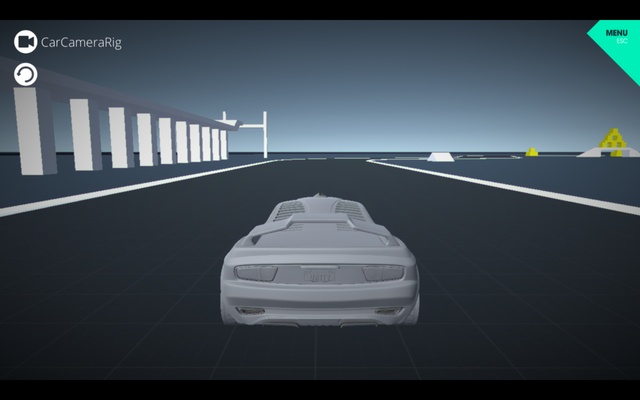
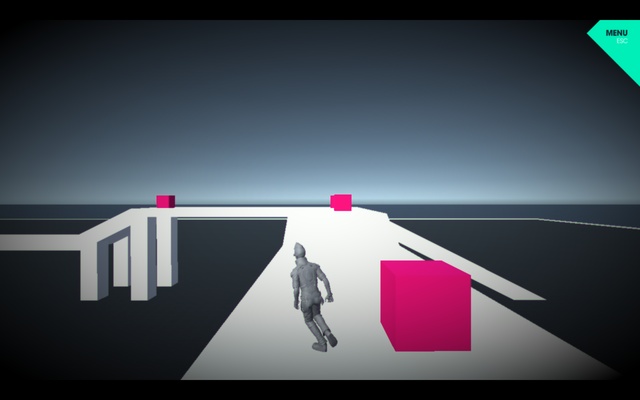
Unity is a powerful game development platform for creating interactive 2D and 3D games and applications. It provides a complete development environment with tools for graphics, animation, physics, audio, user interfaces, scripting, and real-time rendering.
Unity supports development for multiple platforms, making it suitable for indie developers, hobbyists, students, and professional game development teams.
What's New
Recent Unity releases include improvements to rendering performance, multiplayer development, platform support, graphics, animation, productivity, and workflow tools.
Key Features
2D and 3D Development: Create games and interactive experiences using dedicated tools for both 2D and 3D projects.
Real-Time Rendering: Build detailed game environments with real-time lighting, physically based rendering, and modern graphics features.
Animation Tools: Create character animations, cinematic sequences, particle effects, and other animated content.
Physics: Use built-in physics systems to create realistic interactions, collisions, movement, and environmental effects.
Visual Scripting: Build gameplay logic and interactive systems using visual scripting tools without writing every part of the project in code.
UI System: Design menus, HUDs, interfaces, and other in-game user interface elements.
Navigation and AI: Create navigation systems and intelligent NPC movement using navigation meshes and related tools.
Timeline and Cinematic Tools: Create cutscenes, gameplay sequences, and cinematic content directly within the Editor.
Asset Store: Access a large collection of assets, tools, packages, templates, and other resources for game development.
Multiplatform Publishing: Build projects for supported desktop, mobile, web, console, VR, AR, and other platforms.
Customizable Editor: Extend the Unity Editor with packages, scripts, plugins, and custom development tools.
Unity Hub
Unity Hub is the central application for managing Unity installations and projects. It allows users to install different versions of the Unity Editor, create projects, manage existing projects, and access learning resources.
Using Unity Hub is the recommended way to manage multiple Unity Editor versions on the same computer.
User Interface
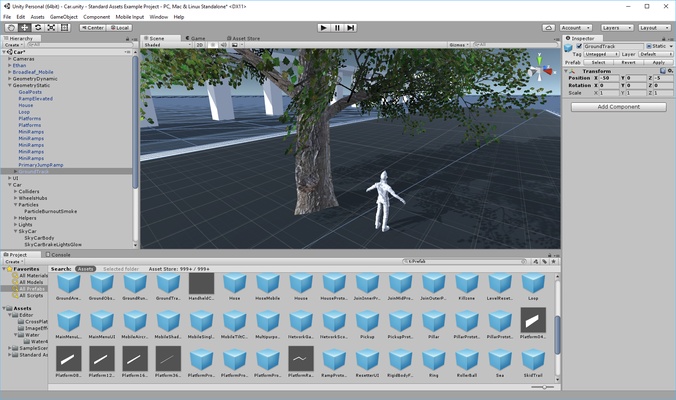
Unity provides a highly customizable development environment with panels for the Scene, Game view, Hierarchy, Inspector, Project files, Console, and other development tools.
The interface is designed to provide quick access to commonly used development functions while allowing users to rearrange panels and customize their workspace.
The large number of available tools can make Unity seem complicated to beginners, but its editor-based workflow provides extensive control for more experienced developers.
Installation and Setup
- Download and install Unity Hub.
- Launch Unity Hub after installation.
- Sign in with a Unity account.
- Install the Unity Editor version you want to use.
- Select additional modules for your target platforms if needed.
- Create a new 2D or 3D project.
- Select a project location and complete the setup.
- Open the project in the Unity Editor.
How to Use
- Launch Unity Hub and create a new project.
- Choose a 2D or 3D project template.
- Create and organize scenes using the Unity Editor.
- Import assets, models, textures, audio, and other resources.
- Use the Inspector and other editor tools to configure objects.
- Add scripts or visual scripting to implement game logic.
- Configure physics, lighting, animation, and user interfaces.
- Test the project using the Game view.
- Build and export the project for the desired platform.
FAQ
What is Unity used for?
Unity is primarily used to create 2D and 3D games, interactive applications, simulations, and other real-time experiences.
Is Unity free?
Unity offers a free Personal plan for eligible individual creators and small teams. Professional and enterprise users may require paid plans depending on their revenue, funding, and usage.
What is Unity Hub?
Unity Hub is a management application used to install Unity Editor versions, create and manage projects, and access Unity-related resources.
Can Unity create both 2D and 3D games?
Yes. Unity provides dedicated tools and workflows for both 2D and 3D game development.
What platforms can Unity target?
Unity supports a wide range of platforms, including Windows, macOS, Linux, mobile devices, web, consoles, and supported XR platforms. Available build targets depend on the Unity version and installed modules.
Is Unity suitable for beginners?
Yes. Unity provides templates, tutorials, documentation, learning resources, and a visual development environment. However, its extensive feature set can result in a relatively steep learning curve.
Alternatives
Unreal Engine: A powerful game engine known for high-end real-time graphics and advanced 3D development tools.
Godot Engine: A free and open-source game engine supporting both 2D and 3D development.
CryEngine: A real-time game development engine with advanced graphics and rendering capabilities.
GameMaker: A game development platform focused primarily on accessible 2D game creation.
Cocos Creator: A development environment designed for creating 2D and 3D interactive applications and games.
Construct: A beginner-friendly game development platform with a visual, event-based workflow.
RPG Maker: A specialized game development tool designed primarily for creating role-playing games.
Pricing
Unity offers several licensing options. Unity Personal is available free of charge for eligible individual creators and smaller organizations that meet Unity's current eligibility requirements.
Paid plans such as Unity Pro and Enterprise provide additional features and services for professional and larger organizations. Pricing and eligibility requirements can change, so users should check the current licensing terms before choosing a plan.
System Requirements
- Windows 10 or Windows 11, 64-bit
- x64 processor with SSE2 instruction support
- 8 GB of RAM recommended
- DirectX 10, 11, or 12 capable GPU
- Modern graphics drivers
- Sufficient storage for Unity Editor, projects, assets, and build files
- Internet connection for Unity Hub, account authentication, downloads, and updates
Pros
- Powerful 2D and 3D development tools
- Real-time rendering capabilities
- Extensive Asset Store
- Supports many platforms
- Large developer community
- Comprehensive animation and physics systems
- Unity Hub simplifies project and Editor management
- Suitable for both beginners and professional developers
Cons
- Steep learning curve for beginners
- Large projects can require powerful hardware
- Editor and project files can consume significant storage
- Advanced features may require paid plans
- Managing different Unity versions and packages can sometimes be complicated
Conclusion
Unity is a comprehensive game development platform that provides everything needed to create 2D and 3D games and interactive applications. Its combination of real-time rendering, animation, physics, scripting, UI tools, asset management, and multiplatform publishing makes it suitable for a wide range of development projects.
While Unity can take time to learn because of its extensive feature set, its flexible workflow, large ecosystem, and broad platform support make it a strong choice for both independent developers and professional game development teams.