

Adobe DNG Converter is a free utility developed by Adobe that allows photographers to convert RAW image files from more than 600 camera models into Adobe Digital Negative (DNG) format.
DNG is an open RAW image standard designed to solve compatibility issues caused by different camera manufacturers using proprietary RAW formats.
By converting camera-specific RAW files into DNG, users can preserve original image data, improve long-term compatibility, and easily manage photos across different editing applications such as Adobe Photoshop, Lightroom, and Bridge.
Key Features
Convert RAW Files to DNG
- Converts RAW files from hundreds of digital cameras.
- Supports more than 600 camera models.
- Creates standardized DNG files for easier storage and editing.
Preserve Original Image Data
- Maintains RAW image quality.
- Keeps metadata, color profiles, and camera information.
- Provides maximum flexibility during photo editing.
Universal Compatibility
DNG files are supported by many professional applications, including:
- Adobe Photoshop
- Adobe Lightroom
- Adobe Bridge
- Other RAW editing software
Batch Conversion
- Convert multiple RAW images at once.
- Simplifies large photo library management.
- Saves time for professional photographers.
Long-Term Photo Archiving
- Uses an open standard format.
- Helps protect photos from future RAW format compatibility issues.
- Provides easier long-term access to archived images.
Supported Camera Brands
Adobe DNG Converter supports RAW files from many manufacturers, including:
- Canon
- Nikon
- Sony
- Fujifilm
- Leica
- Panasonic
- Pentax
- Samsung
- Ricoh
- Hasselblad
- DJI
- Other digital camera brands
User Interface
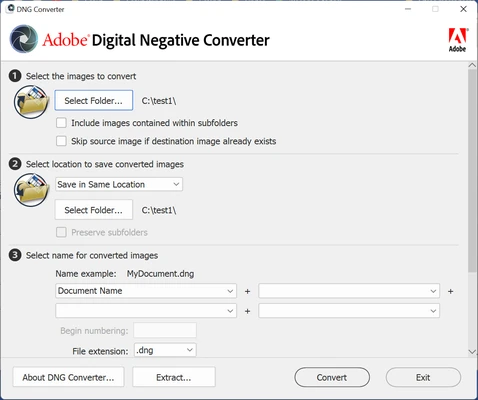
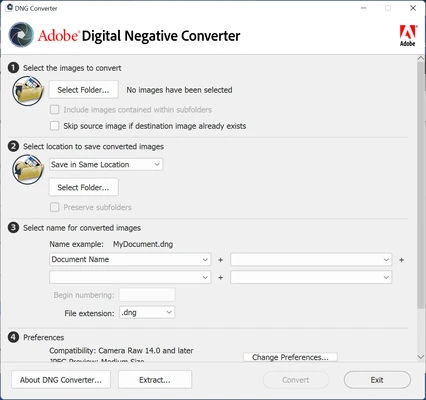
Adobe DNG Converter features a simple and lightweight interface designed specifically for RAW conversion.
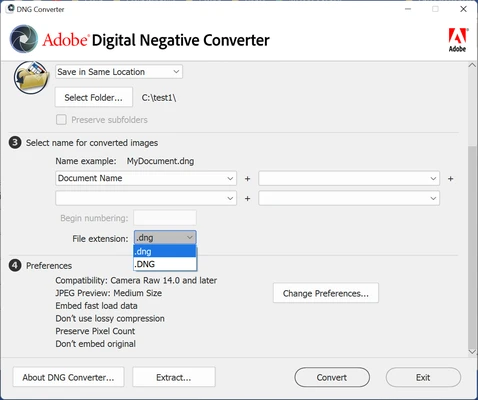
Users only need to select the source folder, choose the destination location, configure conversion options, and start the conversion process.
Installation and Setup
- Download Adobe DNG Converter for Windows or macOS.
- Install the application.
- Launch the converter.
- Select the folder containing RAW images.
- Choose an output folder for converted DNG files.
How to Use Adobe DNG Converter
- Open Adobe DNG Converter.
- Select the RAW image folder.
- Choose the destination folder.
- Adjust compatibility settings if needed.
- Click Convert.
- The software will create DNG copies of your RAW files.
System Requirements
- OS: Windows 10/11 or supported macOS versions
- Processor: Intel or AMD 64-bit processor
- RAM: 2GB minimum (8GB recommended)
- Storage: 1GB free disk space recommended
- Display: 1024×768 resolution or higher
PROS
- Completely free
- Supports hundreds of camera models
- Preserves RAW image quality
- Simple conversion workflow
- Supports batch processing
- Excellent Adobe software compatibility
CONS
- Only provides RAW conversion features
- No advanced photo editing tools
- Mainly useful for photographers working with RAW files
Conclusion
Adobe DNG Converter is a reliable and free RAW conversion tool for photographers who want a universal format for storing and editing camera RAW files.
With broad camera support, lossless conversion, and seamless compatibility with Adobe applications, it is an essential utility for photographers managing large RAW photo collections.