Go to Windows platform Display platforms icon
Go to Windows platform Go to Mac platform Go to Android platform
Mouse without Borders icon

Mouse without Borders

2.2.1.0327
Microsoft Corporation
5
1.33 MB size

Control multiple computers from your PC

Mouse without Borders is a Windows program that allows you to control up to four computers with a single mouse and keyboard set. As a result, you won't need dedicated peripherals for each device, allowing you to simplify your desk arrangements.

How to install and use Mouse without Borders

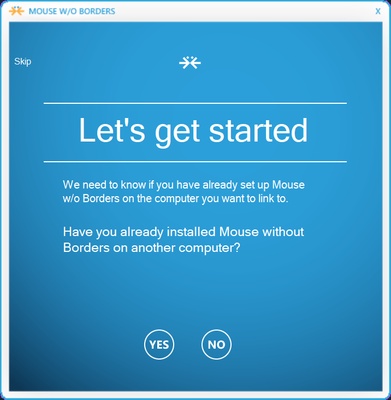
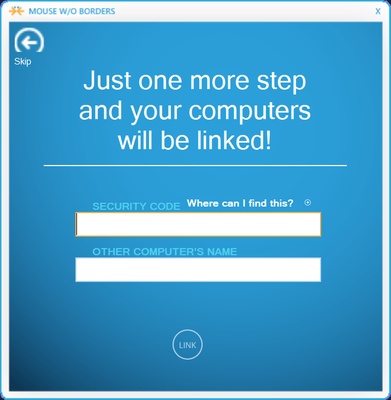
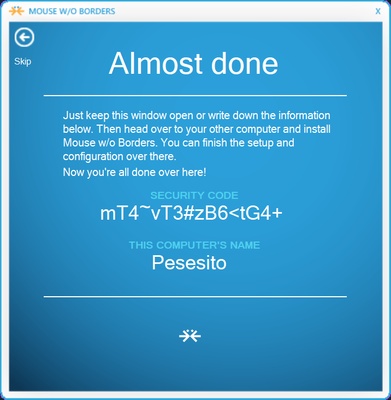
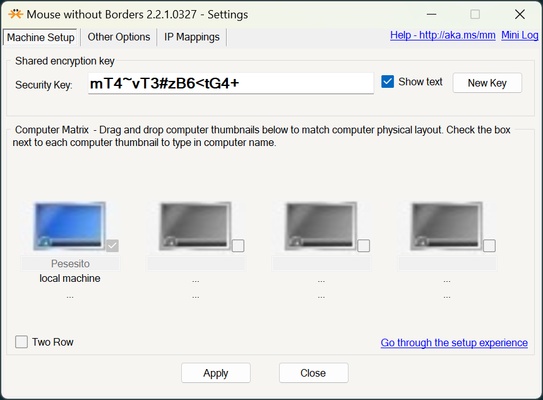
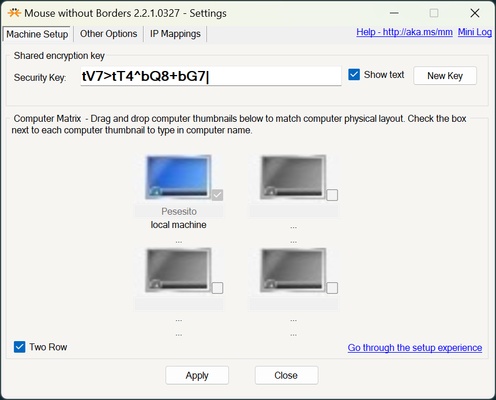
When you open Mouse without Borders for the first time, you will see a configuration window. You can skip this if it is the first computer you are setting up, or you can find the security code of your device to enter it on the one you want to use to control other devices. After the initial configuration, you can activate or deactivate the devices you want to control. You can organize the layout of your devices to look like how you have them set out in real life.

Fast switching between devices

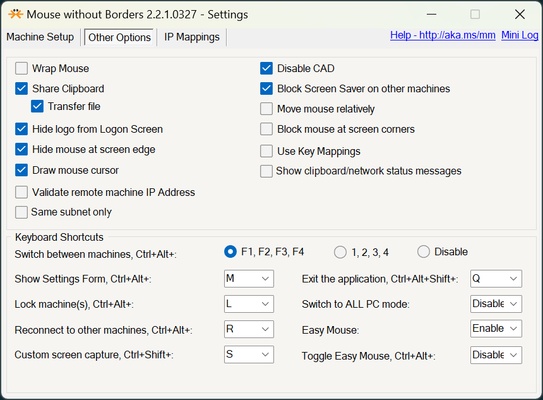
You can switch between devices from the program itself, or make use of commands. The commands can be Ctrl + Alt combined with keys 1, 2, 3 and 4, or Ctrl + Alt combined with F1, F2, F3 and F4. You can also configure Ctrl + Alt shortcuts to display the settings, lock devices, reconnect to other computers, take screenshots, exit the app, and much more.

Other options

Mouse without Borders also allows you to have a global clipboard to easily copy and paste content between different devices. You can also stop the screensaver from being activated, hide the mouse in the corners, and much more.

Connect to other computers with a code or by IP address

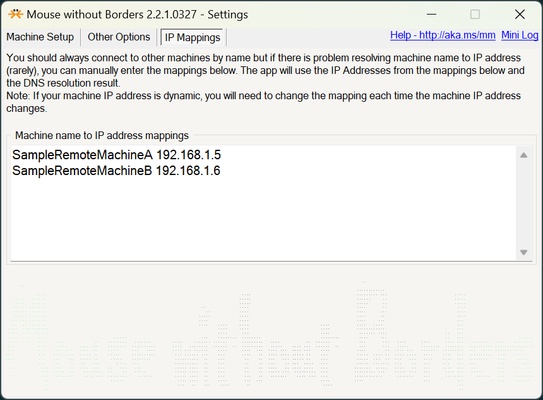
Mouse without Borders allows you to connect via password or by device name. If you choose device name, this option may not always work. For this purpose, Mouse without Borders has a section where you can assign a name to each IP. It is important to note that IP addresses can change, so you may need to check them if there is a network reboot or the DHCP is not configured correctly.

Download Mouse without Borders on Windows and control multiple computers with the same keyboard and mouse.

Information about Mouse without Borders

License Free
Op. System Windows
Category Photo & Design
Language English
Author Microsoft Corporation
permission icon Permissions Not applicable
Date 2026-06-02
Size 1.33 MB
File type MSI

Apps recommended for you

Meitu icon
Powerful photo editor for Windows
Draw.io Desktop icon
Draw.io Desktop for Windows is a powerful diagramming tool for creating flowcharts, network diagrams, and other visuals offline.
Xender - Share Music Transfer icon
Send files between devices and download content
Internxt Drive icon
Internxt
PicPick Portable icon
Everything you need to capture and create images
Honeycam icon
Honeycam for Windows is a user-friendly GIF maker that allows users to create, edit, and enhance animated GIFs with simple tools and features.
Adobe Substance 3D Painter icon
Adobe Substance 3D Painter for Windows is a 3D texturing software that allows users to paint, texture, and create realistic materials for 3D models.
Portable FotoSketcher icon
Turn your photos into paintings easily
TexturePacker 8.0.2 icon
The best sprite sheet generation desktop tool on the market!
Gyazo 6.0.1 icon
Capture screenshots, gifs, and replay videos that are ready to share instantly!
FotoSketcher 4.30 icon
Create beautiful works of art from your digital photos, for Free!
Framer icon
Design and build modern responsive websites easily with Framer for Windows, the powerful no-code web design and prototyping tool for creators and teams.
Honeycam icon
Honeycam for Windows is a user-friendly GIF maker that allows users to create, edit, and enhance animated GIFs with simple tools and features.
PDF-XChange Editor icon
View, edit, and annotate PDF files easily with PDF-XChange Editor for Windows, the feature-rich PDF software for productivity and document management.
FireAlpaca icon
Create digital artwork easily with FireAlpaca for Windows, the lightweight and user-friendly painting software for artists and illustrators.
digiKam icon
Organize, manage, and edit your photo collection with digiKam for Windows, the powerful open-source photo management and image editing software.
ReaConverter Pro icon
ReaConverterPro for Windows is a professional image conversion software that offers advanced features for batch processing, editing, and converting images across multiple formats.
Pinta icon
Free, comprehensive image editor
ibis Paint icon
Unleash your imagination in this drawing app
LibreCAD icon
LibreCAD for Windows is an open-source 2D CAD application that allows users to create technical drawings and architectural designs with ease.
FreeVimager icon
Free image viewer and editor
Fotor icon
A comprehensive photo editor
Sparkbooth icon
A photo booth right on your PC
ImageCompression.SB icon
The program for batch compression of images