

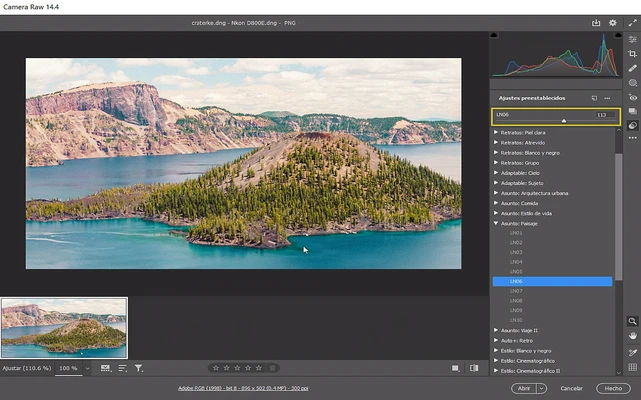
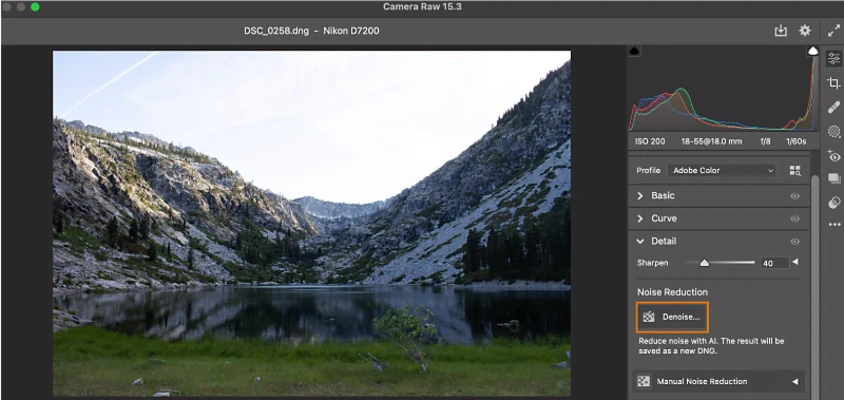
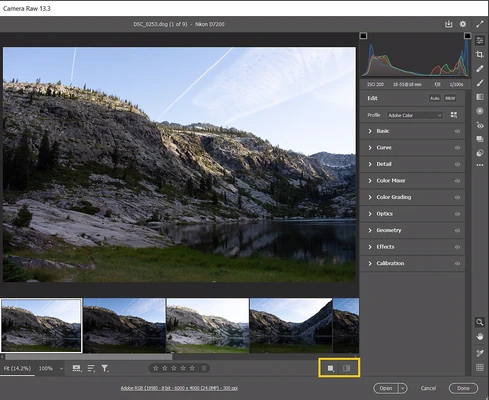
Adobe Camera Raw (ACR) is a professional-grade image processing utility that allows users to import, edit, and enhance raw data captured by digital cameras. Originally released in 2003, this powerful plugin bridges the gap between raw camera sensors and Adobe's flagship creative suites, enabling photographers and graphic designers to maximize image quality, detail, and tonal range.
The program functions natively within supported Adobe applications, utilizing advanced raw processing algorithms to handle complex color grading, exposure correction, and lens adjustments before exporting to standard formats.
Overview & Key Features
-
Advanced Raw Processing: Manipulate original digital sensor data from a vast range of proprietary raw file formats for maximum image fidelity.
-
Non-Destructive Workflow: Preserves original source files. All modifications and adjustments are saved as metadata and can be reverted at any time.
-
Precision Image Tuning: Dedicated sliders for precise control over White Balance, Exposure, Contrast, Highlights, Shadows, and Clarity.
-
Color Grading Engine: Comprehensive HSL (Hue, Saturation, Luminance) adjustment panels for granular control over individual color channels.
-
Lens & Noise Correction: Automatically eliminates geometric lens distortions, chromatic aberrations, and vignetting, while reducing high-ISO digital noise.
-
Batch Operations & Presets: Streamline workflows by applying identical presets, filters, and adjustments to multiple raw images simultaneously.
-
Tethered Shooting Support: Enables direct camera-to-computer connectivity for real-time monitoring and capture control.
How to Use Adobe Camera Raw
-
Launch Adobe Photoshop, Bridge, or Lightroom.
-
Import or open a supported camera raw file format (.CR2, .NEF, .ARW, etc.).
-
The ACR interface will automatically launch. (In Photoshop, it can also be accessed via Filter > Camera Raw Filter).
-
Utilize the right-hand adjustment panels and sliders to fine-tune the image.
-
Click OK or Done to save the metadata changes or open the file in the host application.
Supported Host Applications
Adobe Camera Raw is built upon the same core processing technology that powers Adobe Lightroom. It requires at least one of the following host applications installed to function:
-
Adobe Photoshop
-
Adobe Bridge
-
Adobe After Effects
-
Adobe Photoshop Elements
Pros and Cons
Pros
-
Professional-grade raw image processing and file handling.
-
Fully non-destructive editing workflow preserves original data.
-
Seamless native integration with Adobe Creative Cloud ecosystem.
-
Powerful AI-assisted noise reduction and lens correction profiles.
-
Supports high-volume batch processing and custom presets.
Cons
-
Requires an active Adobe Creative Cloud subscription.
-
Steeper learning curve for amateur or beginner photographers.
-
Has no standalone user interface (cannot run without a host application).
Technical Details & System Requirements
-
Title: Adobe Camera Raw
-
Category: Multimedia / Photo Plugins / Image Editors
-
Developer: Adobe Inc.
-
License: Free Update (Requires Host Application)
-
OS Support: Windows 10 / Windows 11 (64-bit), macOS
-
Supported Brands: Apple, Canon, Fujifilm, Google, GoPro, Hasselblad, Leica, Nikon, Olympus, Panasonic, Sony, Xiaomi, Zeiss, and more.
Top Alternatives
If you are looking for standalone raw processors or budget-friendly alternatives to Adobe Camera Raw, consider the following software:
-
Capture One: Industry-standard raw processing known for superior color reproduction and tethering capabilities.
-
Luminar Neo: An AI-driven photo editor offering advanced automated enhancement tools as a standalone app or plugin.
-
DxO PhotoLab: Renowned for its cutting-edge optical corrections and deep-learning noise reduction technology.
-
ON1 Photo RAW: A robust, all-in-one photo organizer and raw editing suite with no subscription mandatory.
-
Darktable: A free, open-source raw developer providing professional tools for users on a budget.