
Go to Windows platform Display platforms icon
Go to Windows platform Go to Mac platform Go to Android platform
SimilarImagesFinder icon

SimilarImagesFinder

1.020
KurtZimmermann
0
1.48 MB size

Find and delete duplicate or similar photos

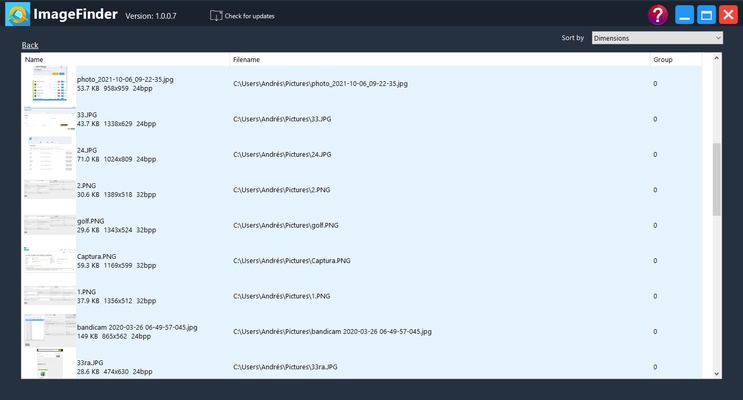
SimilarImagesFinder is a program that will allow you to quickly find any duplicate photos in a folder or on your entire hard drive. Taking many very similar photos to try to get the best possible one is very common, but doing so leaves you, of course, with a lot of pictures that you don't really want, and which you never delete. But thanks to this simple software, you can do just that.

Choose the folder or folders you want to search

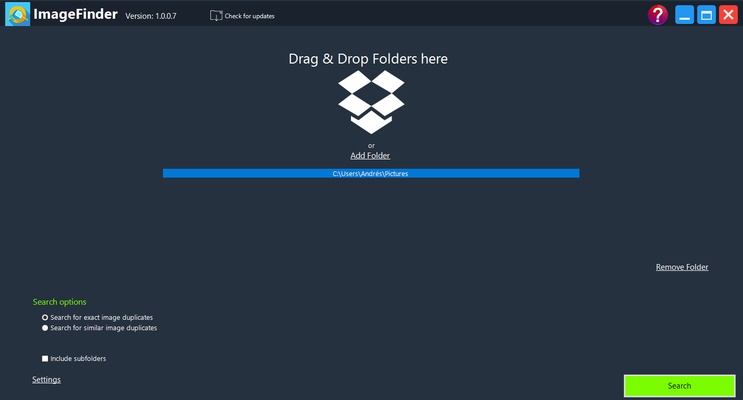
The first step in SimilarImagesFinder is to choose which folder you want to scan. By default, the program will scan the Pictures folder on your hard drive. However, you can add additional folders or even choose to scan the entire hard drive. Scanning the entire drive, however, can be a very long process that takes several minutes, so it is only recommended if you have lots of images spread across your computer.

Duplicate or near-identical images; the choice is yours

One of the most important decisions you have to make before you start searching is whether you want to find only duplicate images, or whether you also want to find images that look very similar. By default, you can have SimilarImagesFinder show you all the images with 90% or more similarity. But you can increase or decrease this percentage if you wish. The more you increase it, the more similar the photos will be to each other.

Delete or keep your photos

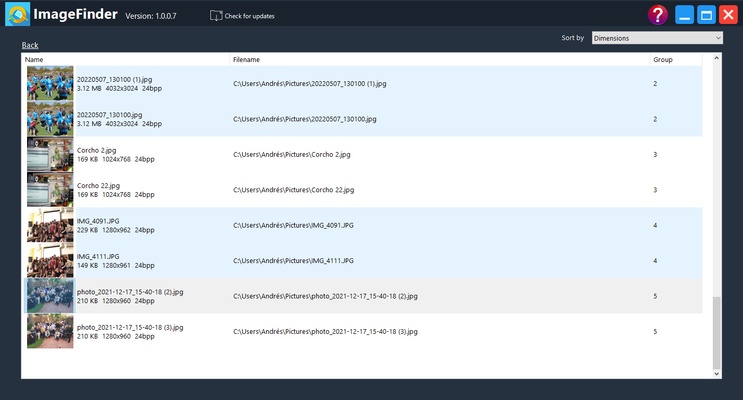
Once SimilarImagesFinder has finished scanning all the directories you've selected, you can choose what you want to do with the images it finds. Simply right-click on any group of images to see all the options. It is best to use the Open in Folder option, so that you can see all the similar photos in detail and keep the one you like best, deleting the rest. This way you can save space and keep your image folder clearer.

A simple way to delete duplicate photos

Download SimilarImagesFinder if you want to get rid of any duplicate or very similar photos, an occurrence that is very common nowadays. Thanks to this app, you can do so very quickly and very easily. In less than 10 minutes, you can find all the duplicate pictures on your computer and, with just a couple of clicks, delete them forever.

Information about SimilarImagesFinder

License Free
Op. System Windows
Category Photo & Design
Language English 47 more
Author KurtZimmermann
permission icon Permissions Not applicable
Date 2026-06-02
Size 1.48 MB
File type EXE

Apps recommended for you

GMIC icon
GMIC for Windows is a versatile image processing tool that offers a wide range of filters and effects for editing and enhancing photos.
Topaz Photo AI icon
Improve your photos with artificial intelligence
LrToolbox icon
Improved photo editing
jAlbum 39.6 icon
Create amazing web photo and video galleries with jAlbum!
PhotoPad Image Editor icon
Retouch your photos and apply effects on them
Blender icon
A great 3D modeling and animation tool
Concepts icon
Concepts for Windows is a flexible sketching and design app that lets users create drawings, diagrams, and illustrations with precision and ease.
Pano2VR icon
Create and publish interactive 360° panoramas and virtual tours with Pano2VR for Windows, the professional panoramic imaging software.
TexturePacker 8.0.2 icon
The best sprite sheet generation desktop tool on the market!
Gyazo 6.0.1 icon
Capture screenshots, gifs, and replay videos that are ready to share instantly!
FotoSketcher 4.30 icon
Create beautiful works of art from your digital photos, for Free!
Framer icon
Design and build modern responsive websites easily with Framer for Windows, the powerful no-code web design and prototyping tool for creators and teams.
Honeycam icon
Honeycam for Windows is a user-friendly GIF maker that allows users to create, edit, and enhance animated GIFs with simple tools and features.
PDF-XChange Editor icon
View, edit, and annotate PDF files easily with PDF-XChange Editor for Windows, the feature-rich PDF software for productivity and document management.
FireAlpaca icon
Create digital artwork easily with FireAlpaca for Windows, the lightweight and user-friendly painting software for artists and illustrators.
digiKam icon
Organize, manage, and edit your photo collection with digiKam for Windows, the powerful open-source photo management and image editing software.
Adobe Creative Cloud icon
Adobe Creative Cloud for Windows is a suite of creative tools for design, video editing, photography, and web development, offering access to apps like Photoshop, Illustrator, and Premiere Pro.
JAlbum icon
Your WebAlbum in just a few clicks
Cinema 4D icon
Animate, model, simulate and render in 3D
RouterX - Login Router Page 192.168.1.1 icon
Easily access and manage your router settings at 192.168.1.1 Page.
Framer icon
Design and build modern responsive websites easily with Framer for Windows, the powerful no-code web design and prototyping tool for creators and teams.
Topaz Gigapixel AI icon
Increase the resolution of your photos with AI
HEIF Image Extensions icon
Official extension for opening files in HEIF format in Windows
Ashampoo Photo Optimizer Pro 26.0.4 icon
Handy, easy-to-use PC software to browse and optimize your photos