
Go to Windows platform Display platforms icon
Go to Windows platform Go to Mac platform Go to Android platform
Pandoc icon

Pandoc

3.6.4
John MacFarlane
0
37.26 MB size

Convert files from one format to another via command line

Pandoc is a Haskell library that allows you to convert files from one format to another via command line. The program is designed in a modular fashion with a set of readers that parse the source text to produce a native representation of the document. In doing so, the original text is converted to the target format.

However, it should be noted that, although an attempt is made to maintain the structure of the elements found in a document, certain aspects of it, such as formatting or margins, may change. The same applies to large and complex tables.

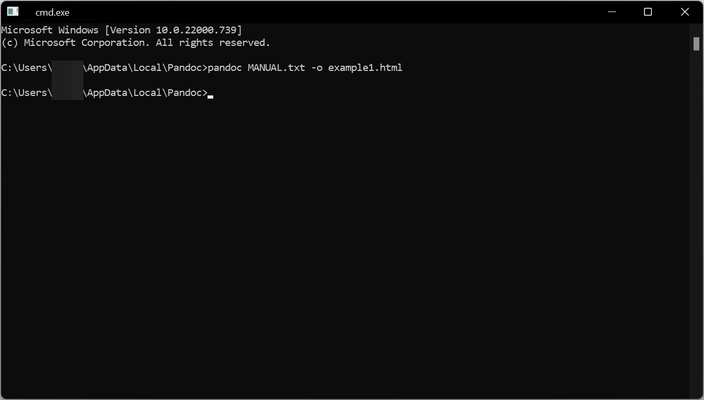
To take advantage of Pandoc, it's necessary to use the command line. For example, if you want to convert a .txt file to .html, the command you should enter is "pandoc MANUAL.txt -o example1.html" without the quotation marks.

The list of formats from which you can convert is as follows:

bibtex, biblatex, commonmark, commonmark_x, creole, csljson, csv, docbook, docx, dokuwiki, endnotexml, epub, fb2, gfm, haddock, html, ipynb, jats, jira, json, latex, markdown, markdown_mmd, markdown_phpextra, markdown_strict, mediawiki, man, muse, native, odt, opml, org, ris, rtf, rst, t2t, textile, tikiwiki, twiki, and vimwiki.

The list of formats to which you can convert is as follows:

asciidoc, beamer, bibtex, biblatex, commonmark, commonmark_x, context, csljson, docbook, docbook4, docbook5, docx, dokuwiki, epub, epub2, epub3, fb2, gfm, haddock, html, html5, html4, icml, ipynb, jats_archiving, jats_articleauthoring, jats_publishing, jats, jira, json, json, latex, man, markdown, markdown_mmd, markdown_phpextra, markdown_strict, markua, mediawiki, ms, muse, native, odt, opml, opendocument, org, pdf, plain, pptx, rst, rtf, texinfo, textile, slideous, slidy, dzslides, revealjs, s5, tei, xwiki, and zimwiki.

Information about Pandoc

License Free
Op. System Windows
Category Photo & Design
Language English
Author John MacFarlane
permission icon Permissions Not applicable
Date 2026-06-02
Size 37.26 MB
File type MSI

Apps recommended for you

GIMP icon
Free software for image retouching and editing
FotoSketcher 4.30 icon
Create beautiful works of art from your digital photos, for Free!
Hugin icon
Create panoramic images from your photos
Pano2VR icon
Create and publish interactive 360° panoramas and virtual tours with Pano2VR for Windows, the professional panoramic imaging software.
Live Home 3D icon
Live Home 3D for Windows is a home design software that lets users create detailed 2D and 3D floor plans and interior designs easily.
XnView Portable icon
The portable edition of the image viewer and converter
VariCAD Viewer icon
VariCAD Viewer for Windows is a free tool that allows users to view and interact with 2D and 3D CAD models created in VariCAD.
Ashampoo Photo Optimizer Pro 26.0.4 icon
Handy, easy-to-use PC software to browse and optimize your photos
TexturePacker 8.0.2 icon
The best sprite sheet generation desktop tool on the market!
Gyazo 6.0.1 icon
Capture screenshots, gifs, and replay videos that are ready to share instantly!
FotoSketcher 4.30 icon
Create beautiful works of art from your digital photos, for Free!
Framer icon
Design and build modern responsive websites easily with Framer for Windows, the powerful no-code web design and prototyping tool for creators and teams.
Honeycam icon
Honeycam for Windows is a user-friendly GIF maker that allows users to create, edit, and enhance animated GIFs with simple tools and features.
PDF-XChange Editor icon
View, edit, and annotate PDF files easily with PDF-XChange Editor for Windows, the feature-rich PDF software for productivity and document management.
FireAlpaca icon
Create digital artwork easily with FireAlpaca for Windows, the lightweight and user-friendly painting software for artists and illustrators.
digiKam icon
Organize, manage, and edit your photo collection with digiKam for Windows, the powerful open-source photo management and image editing software.
HoverScribble icon
HoverScribble for Windows is a creative drawing tool that lets users create interactive sketches and drawings with a simple, intuitive interface.
FreeVimager icon
Free image viewer and editor
jAlbum 39.6 icon
Create amazing web photo and video galleries with jAlbum!
Honeycam icon
Honeycam for Windows is a user-friendly GIF maker that allows users to create, edit, and enhance animated GIFs with simple tools and features.
Convertify icon
Unlock Limitless File Conversion: Your Offline, Private Powerhouse
XnConvert icon
Powerful image converter
SnagIt icon
Capture, organize and edit any image
digiKam icon
Organize, manage, and edit your photo collection with digiKam for Windows, the powerful open-source photo management and image editing software.