Go to Windows platform Display platforms icon
Go to Windows platform Go to Mac platform Go to Android platform
XnConvert icon

XnConvert

1.105.0
XnView
5
25.12 MB size

Powerful image converter

XnConvert is an image conversion tool that you can use to change your photographs from one format to another in an accessible, intuitive way.

The program supports more than 500 different formats, including popular options like JPG, PNG, TIFF, GIF, and RAW.

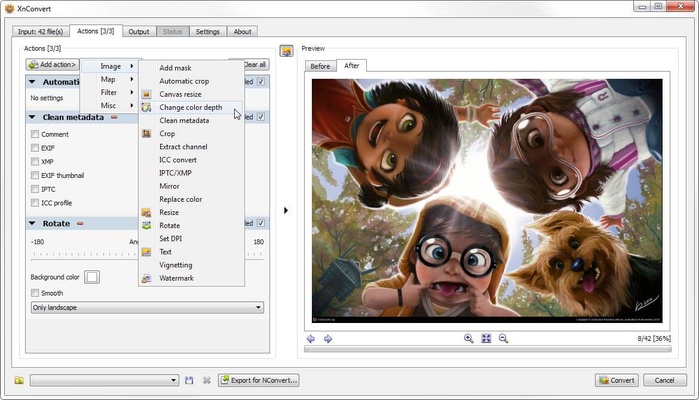
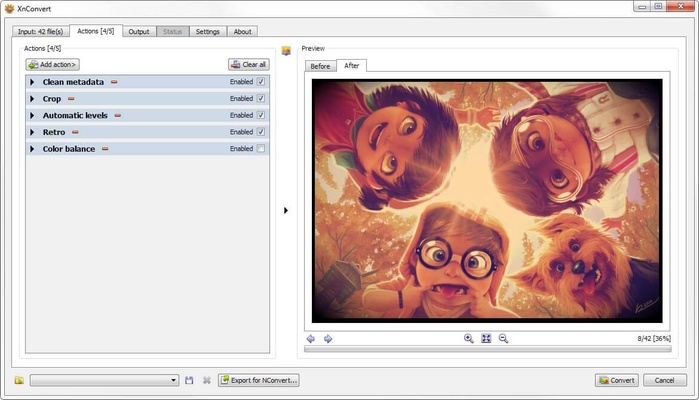
Before converting your images, you can choose to apply a series of masks to add watermarks, signatures, special effects, and more. These can be applied to individual images, or to large groups of images in batch mode.

XnConvert is a great option if you're looking for an image converter. Thanks to its accessible interface and wide range of features, you'll be able to easily switch the format of your favorite photographs.

Information about XnConvert

License Free
Op. System Windows
Category Photo & Design
Language English
Author XnView
permission icon Permissions Not applicable
Date 2026-06-02
Size 25.12 MB
File type EXE

Apps recommended for you

FireAlpaca icon
Create digital artwork easily with FireAlpaca for Windows, the lightweight and user-friendly painting software for artists and illustrators.
Pano2VR 8.0.7 icon
Create virtual tours and interactive 360 panoramas for Windows PC!
Adobe Camera Raw icon
Adobe Camera Raw for Windows is a powerful plugin for editing and enhancing raw image files directly in Adobe Photoshop.
ImageSorter icon
View pictures in a 3D sphere
Rebelle icon
Hyperrealistic drawing software
Blender Portable icon
Efficient 3D modeling program, now in a portable version
Picsart - AI Photo & Video Editor 12.1.7 icon
Make awesome photos or images and share with friends!
XnConvert 1.116.0 (64-bit) icon
Powerful batch image editor for PC with dozens of actions and filters
Figma 126.11.8 icon
Limitless design, collaboration, and creation
GIMP 3.2.8.0 icon
Free software for image retouching and editing
Greenshot 1.3.323 icon
A simple and effective way to take screenshots
Affinity 3.3.1.4940 icon
Covers all your design and photo editing needs
Loom 0.379.4 icon
Record your screen quickly and easily
Rocrail 7445 icon
Design your own model railroad tracks for model railroading
PhotoStage Pro Edition 13.04 icon
Create videos using your pictures with this complete picture editor
Zello 18.10.0 icon
Use your computer as a walkie-talkie
HardCopy icon
Take screenshots and edit them
Blender 5.2.2 (64-bit) icon
Create 3D animations, graphics, and even games with intuitive controls
Pano2VR 8.0.7 icon
Create virtual tours and interactive 360 panoramas for Windows PC!
KLayout 0.30.11 (64-bit) icon
High Performance Layout Viewer and Editor for your Windows system
Greenshot 1.3.323 icon
A simple and effective way to take screenshots
Affinity 3.3.1.4940 icon
Covers all your design and photo editing needs
Diffractor icon
Zac Walker
Topaz Photo AI icon
Improve your photos with artificial intelligence