Go to Windows platform Display platforms icon
Go to Windows platform Go to Mac platform Go to Android platform
WinScan2PDF icon

WinScan2PDF

9.31
Hrg Nenad
3.3
193.4 KB size

Save all your scans as PDFs

WinScan2PDF is a simple app whose main function is to scan documents and then save them directly to your hard drive as a PDF file. This program does not require installation and the way it works is as easy as running it and hitting scan.

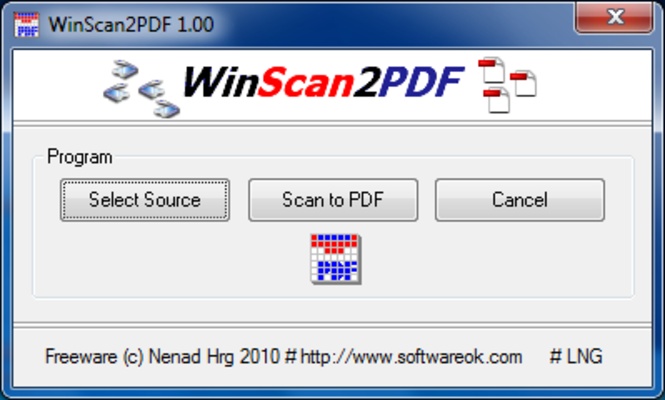
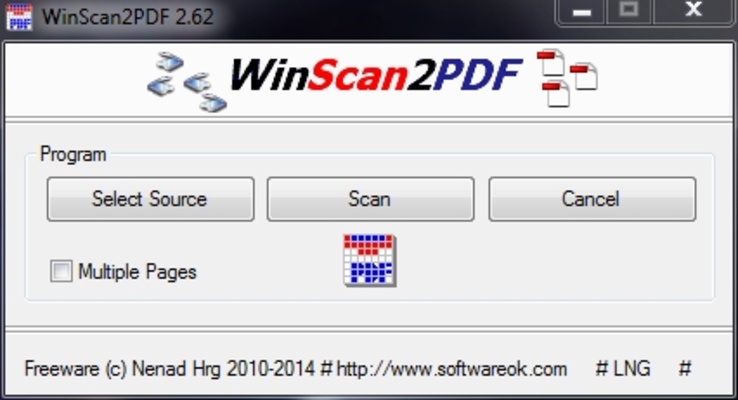
The program works like a PDF printer controller and is really easy to use, as it only has three options on its interface: select source, scan, and save to PDF.

Each button activates a function, all you have to do is select the scanner's device, which will automatically detect and digitalize all the documents you need in an easy, fast, and convenient way.

With WinScan2PDF you won’t need virtual printers. Plus, you can select the 'multiple pages' function when your documents are longer than a page. Thanks to this tool, sending physical documents through email will never be a hassle ever again.

Information about WinScan2PDF

License Free
Op. System Windows
Category Photo & Design
Language English 1 more
Author Hrg Nenad
permission icon Permissions Not applicable
Date 2026-06-02
Size 193.4 KB
File type ZIP

Apps recommended for you

Blender Portable 5.2.0 icon
Create 3D animations, graphics, and even games with intuitive controls
Rebelle icon
Hyperrealistic drawing software
Canva 1.126.0 icon
Canva makes design simple for everyone. Create designs for Web or print!
Canva icon
Create incredible posts for social networks
Snipping Tool icon
Take screenshots with ease on Windows
Ray icon
Ray
Ray for Windows is a modern web browser that focuses on speed, security, and a clean, user-friendly interface.
KLayout 0.30.11 (64-bit) icon
High Performance Layout Viewer and Editor for your Windows system
BandiView icon
Bandisoft International Inc.
Figma 126.11.8 icon
Limitless design, collaboration, and creation
GIMP 3.2.8.0 icon
Free software for image retouching and editing
Greenshot 1.3.323 icon
A simple and effective way to take screenshots
Affinity 3.3.1.4940 icon
Covers all your design and photo editing needs
Loom 0.379.4 icon
Record your screen quickly and easily
Rocrail 7445 icon
Design your own model railroad tracks for model railroading
PhotoStage Pro Edition 13.04 icon
Create videos using your pictures with this complete picture editor
Zello 18.10.0 icon
Use your computer as a walkie-talkie
Adobe Camera Raw 18.4 icon
Software provides fast and easy access to the raw image formats
Draw.io Desktop icon
Draw.io Desktop for Windows is a powerful diagramming tool for creating flowcharts, network diagrams, and other visuals offline.
Capture One icon
Capture One for Windows is a professional photo editing software that offers advanced color grading, tethered shooting, and image management tools.
Caesium icon
Compress your photos without losing quality
Topaz Photo AI icon
Topaz Photo AI for Windows is an AI-powered photo enhancement software that improves image quality, sharpness, and resolution automatically.
Concepts icon
Concepts for Windows is a flexible sketching and design app that lets users create drawings, diagrams, and illustrations with precision and ease.
Shapr3D icon
Easily and professionally create and edit 3D objects
Gyazo 6.0.1 icon
Capture screenshots, gifs, and replay videos that are ready to share instantly!