Canva for PC is an easy-to-use graphic design platform for creating social media graphics, presentations, posters, flyers, documents, videos, and other visual content. Its drag-and-drop editor combines ready-made templates, stock media, editing tools, and AI-powered features, making it suitable for both beginners and experienced creators.
Key Features
-
Drag-and-Drop Editor
-
Thousands of Design Templates
-
Photo and Image Editing
-
Social Media Design
-
Presentation and Document Creation
-
Video Editing and Animation
-
Stock Photos, Graphics, Videos, and Audio
-
Text and Typography Tools
-
Background Removal and Other AI Editing Tools
-
AI-Powered Design and Writing Features
-
Brand Kits and Design Assets
-
Real-Time Collaboration
-
Cloud Storage and Cross-Device Access
-
Multiple Export Formats
User Interface
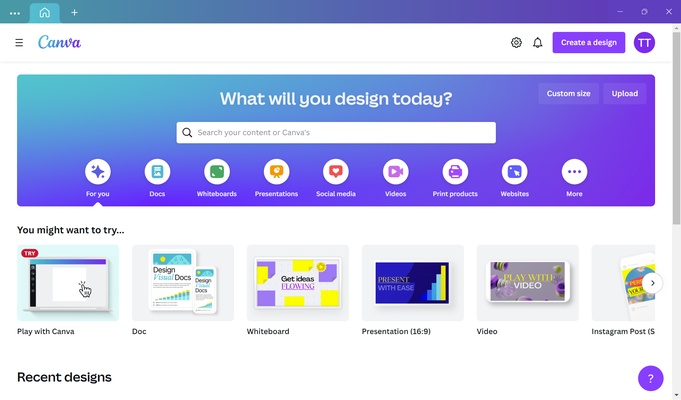
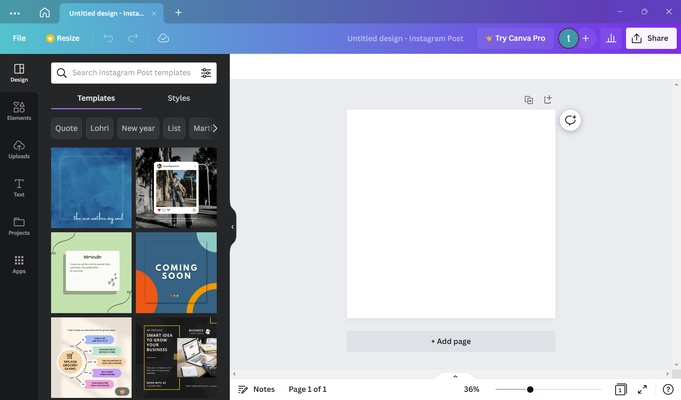
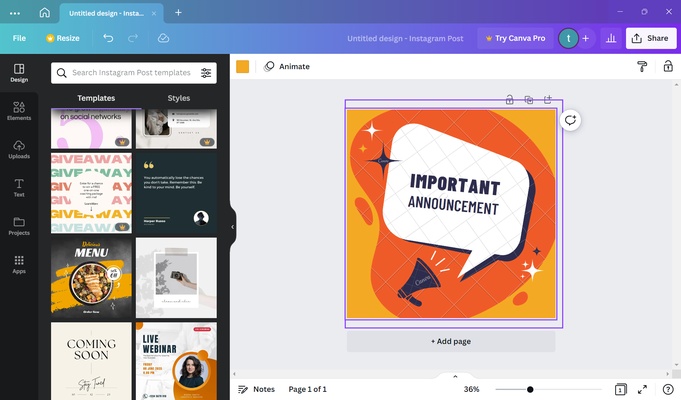
Canva uses a clean, browser-based interface centered around a visual drag-and-drop editor. Templates, design elements, uploads, text, and other tools are organized in an accessible side panel, while the main canvas provides direct control over the design.
The interface is designed to keep common editing tasks simple without requiring extensive graphic design experience.
Installation and Setup
Canva is primarily a web-based service, but desktop applications are also available for supported platforms. Install the desktop app if preferred, launch Canva, and sign in or create an account.
After signing in, users can choose a template or start a new design and begin editing immediately.
How to Use
Open Canva and select the type of project you want to create, such as a presentation, poster, social media graphic, document, or video.
Choose a template or start with a blank canvas. Add text, images, graphics, shapes, and other elements using the editor. Upload your own media when needed and adjust layouts, colors, fonts, and other design settings.
When the design is finished, use the export options to save it in a supported format or share it with other users for collaboration.
Pros
-
Very easy to use
-
Large selection of templates and design elements
-
Useful photo, video, and document creation tools
-
Built-in AI-assisted features
-
Supports real-time collaboration
-
Cloud-based workflow
Cons
-
Some advanced features require a paid plan
-
Many premium templates and assets are restricted
-
Less suitable for highly complex professional image editing
-
Requires an internet connection for many features
Conclusion
Canva for PC provides a straightforward way to create professional-looking graphics without the complexity of traditional design software. Its templates, drag-and-drop editor, media library, collaboration tools, and AI features make it suitable for everyday graphic design, social media content, presentations, marketing materials, and other visual projects.