Krita is a free, open-source digital painting and illustration application for Windows. Designed for artists, illustrators, concept designers, and animators, it provides a wide range of tools for creating digital artwork, comics, concept art, and 2D animations.
The software combines customizable brushes, advanced layer management, color tools, animation features, and support for raster and vector artwork in a flexible workspace. Krita is also available on other desktop platforms and supports pen tablets for digital drawing.
Key Features
-
Customizable Brushes – Choose from a wide range of brush types and adjust their size, opacity, texture, and other properties.
-
Advanced Layer Management – Work with raster and vector layers, groups, masks, and adjustment layers.
-
Color Management – Supports ICC color profiles, color selectors, and other tools for managing colors accurately.
-
2D Animation – Create frame-by-frame animations using the timeline and onion-skinning tools.
-
Drawing Assistants – Use stabilizers, assistants, and other tools to improve drawing precision.
-
Vector and Raster Support – Combine different types of artwork within the same project.
-
Text and Shape Tools – Add text, geometric shapes, and custom vector paths to your artwork.
-
Plugins and Extensions – Extend the application with additional brushes, palettes, plugins, and scripts.
-
PSD Support – Open and save Photoshop PSD files, although complex effects may not always transfer perfectly.
-
Multiple Export Formats – Export artwork to common formats such as PNG, JPEG, WebP, and PSD.
-
Tablet Support – Works with pressure-sensitive graphics tablets and pen input.
-
Cross-Platform – Available for Windows, macOS, and Linux, with additional support for Android devices.
User Interface
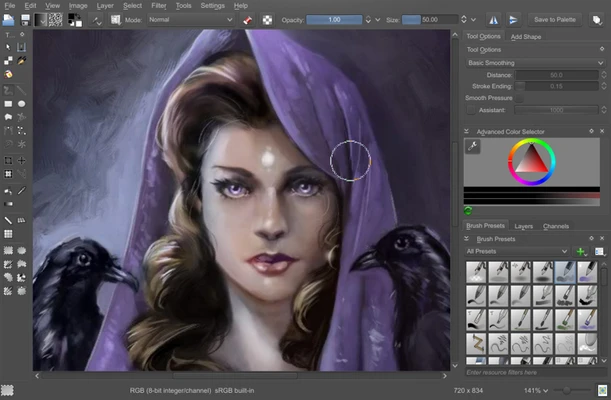
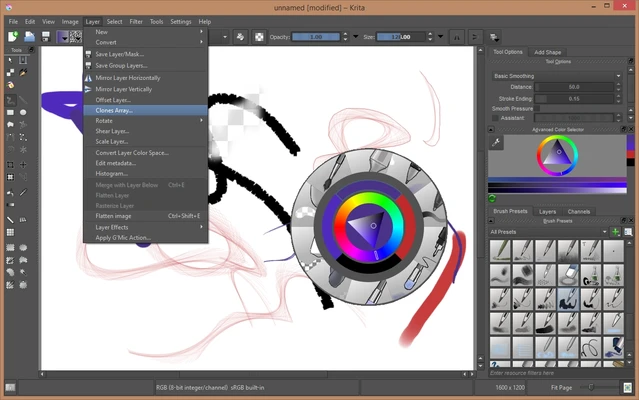
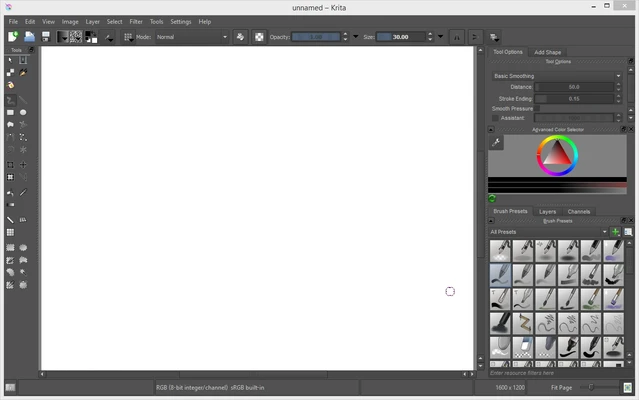
Krita uses a customizable workspace centered around a large drawing canvas. Toolbars, brush presets, layer controls, color selectors, and other panels can be arranged, docked, or hidden according to the user's workflow.
The interface is designed around digital painting, with quick access to frequently used brushes and drawing tools. Keyboard shortcuts and the popup palette can also speed up common operations.
Installation and Setup
-
Download and install Krita.
-
Follow the installation wizard to complete the setup.
-
Launch the application and create a new document.
-
Configure the workspace, brushes, shortcuts, and other preferences as needed.
-
Connect and configure a graphics tablet if you use one for drawing.
Additional brushes, palettes, and other resources can be installed later when needed.
How to Use
Create a New Project: Open Krita and select File > New. Choose a preset canvas size or enter custom dimensions.
Choose Drawing Tools: Select a brush, eraser, shape, or other tool from the toolbar. Brush properties can be adjusted through the brush settings.
Work with Layers: Use the Layers panel to create, organize, group, hide, or modify individual elements. Masks and adjustment layers can be used for more flexible editing.
Create Animations: Open the animation timeline and create individual frames. Onion-skinning can help compare neighboring frames while drawing.
Save and Export: Save editable projects in Krita's native KRA format. Finished artwork can be exported to common image formats for sharing or further editing.
Pros
-
Free and open-source.
-
Powerful digital painting and illustration tools.
-
Highly customizable brush engine.
-
Advanced layer and color management.
-
Built-in 2D animation tools.
-
Supports graphics tablets and PSD files.
-
Customizable workspace and extensive extensions.
Cons
-
Large projects can require considerable system resources.
-
The wide range of tools may take time for beginners to learn.
-
Some complex PSD features may not transfer perfectly.
Conclusion
Krita is a feature-rich open-source application focused primarily on digital painting, illustration, and 2D animation. Its customizable brushes, layer system, color management, animation tools, and tablet support make it suitable for both learning and more advanced digital art workflows.
For users looking for a dedicated digital painting application without a subscription, Krita provides a comprehensive set of creative tools while remaining completely free and open-source.