

Clip Studio Paint is a digital drawing and illustration application designed for artists, comic creators, manga artists, and animators. It provides tools for sketching, inking, coloring, lettering, animation, and comic production.
The software supports raster and vector layers, customizable brushes, 3D models, comic panels, speech balloons, perspective rulers, and other tools designed for digital art workflows. It is available for Windows, macOS, iPad, iPhone, and Android.
What's New
Recent updates have added improvements to 3D models and posing, color adjustment, filters, typography, export options, and WebP support.
Notable additions include:
-
Improved 3D model posing and customization.
-
Support for VRM and additional 3D object features.
-
New color-matching and artistic filters.
-
Improved text alignment, kerning, and font management.
-
Additional comic and manga font options.
-
Presets for frequently used export settings.
-
Watermark options for exported images and timelapses.
-
WebP import and export support.
Key Features
Digital Drawing: Create illustrations, concept art, comics, manga, and other digital artwork.
Custom Brushes: Use a wide selection of brushes or create and customize your own.
Raster and Vector Layers: Work with both raster and vector layers for flexible editing.
Comic and Manga Tools: Create panels, speech balloons, effect lines, rulers, and other comic elements.
3D Models: Use customizable 3D figures and objects as references for characters, poses, and compositions.
Perspective Rulers: Create accurate backgrounds and perspective-based artwork.
Animation: Create frame-based animations using timelines and onion-skin tools.
Text and Typography: Add dialogue, captions, and other text with customizable fonts and layout options.
PSD Support: Import and export Photoshop PSD files for compatibility with other graphics applications.
Timelapse: Record the creation process of artwork and export it as a video.
Materials: Access brushes, textures, patterns, 3D assets, and other downloadable materials.
User Interface
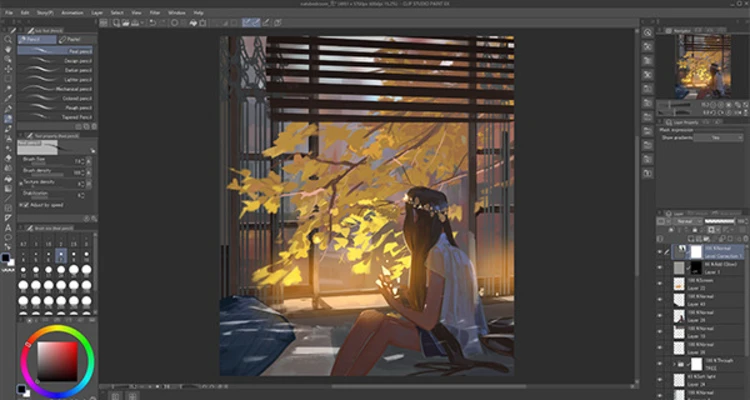
Clip Studio Paint uses a customizable workspace with a central canvas surrounded by toolbars, palettes, and editing panels. Users can dock, move, resize, or hide panels to match their workflow.
The interface provides quick access to brushes, layers, colors, materials, properties, and other frequently used tools. It may take some time for beginners to become familiar with the large number of available features.
Installation and Setup
-
Download and install Clip Studio Paint for your operating system.
-
Launch the application.
-
Sign in or create a Clip Studio account when required.
-
Select the appropriate license or trial option.
-
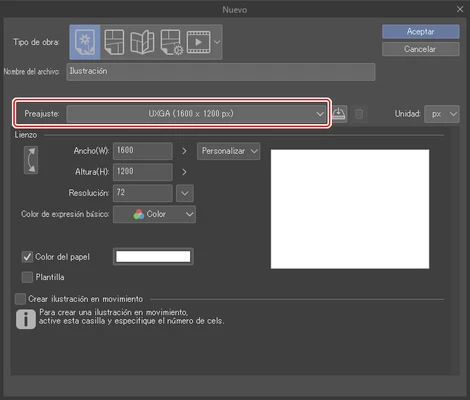
Create a new canvas and configure the required size and resolution.
-
Connect a compatible graphics tablet if needed.
-
Start creating your artwork.
How to Use
Create a Canvas: Open Clip Studio Paint, create a new project, and select the desired canvas size and resolution.
Sketch and Draw: Choose a brush and begin sketching or drawing on a raster or vector layer.
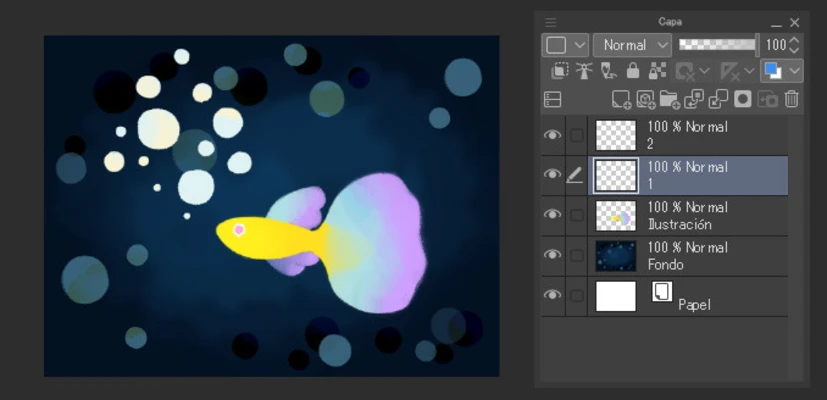
Manage Layers: Create separate layers for sketches, line art, colors, effects, and other elements.
Add Colors: Use the color wheel, eyedropper, gradients, blending modes, and other coloring tools.
Create Comics: Use panel, ruler, speech balloon, and text tools to build comic and manga pages.
Use 3D References: Add 3D figures or objects to help establish poses and compositions.
Export Your Work: Save or export finished artwork in a suitable image or document format.
FAQ
What is the difference between Clip Studio Paint PRO and EX?
PRO is primarily intended for illustrations, comics, and general digital art. EX includes additional features for multi-page comic projects and more advanced animation workflows.
Is Clip Studio Paint free?
It is commercial software, but trial options are available. The available purchase and subscription plans depend on the platform and version.
Can Clip Studio Paint import PSD files?
Yes. It supports Photoshop PSD files, making it possible to work with projects created in compatible graphics applications.
Does Clip Studio Paint support graphics tablets?
Yes. It supports pressure-sensitive graphics tablets, including popular pen tablets and displays.
Can I use Clip Studio Paint for animation?
Yes. Animation tools are available, with additional capabilities provided by the EX version.
Is Clip Studio Paint available on Mac and mobile devices?
Yes. Versions are available for Windows, macOS, iPad, iPhone, and Android.
Alternatives
Adobe Photoshop – A professional image-editing and digital-art application with extensive graphics and compositing tools.
Krita – A free and open-source digital painting application with strong brush and illustration capabilities.
Corel Painter – Digital painting software focused on natural-media brushes and traditional painting effects.
Rebelle – A digital painting application known for realistic watercolor, acrylic, and other traditional-media simulations.
Pricing
Clip Studio Paint is commercial software with different plans depending on the version and supported platform. PRO and EX have different feature sets, and subscription or purchase options may vary by platform.
System Requirements
-
Operating System: Windows 10 or later
-
Processor: Intel or AMD processor with SSE2 support
-
RAM: 2 GB minimum; 8 GB or more recommended for larger projects
-
Storage: At least 3 GB of available space
-
Graphics: OpenGL 2.1-compatible graphics processor recommended
-
Input: Keyboard, mouse, or compatible graphics tablet
Actual requirements may vary depending on the version and project size.
Pros
-
Extensive drawing and painting tools
-
Excellent brush customization
-
Strong comic and manga features
-
Raster and vector layer support
-
3D models and pose references
-
Animation support
-
PSD compatibility
-
Customizable interface
-
Available on multiple platforms
Cons
-
Large feature set can be overwhelming for beginners
-
Some advanced features are limited to the EX version
-
Large or complex projects can require significant system resources
-
Commercial software with different licensing options
Conclusion
Clip Studio Paint is a comprehensive digital art application particularly well suited to illustrators, comic artists, manga creators, and animators. Its combination of customizable brushes, vector and raster tools, comic features, 3D references, and animation capabilities makes it suitable for both personal and professional creative work.
The PRO version is a good fit for general illustration and comic creation, while EX is better suited to users who need advanced multi-page comic or animation features.