


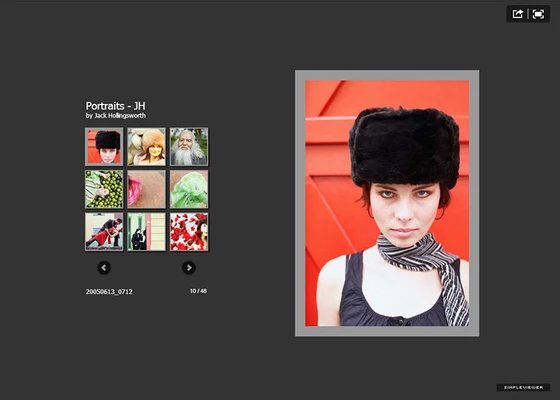

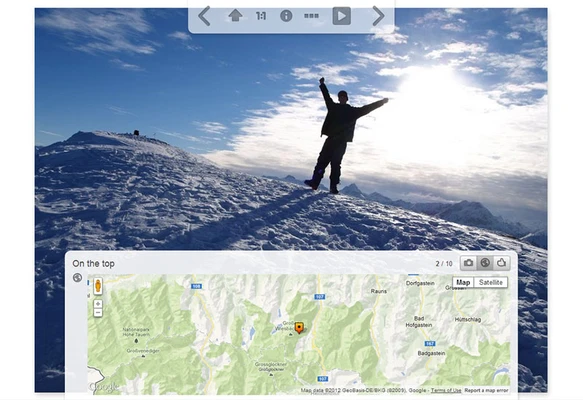
jAlbum is a photo and file management application that lets you create web-based photo albums and galleries from images, videos, and other files. It combines drag-and-drop organization, basic image editing, customizable album templates, and publishing tools in one application.
The software uses customizable templates called skins to control the appearance and functionality of generated web albums. Users can organize large collections of images, add captions, edit photos, create galleries, and publish finished albums to online hosting or their own websites.
jAlbum is also capable of working with video files and provides tools for creating galleries that can be shared online.
What's New
-
Improved album creation and publishing workflow
-
Updates to album skins and gallery templates
-
Improvements to image and video handling
-
Performance and stability improvements
-
Bug fixes and compatibility updates
Key Features
Web Album Creation
Create web galleries from photos, videos, and other files. The software can process images in batches, resize them for web use, and generate the required gallery pages.
Drag-and-Drop Organization
Import photos and folders using drag and drop. Files can be organized into folders, sorted, rotated, renamed, and assigned captions or thumbnails.
Customizable Skins
Skins determine the layout, appearance, and available features of an album. Different skins can provide features such as video playback, interactive navigation, maps, and shopping cart functionality.
Image Editing
Edit photos before adding them to a gallery. Available tools include cropping, straightening, gamma and level adjustments, filters, captions, and text overlays.
Video Support
jAlbum can create web galleries containing video content and supports conversion of various video formats for web playback.
Large Photo Collections
The software is designed to handle large numbers of images while preserving existing folder structures, making it suitable for extensive photo collections and portfolio websites.
Online Publishing
Publish completed albums to jAlbum's hosting service or upload them to your own website using FTP.
Image Protection
Add watermarks, logos, and copyright information to images. Some album skins also provide additional options for limiting image downloads.
Image Sales
Selected skins can add shopping cart functionality for users who want to sell photographs or products displayed in their galleries.
Lightroom Integration
A Lightroom plugin can be used to send selected images to jAlbum and create albums directly from a Lightroom workflow.
User Interface
jAlbum uses an explorer-style interface centered around file and folder organization. Users can drag files into an album project, arrange folders, select individual images, and access common functions through menus and context menus.
The workspace also provides tools for editing images, selecting skins, previewing galleries, and configuring publishing options. While the interface is relatively straightforward, some areas may feel dated compared with newer photo management applications.
Installation and Setup
Download and install jAlbum on your Windows PC and follow the on-screen installation instructions.
After installation:
-
Launch jAlbum and create a new album project.
-
Add photos, videos, or folders to the project.
-
Select a skin for the gallery.
-
Configure the album layout and available options.
-
Edit images and add captions if necessary.
-
Preview the finished album.
-
Publish the album to your preferred destination.
An internet connection may be required for online publishing, updates, and certain online services.
How to Use
Create an Album
Start a new project and import the photos, videos, or folders you want to publish.
Organize Your Files
Arrange files into folders, change their order, add captions, and select thumbnails for individual folders.
Edit Photos
Open an image in Edit mode to crop, straighten, adjust levels, apply filters, or add text and other adjustments.
Choose a Skin
Select a skin to determine the appearance and functionality of the generated web gallery. Different skins provide different layouts and features.
Preview the Gallery
Use the built-in preview function to check how the album will look before publishing it online.
Publish the Album
Upload the completed album to jAlbum's hosting service or configure FTP settings to publish it to your own website.
FAQ
Is jAlbum free?
jAlbum offers a trial version and paid licensing options. Some features and skins may require a paid license.
Can jAlbum create photo websites?
Yes. It can generate complete web-based photo galleries using customizable skins and publish them online.
Does jAlbum support videos?
Yes. Videos can be included in albums, and the software provides tools for preparing video content for web presentation.
Can I use my own website to host jAlbum galleries?
Yes. You can publish galleries to your own website using the built-in FTP functionality.
Can jAlbum handle large photo collections?
Yes. It is designed to work with large collections and can retain existing folder structures when creating web galleries.
Can I edit photos in jAlbum?
Yes. The built-in editor provides basic tools for cropping, straightening, tonal adjustments, filters, captions, and text overlays.
Does jAlbum support Lightroom?
Yes. A Lightroom plugin can be used to create jAlbum projects from selected Lightroom images.
Alternatives
Adobe Lightroom – A comprehensive photo management and editing application suitable for organizing and processing large image libraries.
Google Photos – A cloud-based photo management and sharing service with automatic organization and online galleries.
Piwigo – An open-source photo gallery platform designed for hosting and managing online image collections.
Zenphoto – A web-based photo management and gallery system for users who want to host their own image galleries.
Pricing
jAlbum provides a 30-day trial for users who want to evaluate the software before purchasing.
The full version requires a paid license, while individual skins or advanced gallery features may have their own licensing requirements. Pricing can vary depending on the selected license and available features.
System Requirements
-
Operating System: Windows 7, Windows 8, Windows 10, or Windows 11
-
Processor: 1.5 GHz or faster
-
RAM: 1 GB minimum; 2 GB or more recommended
-
Storage: At least 200 MB of free disk space
-
Java: Required runtime depends on the current jAlbum distribution
-
Internet Connection: Required for online publishing, updates, and certain online features
Additional memory and storage may be required when processing large image or video collections.
Pros
-
Easy drag-and-drop workflow
-
Supports photos, videos, and other files
-
Large selection of customizable skins
-
Built-in image editing tools
-
Handles large photo collections
-
Supports publishing to personal websites
-
FTP publishing included
-
Watermarking and copyright options
-
Lightroom integration
Cons
-
Some skins and advanced features require additional licensing
-
Interface can feel dated in some areas
-
Large projects may require significant system resources
-
Some online features depend on external services
Conclusion
jAlbum is a versatile tool for creating and publishing web-based photo galleries. Its combination of file organization, basic image editing, customizable skins, and online publishing makes it suitable for photographers, designers, and users who want to turn local photo collections into shareable web albums.
Its ability to handle large collections and preserve existing folder structures is particularly useful for portfolio and archive projects. The wide range of skins also allows users to create galleries with different layouts and functionality.
For users who need a dedicated application for building customizable photo websites rather than simply storing images in a cloud photo service, jAlbum remains a useful option for creating and managing web galleries.