

KiCad is a free and open-source electronic design automation (EDA) software suite for creating circuit schematics, designing printed circuit boards (PCBs), and preparing designs for manufacturing.
It provides a complete set of tools for electronics design, including schematic capture, PCB layout, 3D visualization, component libraries, and SPICE-based circuit simulation. KiCad is suitable for electronics hobbyists, students, engineers, and professional designers working on projects ranging from simple circuits to complex multi-layer PCBs.
What's New
Recent versions of KiCad focus on improved PCB design workflows, schematic editing, 3D visualization, library management, performance, and overall stability.
Key Features
-
Create and edit detailed electronic schematics.
-
Design single-layer and multi-layer PCBs.
-
Interactive PCB routing with design rule checking.
-
Support for differential pairs and high-speed PCB layouts.
-
Built-in component symbols, footprints, and libraries.
-
Create and manage custom symbols and footprints.
-
Integrated 3D PCB viewer for inspecting board layouts.
-
SPICE circuit simulation through Ngspice integration.
-
Hierarchical schematic design for larger projects.
-
Automatic and manual component annotation.
-
Generate Gerber and other manufacturing files.
-
Import and export common electronic design formats.
-
Cross-platform support for Windows, macOS, and Linux.
User Interface
KiCad uses a modular interface with separate applications for schematic capture, PCB layout, and other design tasks.
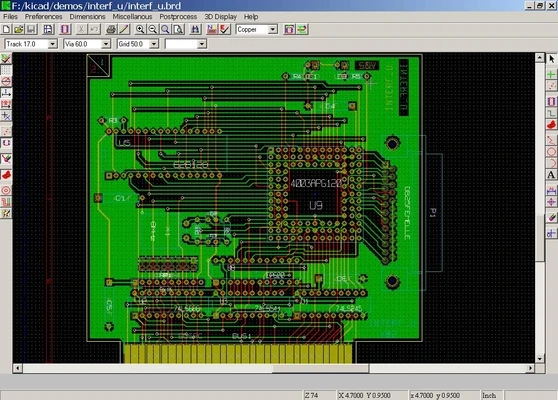
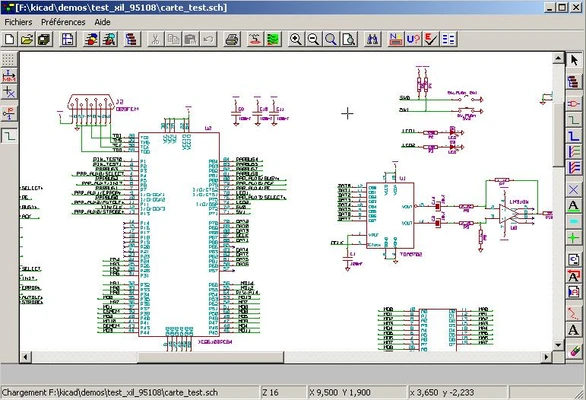
The schematic editor provides tools for placing components and creating electrical connections, while the PCB editor focuses on component placement, routing, board configuration, and design rule checking.
The interface provides extensive tools and configuration options, but beginners may need some time to become familiar with the workflow. Once learned, the modular design makes it easy to move between schematic, PCB, and 3D views.
Installation and Setup
Download the KiCad installer for your operating system and follow the on-screen instructions to complete the installation.
During the initial setup, KiCad can configure its standard component libraries and other default settings. After installation, create a new project and begin designing your schematic.
KiCad also provides documentation and tutorials for users who are new to PCB design.
How to Use
-
Create a new KiCad project.
-
Open the schematic editor and add the required components.
-
Connect components and define the electrical design.
-
Assign footprints to the schematic components.
-
Open the PCB editor and import the schematic design.
-
Place components on the board and route the connections.
-
Run design rule checks to identify potential problems.
-
Use the 3D viewer to inspect the physical board layout.
-
Generate Gerber and other manufacturing files when the design is ready.
FAQ
Is KiCad free?
Yes. KiCad is free and open-source software and can be used for both personal and commercial projects.
Is KiCad suitable for professional PCB design?
Yes. KiCad provides schematic capture, multi-layer PCB layout, design rule checking, 3D visualization, libraries, and manufacturing output tools suitable for many professional projects.
Does KiCad support circuit simulation?
Yes. KiCad integrates with Ngspice to provide SPICE-based circuit simulation.
Can KiCad import designs from other EDA software?
Yes. KiCad supports importing certain designs and libraries from other EDA applications, although some projects may require adjustments after import.
Does KiCad support 3D PCB visualization?
Yes. The integrated 3D viewer allows users to inspect the board, components, and physical layout before manufacturing.
Alternatives
Autodesk Fusion Electronics: An electronics design solution that combines PCB design with broader mechanical and engineering workflows.
Altium Designer: A professional EDA platform with advanced PCB design and collaboration features.
Fritzing: A simpler electronics design application aimed primarily at beginners, educators, and hobbyists.
LTspice: A free SPICE-based circuit simulator focused on circuit analysis and simulation.
Pricing
KiCad is FREE and open-source. There are no subscription fees or paid editions required to access its core EDA tools.
System Requirements
-
OS: Windows 10 or Windows 11
-
Processor: 64-bit x86 processor
-
RAM: 4 GB minimum, 8 GB or more recommended
-
Storage: Approximately 2 GB or more
-
Graphics: OpenGL-compatible graphics hardware
-
Display: 1280 × 800 or higher recommended
Actual resource requirements depend on the size and complexity of the project.
Pros
-
Free and open-source
-
Complete EDA toolset
-
Powerful schematic and PCB design features
-
Multi-layer PCB support
-
Integrated 3D viewer
-
SPICE simulation support
-
Extensive component libraries
-
Windows, macOS, and Linux support
-
Suitable for hobbyists and professional users
Cons
-
Steep learning curve for beginners
-
Large number of tools can make the interface feel complex
-
Advanced PCB projects may require a powerful computer
-
Some imported projects may require manual adjustments
Conclusion
KiCad is a comprehensive open-source EDA suite that provides the essential tools needed to design electronic circuits and printed circuit boards.
With schematic capture, PCB layout, design rule checking, 3D visualization, component libraries, and SPICE simulation in one package, it is a strong choice for both hobbyists and professional electronics designers. Its learning curve can be significant for beginners, but its extensive feature set and zero licensing cost make it one of the most capable free PCB design solutions available.