

Adobe DNG Converter is a free utility from Adobe that converts camera-specific RAW files into the Digital Negative (DNG) format. It supports RAW files from a wide range of digital cameras and provides a simple way to store and manage RAW images in a more widely supported format.
DNG preserves the original RAW image data and metadata, making it useful for photographers who want a consistent format for editing, storage, and long-term archiving.
What's New
Recent versions improve support for newer camera models and RAW formats while maintaining compatibility with Adobe Camera Raw and other applications that support DNG.
Key Features
RAW to DNG Conversion: Converts supported camera RAW files into Adobe's DNG format.
Wide Camera Support: Supports RAW files from many popular camera manufacturers and models.
RAW Data Preservation: Retains the original image data and important metadata during conversion.
Batch Conversion: Converts multiple RAW files at once to save time when processing large photo collections.
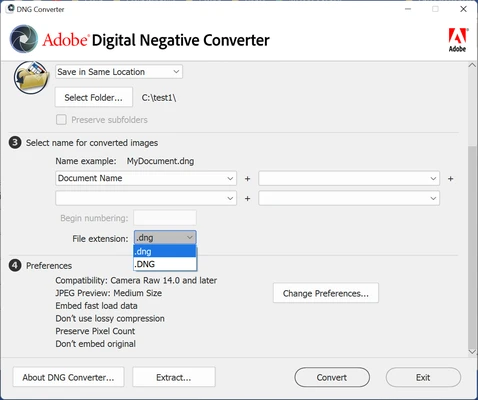
Flexible Conversion Options: Provides settings for compatibility, file handling, and other conversion preferences.
Long-Term Archiving: DNG provides a standardized format that can make RAW photo collections easier to maintain and access over time.
Adobe Compatibility: Works well with Adobe applications that support RAW and DNG files, including Photoshop and Lightroom.
User Interface
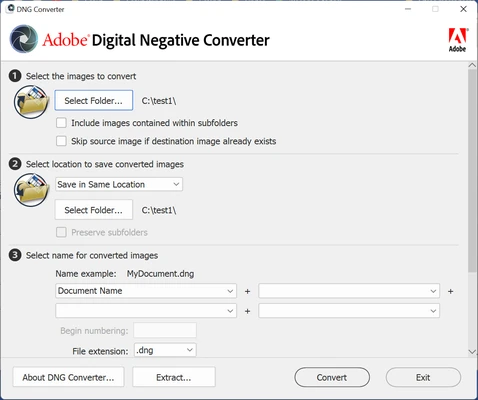
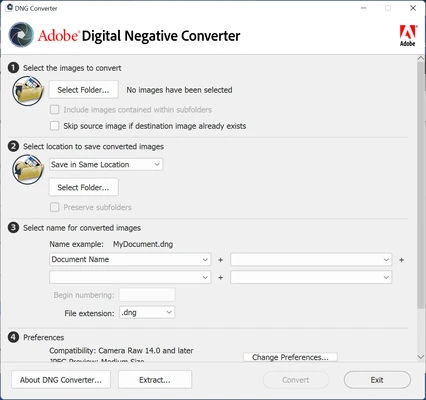
Adobe DNG Converter has a simple and straightforward interface. The main window lets you select a folder containing RAW files, choose an output location, and configure conversion settings.
The interface is designed primarily for file conversion rather than photo editing, so there are no unnecessary editing tools or complicated controls.
Installation and Setup
-
Download and install Adobe DNG Converter for your operating system.
-
Run the installer and follow the on-screen instructions.
-
Launch the application after installation.
-
Select the folder containing your RAW files.
-
Choose the destination folder for the converted DNG files.
-
Adjust the available conversion settings if necessary.
How to Use
-
Open Adobe DNG Converter.
-
Select the folder containing your camera RAW files.
-
Choose where you want to save the converted DNG files.
-
Configure compatibility and conversion options.
-
Start the conversion process.
-
The converted DNG files will be saved in the selected destination folder.
FAQ
What is Adobe DNG Converter used for?
It converts supported camera RAW files into Adobe's DNG format for easier storage, editing, and compatibility.
Does Adobe DNG Converter reduce image quality?
DNG conversion is designed to preserve the original RAW image data. However, available conversion options can vary depending on the source RAW format.
Can I convert multiple RAW files at once?
Yes. The application supports batch conversion, allowing you to process multiple files from a folder.
Is Adobe DNG Converter free?
Yes. Adobe DNG Converter is available as a free utility.
Does it support my camera?
Camera support depends on the version of Adobe DNG Converter and the specific RAW format. Newer versions generally add support for additional camera models.
Alternatives
Adobe Lightroom: A full-featured photo management and editing application with extensive RAW support.
Capture One: Professional photo editing software with advanced RAW processing and color management tools.
RawTherapee: A free and open-source RAW image processing application designed for photographers who want more editing controls.
Pricing
Adobe DNG Converter is available for free.
System Requirements
-
Windows 10 or later
-
64-bit Intel or AMD processor
-
2 GB of RAM
-
1 GB of available disk space
-
1024 × 768 display resolution
Pros
-
Free to use
-
Supports a wide range of camera RAW formats
-
Batch conversion
-
Preserves RAW image data and metadata
-
Simple and easy-to-use interface
-
Useful for long-term RAW file storage
Cons
-
Only provides RAW conversion and does not include photo editing tools
-
Camera support depends on the installed version
-
May be unnecessary for users who already have a complete RAW workflow
Conclusion
Adobe DNG Converter is a useful free tool for photographers who need to convert camera-specific RAW files into the more standardized DNG format. Its simple interface, broad camera support, and batch conversion capabilities make it a practical choice for managing large RAW photo collections.