

Darktable is a free and open-source photography workflow application and RAW developer for Windows. It provides photographers with tools to organize, develop, and enhance digital photos through a non-destructive editing workflow.
Darktable works as a virtual lighttable and darkroom, allowing users to manage large photo collections, review and organize images, and process RAW files without modifying the original files. It supports a wide range of cameras and image formats and is designed for both everyday photography and advanced image processing.
What’s New
Recent versions of Darktable include improvements to RAW processing, image quality, performance, color management, and workflow tools. Updates also bring new and improved processing modules, camera support, bug fixes, and refinements to the user interface and overall stability.
Key Features
-
Free and open-source photography software.
-
Professional RAW image development.
-
Non-destructive photo editing.
-
Digital photo management and organization.
-
Lighttable for browsing, sorting, rating, and tagging images.
-
Darkroom for detailed photo adjustments.
-
Exposure, contrast, brightness, and color controls.
-
Tone curve and color correction tools.
-
Cropping, sharpening, and noise reduction.
-
Spot removal and other retouching tools.
-
Masks and local adjustment controls.
-
Tethered shooting support for compatible cameras.
-
Supports JPEG and other standard image formats.
-
HDR and high-dynamic-range image processing.
-
Floating-point image processing.
-
Database-based image and metadata management.
-
Customizable workflow and processing modules.
-
Efficient caching for large photo collections.
-
Non-destructive editing throughout the workflow.
-
Export images in multiple formats and resolutions.
User Interface
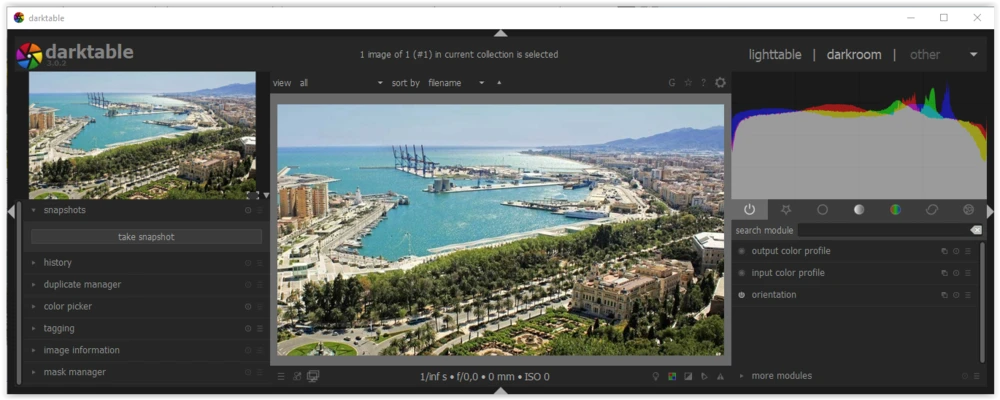
Darktable is divided primarily into two working areas: Lighttable and Darkroom.
Lighttable is used to browse and manage photo collections. Users can sort, rate, tag, and organize images before editing them.
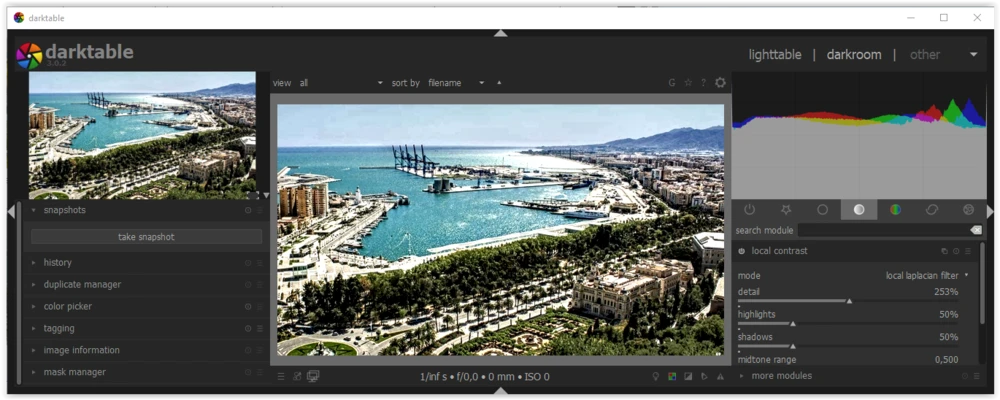
Darkroom provides the main photo development tools. It includes controls for exposure, color, contrast, tone, sharpening, noise reduction, masks, and other image adjustments.
The interface is designed around a database-driven workflow, allowing photographers to work with large collections while keeping the original images unchanged.
Installation and Setup
Download the Darktable installer for Windows and run the setup file.
Follow the installation instructions to complete the setup. After launching Darktable, import your existing photo folders or images into the Lighttable view.
Once the photos are imported, you can organize them and switch to Darkroom when you are ready to edit an image.
How to Use
Import Photos
Launch Darktable and import RAW files or other supported images into the Lighttable.
Organize Your Photos
Use ratings, tags, labels, and collections to organize large photo libraries and quickly locate specific images.
Edit Photos
Open an image in Darkroom and adjust exposure, contrast, colors, tone curves, sharpening, noise reduction, and other settings.
Apply Local Adjustments
Use masks and local editing tools when you need to modify specific areas of an image without affecting the entire photo.
Review and Refine
Darktable uses a non-destructive workflow, so you can experiment with different adjustments without permanently changing the original image.
Export Photos
When editing is complete, export the processed image in your preferred format, resolution, and quality settings.
FAQ
Is Darktable free?
Yes. Darktable is free and open-source software.
Does Darktable support RAW files?
Yes. RAW development is one of Darktable's main features, and it supports RAW files from many different digital cameras.
Is Darktable a Photoshop alternative?
Darktable is primarily designed for RAW development, photo management, and photography workflows. It can replace some features of traditional photo editors, but it is not intended to be a direct replacement for Photoshop's full range of graphic design and compositing tools.
Is Darktable non-destructive?
Yes. Darktable uses a non-destructive editing workflow. Your original image files remain unchanged while editing adjustments are stored separately.
Can Darktable edit JPEG images?
Yes. Darktable can work with JPEG and several other standard image formats in addition to RAW files.
Does Darktable support tethered shooting?
Yes. Darktable supports tethered shooting with compatible cameras.
Is Darktable suitable for professional photographers?
Yes. Darktable provides advanced RAW processing, color management, local adjustments, tethered shooting, and photo organization features that can support professional photography workflows.
Alternatives
RawTherapee: A free and open-source RAW image processor focused on detailed photo development and image quality.
digiKam: A photo management application designed for organizing and managing large digital image collections.
LightZone: A non-destructive photo editor with RAW processing and advanced image adjustment tools.
ART: A free RAW image processor based on RawTherapee with a focus on advanced editing controls and usability.
Raw Photo Processor: A RAW development application designed for photographers who want detailed control over image processing.
Pricing
Darktable is completely free and open-source. There are no subscription fees or paid editions required for its core photography and RAW development features.
System Requirements
-
Operating System: Windows 10 or Windows 11 (64-bit)
-
Processor: SSE2-capable Intel or AMD processor
-
Memory: 4 GB RAM minimum; 8 GB or more recommended
-
Graphics: OpenCL-capable GPU recommended for improved performance
-
Storage: At least 500 MB of available disk space
-
Display: 1280 × 800 resolution or higher
Pros
-
Free and open-source.
-
Powerful RAW development tools.
-
Fully non-destructive editing workflow.
-
Extensive photo organization features.
-
Supports large image collections.
-
Advanced color and exposure controls.
-
Supports masks and local adjustments.
-
Tethered shooting support.
-
Highly customizable workflow.
Cons
-
The interface can be overwhelming for beginners.
-
Requires time to learn the large number of available tools.
-
Performance can vary depending on hardware and image processing workload.
-
Some advanced features may require additional learning.
Conclusion
Darktable is a powerful free and open-source RAW developer and photography workflow application. It combines photo management, RAW processing, and non-destructive editing in a single application.
With its Lighttable and Darkroom workspaces, extensive image processing tools, and support for large photo collections, Darktable is a strong choice for photographers who want professional-level editing capabilities without paying for a subscription.