Canva is an easy-to-use graphic design platform that lets users create professional-looking graphics, presentations, social media posts, posters, flyers, documents, videos, and other visual content. Its drag-and-drop editor makes it suitable for beginners while providing enough tools for creators, marketers, educators, and businesses.
Canva combines templates, photo and video editing tools, stock media, collaboration features, and AI-powered design tools in one platform. Users can start with a ready-made template or create a design from scratch and customize it with their own content.
What's New
Recent Canva updates have focused on AI-powered creation, improved editing tools, collaboration, and content management.
Newer versions and updates include improvements to AI-assisted design generation, image editing, writing tools, presentations, video creation, brand management, and workflow automation. Feature availability may vary depending on the user's Canva plan and platform.
Key Features
Drag-and-Drop Editor: Easily add, move, resize, and customize text, images, graphics, videos, and other design elements.
Professional Templates: Provides templates for presentations, social media posts, posters, flyers, resumes, business cards, videos, and many other design types.
AI-Powered Tools: Canva includes AI features for generating designs, images, text, and other content from simple prompts.
Photo Editing: Crop, resize, adjust, enhance, and modify images directly inside the editor.
Background Removal: Quickly remove backgrounds from supported images without requiring advanced photo-editing skills.
Video Editing: Create and edit videos using templates, transitions, effects, text, music, and other media elements.
Stock Media Library: Provides access to photos, illustrations, icons, videos, audio, and other design assets.
Brand Kits: Store logos, fonts, colors, and other brand assets to maintain consistent branding across designs.
Collaboration: Share projects with other users and collaborate through comments, editing permissions, and shared workspaces.
Cloud Storage: Store designs online and access projects from supported devices.
Design Resizing: Resize existing designs for different platforms and formats with supported plans.
User Interface
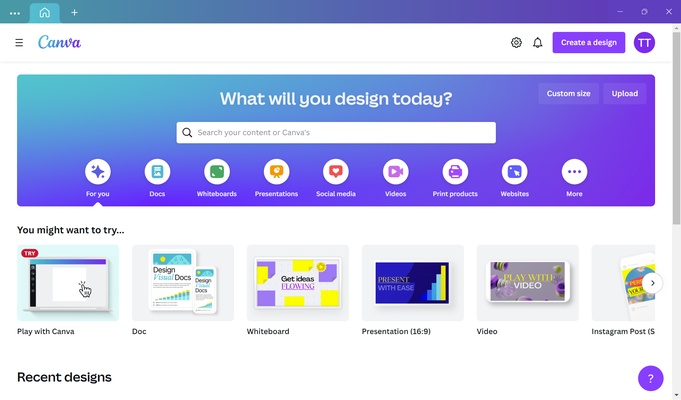
Canva uses a clean and straightforward interface centered around its drag-and-drop editor.
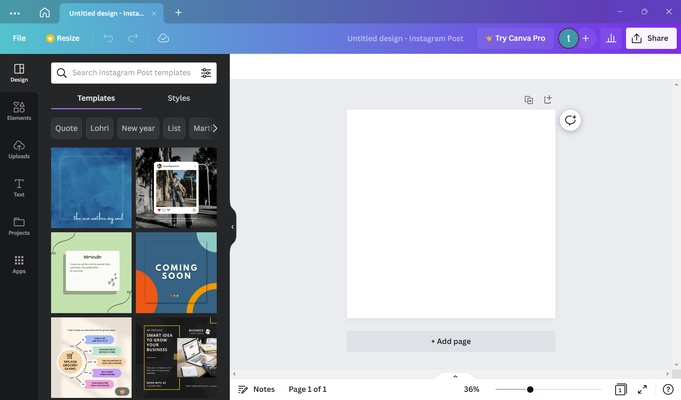
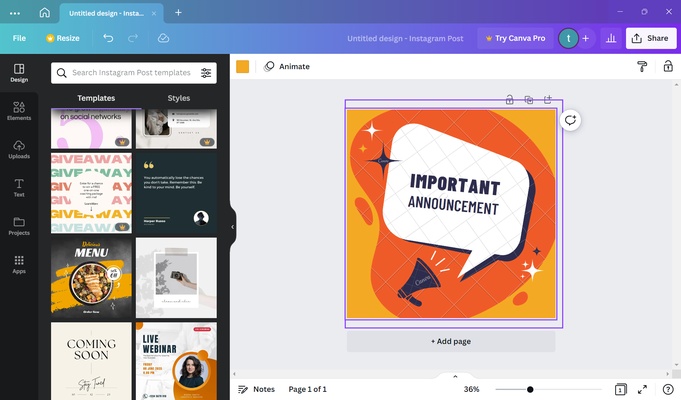
The editor provides quick access to templates, text, elements, uploads, media, and design tools. Users can search for specific assets and place them directly onto the canvas.
The layout is designed to minimize the learning curve, making Canva suitable for users who have little or no previous graphic design experience. More advanced users can also take advantage of branding, AI tools, collaboration, and professional export options.
Installation and Setup
Canva is primarily a web-based application, but desktop and mobile applications are also available for supported platforms.
To get started:
-
Download and install the Canva application if you prefer the desktop or mobile version.
-
Launch Canva and sign in or create an account.
-
Choose a design type or enter custom dimensions.
-
Select a template or start with a blank design.
-
Customize the project using Canva's editing tools.
An internet connection is required for most cloud-based features and online content.
How to Use
Create a Design: Select a template or choose custom dimensions for your project.
Choose a Template: Browse Canva's template library and select a design that matches your requirements.
Customize the Content: Replace text, images, colors, fonts, graphics, and other elements.
Upload Your Files: Add your own photos, videos, logos, and other supported files.
Use AI Tools: Use available AI features to generate or modify designs, images, and text.
Collaborate: Share the project with other users and allow them to view, comment, or edit it.
Export the Design: Download the finished project in a supported format such as PNG, JPEG, PDF, MP4, or GIF.
FAQ
Is Canva free?
Yes. Canva provides a free plan with access to the basic editor, free templates, design elements, and limited AI features. Some premium tools and assets require a paid subscription.
Can Canva be used for commercial projects?
Yes, Canva can be used for commercial projects. However, individual stock assets and other content may have specific licensing conditions, so users should check the applicable license before using them commercially.
Can I use Canva on Windows?
Yes. Canva can be accessed through a web browser and also provides a desktop application for supported Windows versions.
Can I edit photos with Canva?
Yes. Canva includes a range of photo-editing tools for cropping, resizing, adjustments, effects, background removal, and other common editing tasks.
Can I create videos with Canva?
Yes. Canva includes video-editing tools that allow users to create videos using templates, images, video clips, transitions, animations, text, music, and other elements.
Can I collaborate with other users?
Yes. Canva supports collaborative editing, comments, sharing, and team-based workflows.
Can I download my Canva designs?
Yes. Depending on the design and account type, projects can be exported in formats such as PNG, JPEG, PDF, MP4, and GIF.
Does Canva support AI?
Yes. Canva includes a range of AI-powered tools for generating and editing designs, images, text, presentations, and other content. Availability and usage limits depend on the user's plan.
Alternatives
Adobe Express: A simple online design platform with templates, photo editing, video tools, and AI features.
Adobe Photoshop: A professional image-editing application offering advanced tools for detailed photo manipulation and graphic design.
Picsart: A creative editing platform offering photo, video, graphic design, and AI-powered tools.
Pixlr: A browser-based image editor suitable for quick photo editing and graphic design.
Photopea: A web-based image editor supporting PSD and other popular professional image formats.
Pricing
Free
-
Basic design editor
-
Free templates and design elements
-
Limited AI features
-
5 GB cloud storage
-
Basic collaboration features
Canva Pro
Canva Pro provides access to premium templates, stock media, advanced AI features, background removal, Magic Resize, Brand Kits, additional cloud storage, and other premium tools.
Canva for Teams
The team plan adds collaboration, centralized brand assets, approval workflows, team management, reporting, and other business-oriented features.
Enterprise
Enterprise plans provide advanced security, administration, integrations, brand management, and support for larger organizations.
Pricing and available features may vary by region, subscription type, and current Canva plans.
System Requirements
-
Operating System: Windows 10 or later, macOS, Android, or iOS
-
Processor: Modern Intel, AMD, or Apple processor
-
RAM: 4 GB or more recommended
-
Storage: Varies depending on the application and cached content
-
Internet Connection: Required for online features and cloud-based content
-
Browser: A modern web browser is recommended when using the web version
Pros
-
Easy-to-use drag-and-drop editor
-
Large selection of templates
-
Extensive stock media library
-
Useful AI-powered design tools
-
Photo and video editing capabilities
-
Real-time collaboration
-
Cloud-based project storage
-
Suitable for beginners and professionals
Cons
-
Many advanced features require a paid subscription
-
Some premium templates and media assets are restricted
-
Requires an internet connection for many features
-
Not designed to replace advanced professional applications for complex graphic design work
Conclusion
Canva is a versatile graphic design platform that makes it easy to create professional visual content without requiring extensive design experience. Its combination of templates, drag-and-drop editing, stock media, photo and video tools, AI features, and collaboration capabilities makes it suitable for a wide range of users.
For creating presentations, social media graphics, marketing materials, posters, documents, and videos, Canva provides a convenient and accessible alternative to more complicated professional design software.