

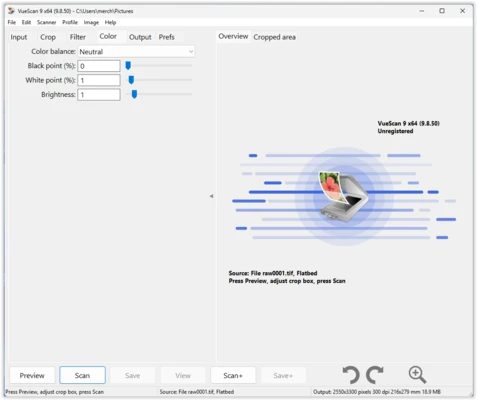
VueScan is a scanning software for Windows, macOS, and Linux that works with a wide range of flatbed, document, film, and slide scanners. It provides advanced scanning controls and supports many older scanners that may no longer be supported by their manufacturers.
The software can scan documents, photos, film, and slides and save them in formats such as JPEG, TIFF, PDF, and RAW. It also includes OCR, batch scanning, color correction, automatic cropping, and other tools for improving scan quality.
Key Features
- Supports more than 7,400 scanner models
- Works with flatbed, document, film, and slide scanners
- Supports automatic document feeders (ADF)
- Scan documents to PDF, JPEG, and TIFF
- Create single-page and multipage PDF files
- OCR text recognition
- Batch scanning
- Automatic color detection and correction
- Automatic cropping and deskewing
- Scan multiple photos at once
- Film and slide scanning
- Infrared dust and scratch removal
- IT8 color calibration
- RAW scanning support
- Photoshop integration
- Support for Windows, macOS, and Linux
- Available in multiple languages
User Interface
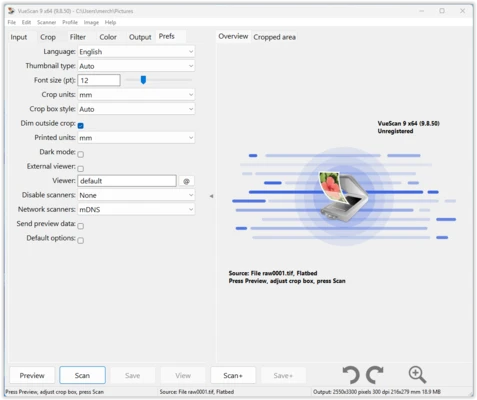
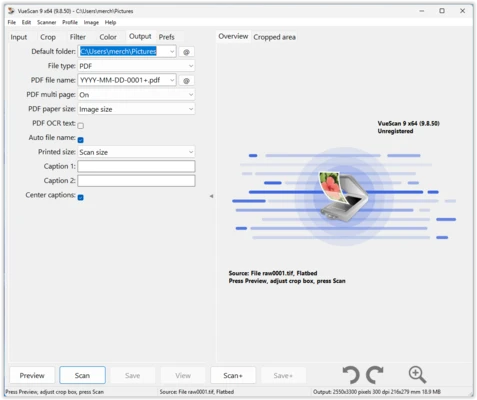
VueScan uses a functional interface with settings organized into sections such as Input, Crop, Filter, and Color. Users can select the scanner, choose the scan type, adjust resolution and color settings, and configure the output format from the main interface.
The software provides different levels of control, making it suitable for both basic scanning and more advanced workflows.
How to Use
- Install VueScan and connect your scanner to the computer.
- Launch the software and select the detected scanner.
- Choose the appropriate scan type, such as Document, Image, or Film.
- Set the resolution, color mode, file format, and other options.
- Use Preview to check the scan and adjust the crop or image settings.
- Click Scan to create the final file.
- Save the scanned document or image to the desired location.
FAQ
Does VueScan support older scanners?
Yes. One of VueScan's main advantages is its broad compatibility with older scanner models, including some that are no longer supported by their manufacturers.
What operating systems does VueScan support?
VueScan is available for Windows, macOS, and Linux.
Can VueScan scan documents to PDF?
Yes. It can create both single-page and multipage PDF documents.
Does VueScan support OCR?
Yes. OCR is available in the editions that include this feature.
Can VueScan scan film and slides?
Yes. The Professional Edition supports film and slide scanners and includes features such as infrared dust removal and color correction.
Does the free version add a watermark?
Yes. Scans created with the trial version contain a watermark.
Pricing
VueScan offers several editions with different scanning capabilities. A free trial is available for testing the software, but trial scans contain a watermark.
- Basic Edition – Basic flatbed scanning and JPEG output
- Standard Edition – Adds PDF, TIFF, OCR, automatic cropping, and document feeder support
- Professional Edition – Adds advanced scanning options, RAW output, and film/slide scanner support
Alternatives
Windows Scan – A simple scanning application for Windows users.
NAPS2 – A free scanning application with support for document scanners, automatic document feeders, OCR, and PDF creation.
PaperScan – A scanner software offering document scanning, image processing, and PDF creation features.
System Requirements
- Operating System: Windows 7, 8, 10, or 11
- Architecture: 32-bit and 64-bit
- RAM: 2 GB or more recommended
- Storage: At least 200 MB of free disk space
- Compatible scanner required
PROS
- Supports thousands of scanner models
- Works with many older scanners
- Advanced scanning controls
- OCR and PDF support
- Film and slide scanning
- Batch scanning
- Windows, macOS, and Linux support
CONS
- Trial version adds watermarks
- Interface looks somewhat dated
- Advanced features require a paid edition
- Professional Edition can be expensive for casual users
Conclusion
VueScan is a versatile scanning solution for users who need broader scanner compatibility and more control than the software supplied with their scanner. Its support for older hardware, document scanning, OCR, PDF creation, batch processing, and film scanning makes it useful for both everyday scanning and professional workflows.
For users with an unsupported or older scanner, VueScan can be a practical way to extend the life of existing hardware without replacing the device.