All My Books is a comprehensive book library management software for Windows developed by Bolide Software. It is designed for readers, collectors, and anyone who wants to organize and manage a large collection of physical books, eBooks, and audiobooks.
The software allows users to create detailed catalogs, automatically retrieve book information, track loans, organize collections, and export library data. Books can be added manually, by ISBN, or by importing existing book lists.
Key Features
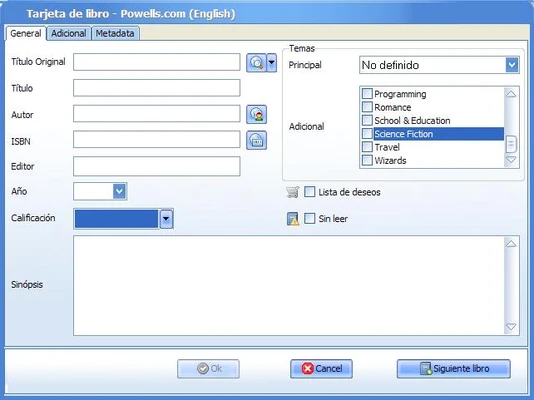
Automatic Book Information – Enter a book title, author, or ISBN and automatically retrieve information such as the cover, publisher, publication date, synopsis, and other metadata.
Physical and Digital Books – Manage physical books as well as eBooks and audiobooks in a single library.
ISBN Search – Quickly locate book information by entering its ISBN.
Custom Fields – Add personal notes, reading status, book condition, loan information, and other custom details.
Book Lending Management – Keep track of books that have been loaned to friends, family members, or other people.
Multiple Databases – Create separate databases for different collections, such as personal books, professional materials, and eBooks.
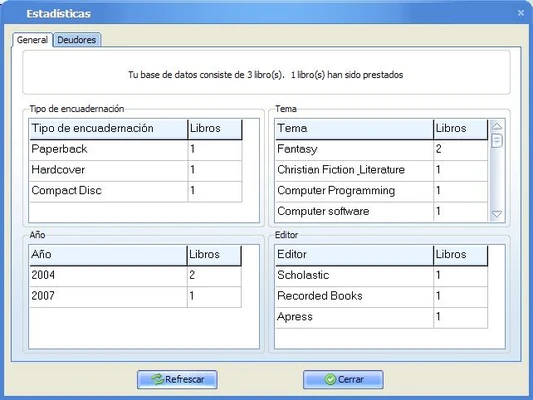
Book Organization – Sort and group books by author, genre, publication date, reading status, and other criteria.
Visual Book Shelf – Display your collection in a shelf-style view using book cover images.
Import and Export – Import existing book lists and export your library to formats such as Excel, HTML, PDF, XLS, and text.
Barcode Support – Use a compatible barcode scanner to quickly add books to large collections.
Audiobook Support – Store and play supported audiobook files directly from book records.
User Interface
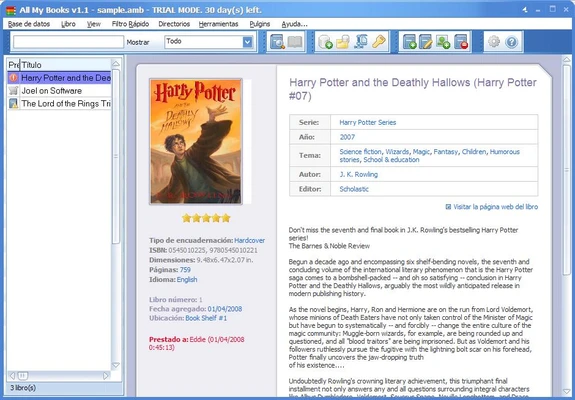
All My Books features a straightforward interface designed around managing and browsing a personal library.
The main window can display books in list or visual formats, while sorting and filtering tools make it easier to locate specific titles.
The customizable toolbar provides quick access to common functions such as adding books, searching the collection, editing records, and exporting data.
A visual bookshelf view displays book covers, making it particularly useful for users who prefer browsing their collection visually.
Installation and Setup
Download and run the All My Books installer.
Follow the on-screen instructions to complete the installation.
Launch the program and create your first library database.
Add books manually or use ISBN search and barcode scanning to populate your collection.
Configure the fields, database location, and other preferences according to your needs.
You can also import an existing book list if you already have your collection stored in another format.
How to Use
Add Books: Click Add Book and enter the title, author, or ISBN. The software can retrieve available metadata automatically.
Organize Your Collection: Create categories and sort books by author, genre, publication date, reading status, or other criteria.
Track Loans: Use the Loan Manager to record who borrowed a book and keep track of outstanding loans.
Search Your Library: Use the search tools to locate books by title, author, ISBN, genre, or other information.
Manage eBooks: Attach supported eBook files or links to individual book records.
Manage Audiobooks: Store supported audiobook files with the corresponding book entry and play them when needed.
Export Your Library: Export your collection to Excel, HTML, PDF, or text for backup or sharing.
FAQ
What is All My Books used for?
All My Books is used to catalog, organize, search, and manage book collections on Windows computers.
Does All My Books support eBooks and audiobooks?
Yes. It can manage eBooks and audiobooks alongside physical books and supports formats such as EPUB, MOBI, PDF, MP3, WMA, M4A, OGG, AA, and AAX.
Can I add books using an ISBN?
Yes. Entering an ISBN allows the software to search supported online databases and retrieve available book information.
Can I import an existing book list?
Yes. Existing book lists can be imported from supported text and spreadsheet formats.
Can I track books I have lent to other people?
Yes. The built-in Loan Manager lets you record lending information and track books that are currently away from your collection.
Can I export my library?
Yes. The software supports exporting collection information to formats including Excel, HTML, PDF, XLS, and text.
Is All My Books available for macOS?
No. All My Books is designed for Windows. Running it on macOS requires a compatible Windows virtualization or compatibility solution.
Alternatives
Epubor eBook Manager – A tool focused on managing, converting, and transferring eBooks.
Calibre – A popular free and open-source eBook management application with extensive support for digital books.
Pricing
Single License – $39.95
- Activation on up to 2 of your own computers
- One-time purchase
- Lifetime updates
Family License – $49.95
- Activation on up to 6 family computers
Business License – $480
- Unlimited activations
- Designed for business use
A 30-day trial version is also available with some limitations.
System Requirements
Operating System: Windows 11, 10, 8, 7
Processor: 1 GHz or faster
Memory: 512 MB RAM or more
Storage: Approximately 20 MB of free disk space
Internet Connection: Required for retrieving book information from online databases
PROS
- Easy-to-use interface
- Supports physical and digital books
- Automatic book metadata retrieval
- ISBN and barcode support
- Book lending management
- Customizable book fields
- Multiple database support
- Extensive import and export options
CONS
- Windows-only
- No native mobile application
- No built-in cloud synchronization
- Some advanced features may require the paid version
- Online metadata retrieval requires an internet connection
Conclusion
All My Books is a practical library management tool for users who need to organize large collections of physical books, eBooks, and audiobooks. Its automatic metadata retrieval, ISBN support, lending management, customizable fields, and extensive export options make cataloging a large collection considerably easier.
The software is particularly well suited to book collectors and serious readers who want a dedicated Windows application rather than a general-purpose spreadsheet. While the lack of native macOS and mobile versions is a limitation, its straightforward interface and one-time licensing model make All My Books a solid choice for maintaining a personal or professional book catalog.
Note: 30-day trial version. Limited functionality.