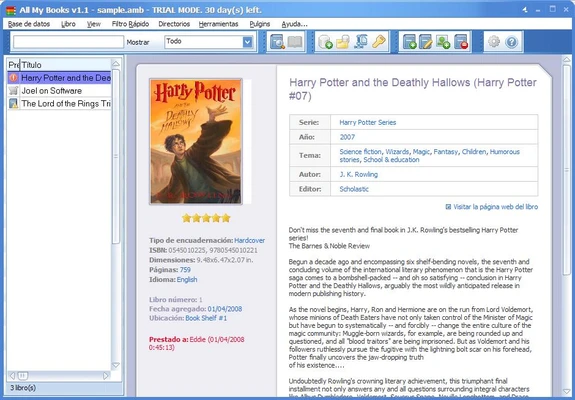
All My Books is a Windows library management tool designed to help users catalog and organize physical books, eBooks, and audiobooks.
It allows you to create detailed book records, automatically retrieve information such as covers and publication details from online databases, track loans, and organize your collection using customizable fields, categories, and filters.
Key Features
-
Automatically retrieve book information using titles, authors, or ISBNs
-
Support for physical books, eBooks, and audiobooks
-
Import and export book lists in multiple formats
-
Track borrowed and loaned books
-
Create multiple databases for different collections
-
Add custom fields, notes, and reading status
-
Organize books by author, genre, location, or other criteria
-
Scan ISBN barcodes to add books quickly
-
Search and filter your collection
-
View books in list or bookshelf-style layouts
-
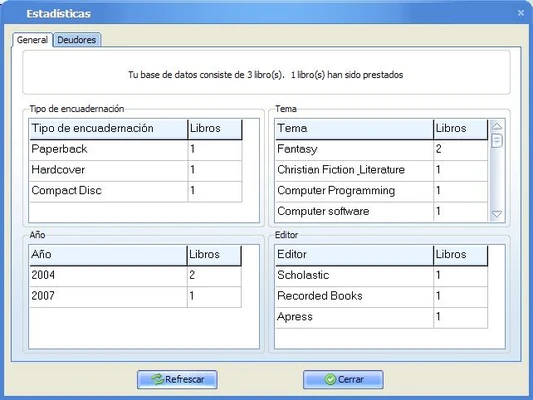
Generate statistics and reports about your collection
-
Protect databases with a password
-
Store links to eBooks and play supported audiobook files
User Interface
All My Books features a straightforward Windows interface with customizable views and toolbars. Books can be displayed as a detailed list or as a visual bookshelf with cover images.
The interface provides sorting, filtering, and search tools that make it easy to manage large collections and quickly find specific books.
Installation and Setup
-
Download and run the installer.
-
Follow the on-screen installation instructions.
-
Launch All My Books and create a new database.
-
Add books manually or import an existing collection.
-
Configure the fields, views, and database settings according to your preferences.
How to Use
-
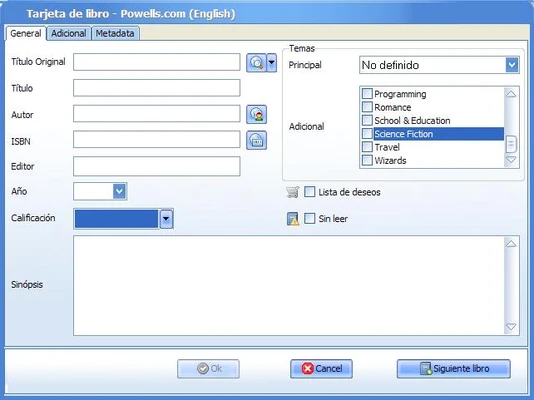
Add a book by entering its title, author, or ISBN.
-
Retrieve book information from available online databases.
-
Edit or add personal information such as notes, categories, and reading status.
-
Organize books using filters, groups, and custom directories.
-
Use the Loan Manager to track books lent to other people.
-
Search your collection by title, author, ISBN, or other information.
-
Export your catalog for backup or sharing.
FAQ
Can All My Books manage eBooks and audiobooks?
Yes. It can catalog physical books, eBooks, and audiobooks. It can also store links to eBooks and play supported audiobook files.
Can I add books using an ISBN?
Yes. Entering an ISBN can automatically retrieve available book information from online databases.
Can I import an existing book collection?
Yes. The software supports importing book lists from formats such as text and Excel files.
Can I track books that I lend to other people?
Yes. The built-in loan management features allow you to record where your books are and track lending information.
Is All My Books available for Mac?
No. All My Books is designed for Windows. Mac users may need compatibility or virtualization software to run it.
Alternatives
Calibre – A popular open-source eBook management application with extensive format support.
Epubor eBook Manager – An eBook management tool for organizing, converting, and transferring digital books.
Pricing
Single License – $39.95
Activation on up to 2 personal computers, with lifetime updates.
Family License – $49.95
Activation on up to 6 family computers.
Business License – $480
Designed for business use with unlimited activations.
A 30-day trial version is available with limited functionality.
System Requirements
-
Operating System: Windows 7, 8, 10, or 11
-
Processor: 1 GHz or faster
-
RAM: 512 MB or more
-
Storage: 20 MB of free disk space
-
Internet Connection: Required for online book information
Pros
-
Easy to use
-
Supports physical and digital books
-
Automatic book information retrieval
-
ISBN and barcode support
-
Loan tracking
-
Customizable book fields
-
Multiple export options
Cons
-
Windows only
-
No built-in cloud synchronization
-
No dedicated mobile app
-
Trial version has limitations
Conclusion
All My Books is a practical library management tool for Windows users who want to catalog and organize a large collection of physical books, eBooks, and audiobooks. Its automatic metadata retrieval, ISBN support, lending management, customizable fields, and flexible organization tools make it suitable for both casual readers and serious book collectors.
The Windows-only availability and lack of built-in cloud synchronization may be limitations for some users, but its straightforward interface and comprehensive cataloging features make it a solid choice for managing a personal book collection.
Note: 30-day trial version with limited functionality.