Calibre is a free and open-source e-book management software for Windows that helps users organize, edit, convert, read, and manage digital books.
Calibre supports a wide range of e-book formats and works with popular e-readers such as Kindle, Kobo, and Nook. It combines library management, format conversion, metadata editing, e-book reading, and device synchronization in a single application.
Whether you manage a small personal collection or thousands of e-books, Calibre for PC provides powerful tools for organizing and maintaining your digital library.
What’s New
Calibre is actively developed with regular updates that improve compatibility, performance, e-book conversion, metadata handling, and the built-in reader.
Recent versions have continued to improve support for modern e-book formats, enhance the content server, refine the user interface, and add improvements to the editor and device integration.
Key Features
Library Management – Organize books using metadata, tags, authors, series, categories, and custom fields.
Format Conversion – Convert between popular formats such as EPUB, AZW3, MOBI, PDF, DOCX, and TXT.
E-Book Editing – Edit EPUB and AZW3 books using the built-in e-book editor.
Metadata Management – Download and edit titles, authors, descriptions, covers, publishers, ratings, and other book information.
E-Reader Support – Transfer books between your computer and compatible Kindle, Kobo, Nook, and other supported devices.
Built-in E-Book Reader – Open and read books directly in Calibre with customizable fonts, layouts, and reading settings.
News Downloading – Fetch content from supported news websites and RSS feeds and convert it into an e-book format.
Content Server – Access your Calibre library remotely through a web browser on compatible devices.
Plugin Support – Extend the software with third-party plugins for additional functionality.
Library Search – Quickly locate books using titles, authors, tags, formats, series, and other metadata.
User Interface
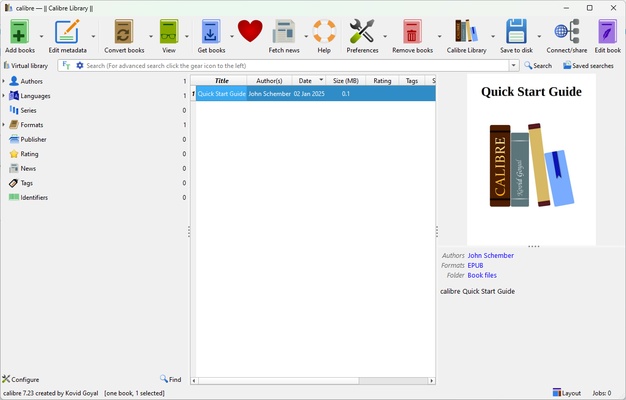
Calibre uses a feature-rich desktop interface centered around the main library window.
The library displays books in a list or cover-based view, while the toolbar provides quick access to common functions such as adding books, editing metadata, converting formats, and transferring books to connected devices.
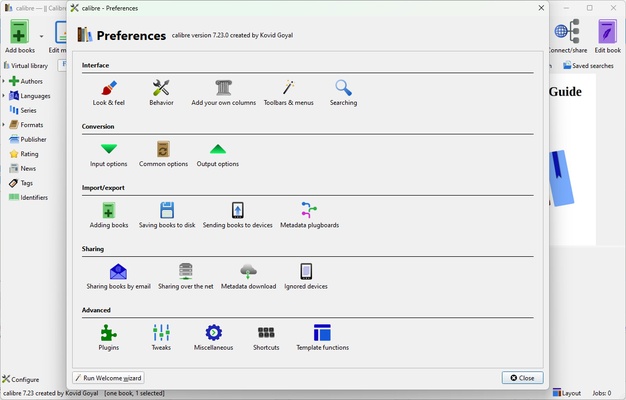
The interface offers extensive customization options, although the large number of available features can make Calibre appear complicated to new users.
The built-in reader provides a separate reading environment with customizable fonts, themes, margins, navigation, and other reading preferences.
Installation and Setup
-
Download the Calibre installer for Windows.
-
Run the installer and follow the setup instructions.
-
Choose the location where your e-book library will be stored.
-
Select your preferred interface language.
-
Choose your primary e-reader device if required.
-
Launch Calibre and add your existing e-books to the library.
-
Configure metadata, conversion, and reader preferences as needed.
How to Use
Add Books – Drag and drop e-books into the library or use the Add Books function.
Organize Your Library – Edit metadata, assign tags, organize books into series, and use categories to keep your collection structured.
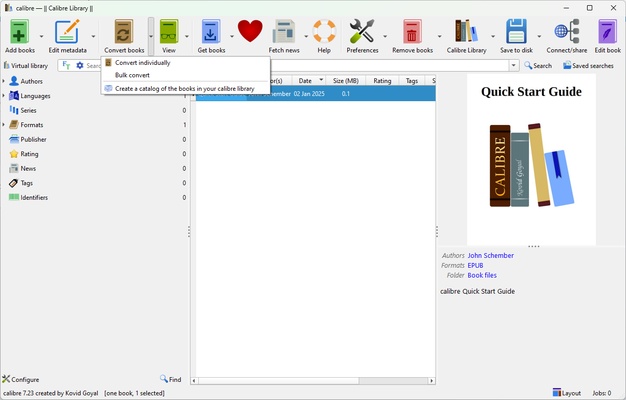
Convert E-Books – Select a book, choose Convert Books, select the output format, adjust the conversion settings, and start the conversion.
Edit Books – Open a supported EPUB or AZW3 file in the built-in editor to modify its contents.
Transfer Books – Connect a compatible e-reader through USB and use the device management functions to send books to the device.
Read Books – Open a book using the built-in reader and customize the reading experience.
Fetch Metadata – Use the metadata download tools to retrieve available information and cover artwork for your books.
Use the Content Server – Start the content server to access your library from supported devices through a web browser.
FAQ
Is Calibre free?
Yes. Calibre is completely free and open-source software with no subscription or premium version.
Can Calibre convert e-books?
Yes. It supports conversion between many popular e-book formats, including EPUB, AZW3, MOBI, PDF, DOCX, and TXT.
Can Calibre manage Kindle books?
Yes. Calibre can manage compatible Kindle books and transfer supported files to Kindle devices. DRM-protected books may have additional restrictions.
Does Calibre support audiobooks?
No. Calibre is primarily designed for managing e-books and does not provide dedicated audiobook management functionality.
Can Calibre edit e-books?
Yes. The built-in editor can be used to edit supported EPUB and AZW3 e-books.
Can I access my library from another device?
Yes. Calibre includes a Content Server that can make your library accessible through a web browser.
Does Calibre sync books with cloud storage?
Calibre does not provide native cloud synchronization for its library. Users can store library files on compatible storage services, but this requires additional configuration and care to avoid database conflicts.
Alternatives
Kindle for PC – A good choice for users who primarily purchase and read books from the Amazon Kindle ecosystem.
Adobe Digital Editions – A lightweight solution for reading and managing EPUB and PDF books, particularly for supported library and publishing workflows.
Icecream Ebook Reader – A simpler e-book reader with basic library management features and an easier interface for casual users.
Kobo Desktop – Designed primarily for Kobo users and integrates with the Kobo ecosystem.
Pricing
Calibre is 100% free and open-source.
There are no premium editions, subscriptions, or mandatory activation fees. Users can optionally support the project through donations.
System Requirements
-
Operating System: Windows 10 and later
-
Processor: Intel or AMD processor
-
Memory: 2 GB RAM minimum
-
Storage: At least 300 MB of free disk space for installation
-
Additional Storage: More space is required for storing your e-book library
Pros
-
Free and open-source
-
Supports numerous e-book formats
-
Powerful library management tools
-
Built-in e-book conversion
-
Metadata and cover management
-
Supports many e-readers
-
Built-in e-book editor and reader
-
Content server for remote library access
-
Extensive plugin ecosystem
Cons
-
Interface can be overwhelming for beginners
-
No native cloud synchronization
-
Large libraries can require significant system resources
-
No dedicated audiobook management
-
Some device and format workflows require additional configuration
Conclusion
Calibre is one of the most comprehensive e-book management solutions available for Windows. Its combination of library management, format conversion, metadata editing, e-book editing, device synchronization, and built-in reading tools makes it suitable for both casual readers and users with large digital libraries.
The interface has a noticeable learning curve, but users who take the time to understand its features will find a highly flexible and capable e-book management platform. Best of all, it is completely free and open-source.