Anki is a free flashcard-based learning application designed to help users memorize and retain information through spaced repetition. It can be used for language learning, exam preparation, vocabulary building, geography, names, facts, and many other subjects.
Users create or download decks containing questions and answers, then review cards at scheduled intervals. After answering each card, users rate how well they remembered it, allowing Anki to determine when the card should appear again.
Key Features
-
Spaced Repetition – Schedules cards at appropriate intervals to improve long-term retention.
-
Custom Flashcards – Create cards with your own questions, answers, text, images, and audio.
-
Deck Management – Organize cards into separate decks and categories for different subjects.
-
Shared Decks – Download and use card collections created by other Anki users.
-
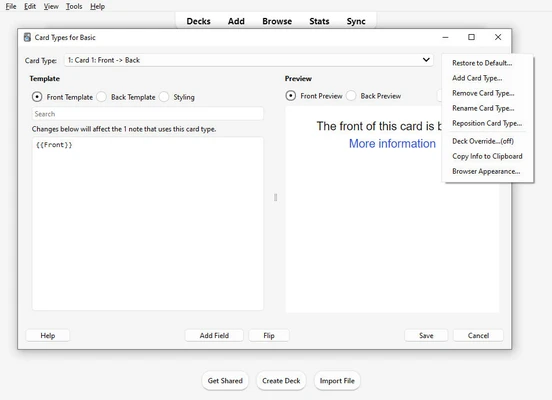
Custom Card Templates – Adjust card layouts, fonts, colors, and other visual elements.
-
Multimedia Support – Add images, audio, and other media to flashcards.
-
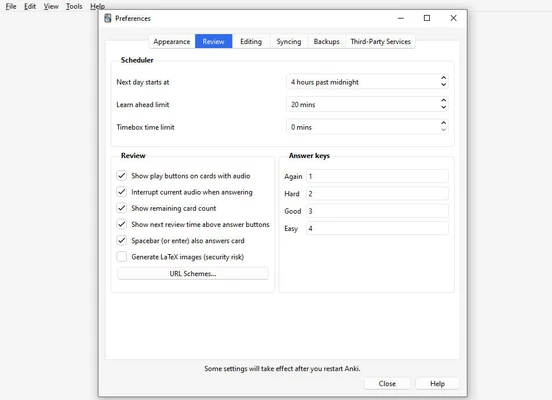
Study Controls – Configure daily limits, new cards, review cards, and session settings.
-
Progress Statistics – View detailed statistics about reviews, cards, decks, and learning progress.
-
AnkiWeb Sync – Synchronize cards and study progress across supported devices.
-
Add-ons – Extend Anki with additional features and customization options.
-
Powerful Card Browser – Search, edit, tag, organize, and manage large collections of cards.
User Interface
Anki uses a functional desktop interface centered around decks, cards, and study sessions. The main window provides quick access to decks and their current review status, while the card browser offers more detailed tools for managing individual cards.
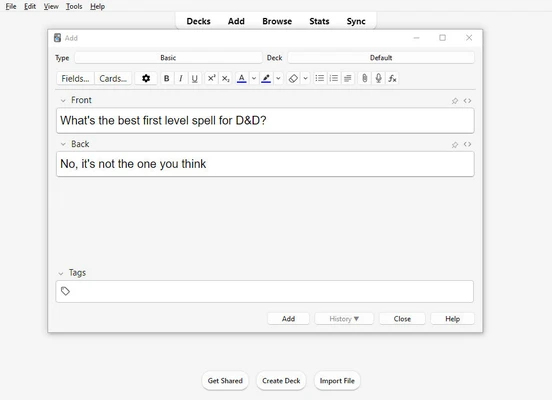
The built-in editor allows users to create and customize flashcards without needing additional software. The interface is relatively utilitarian, but it provides extensive control over learning and card management.
Installation and Setup
-
Download and install Anki for Windows.
-
Launch Anki and create a profile.
-
Create a new deck or import an existing deck.
-
Add flashcards containing questions and answers.
-
Configure your preferred study settings.
-
Start a review session and rate each card based on how well you remembered it.
-
Sign in to AnkiWeb if you want to synchronize your cards and progress across devices.
How to Use
Create a deck for the subject you want to study, then add cards containing questions and answers. During a review session, Anki presents cards according to its spaced-repetition scheduling system.
After viewing the answer, select the appropriate response such as Again, Good, or Easy. Anki uses this feedback to determine when the card should be reviewed again.
The Browse section can be used to search and edit cards, add tags, and organize large collections. The Stats section provides information about review activity and learning progress.
Users can also download shared decks, synchronize their collection through AnkiWeb, and install add-ons to extend the application's functionality.
System Requirements
-
Operating System: Windows 10 or Windows 11
-
Processor: Intel or AMD processor
-
Memory: 2 GB RAM or more recommended
-
Storage: Approximately 250 MB of available disk space
-
Internet: Required for synchronization, shared decks, and add-ons
Pros
-
Effective spaced-repetition learning system
-
Highly customizable flashcards and study settings
-
Supports images and audio
-
Large collection of shared decks
-
Detailed learning statistics
-
AnkiWeb synchronization
-
Extensive add-on ecosystem
-
Free to use
Cons
-
Interface is relatively utilitarian
-
Advanced customization requires some learning
-
Creating large card collections can take considerable time
-
Some features may feel complex for beginners
Conclusion
Anki is a powerful flashcard application for users who want to improve long-term memory through spaced repetition. Its customizable cards, shared decks, multimedia support, detailed statistics, synchronization, and add-on system make it suitable for everything from language learning to professional exam preparation.
Although the interface is less polished than some modern learning applications, Anki provides extensive control over how information is organized and reviewed, making it a strong choice for users who want a flexible long-term study tool.