


CPU-Z is a lightweight and free system information and diagnostics tool for Windows. Developed by CPUID, it provides detailed information about the processor, motherboard, memory, and other hardware components installed in your PC.
The software is useful for checking hardware specifications, identifying processor and memory configurations, verifying clock speeds, and troubleshooting system hardware. It displays information in an easy-to-understand tabbed interface and requires very few system resources.
CPU-Z is particularly useful for PC enthusiasts, gamers, technicians, and users who need detailed hardware information without installing a large system monitoring suite.
Key Features
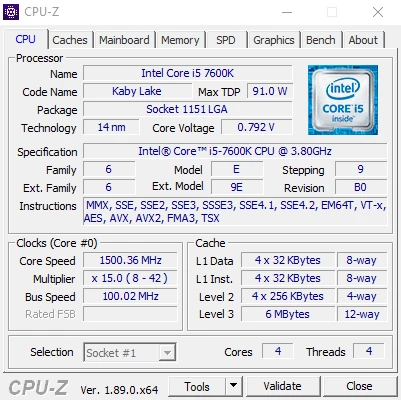
CPU Information – Displays detailed information about the processor, including its name, architecture, codename, manufacturing process, package, clock speed, core count, and cache levels.
Motherboard Information – Shows the motherboard manufacturer, model, chipset, BIOS version, and other mainboard details.
Memory Information – Provides information about installed RAM, including memory type, capacity, frequency, timings, and channel configuration.
SPD Information – Displays detailed information about individual memory modules, including manufacturer, module size, supported frequencies, and timing profiles.
Real-Time Clock Monitoring – Shows the current internal frequency of CPU cores and memory.
Graphics Information – Provides basic information about the graphics processor, including GPU model, technology, and clock information.
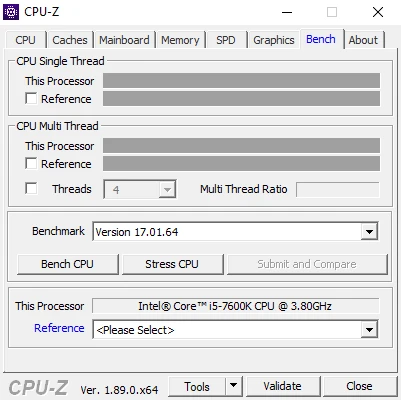
CPU Benchmark – Includes basic CPU benchmarking and stress-testing functions for evaluating processor performance.
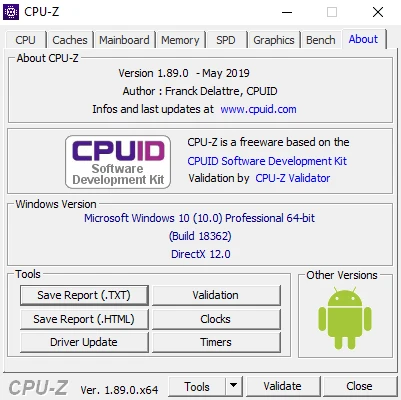
Hardware Reports – Allows users to save system information as TXT or HTML reports for troubleshooting or sharing.
Validation – Provides a validation system that can be used to verify and share hardware configuration information.
What's New
- Added support for newer Intel and AMD processors.
- Added support for recent AMD Radeon and NVIDIA GeForce GPUs.
- Improved detection of newer CPU architectures and models.
- Improved graphics card information displayed on the Graphics tab.
- Added additional CPU and GPU identification information.
- Improved hardware detection and validation features.
- Various bug fixes and compatibility improvements.
User Interface
CPU-Z uses a simple tab-based interface that makes hardware information easy to access.
The main interface includes tabs such as CPU, Caches, Mainboard, Memory, SPD, Graphics, Bench, and About. Each tab focuses on a different area of the computer's hardware.
The interface is lightweight and straightforward, making it suitable for both beginners and experienced PC users.
Installation and Setup
CPU-Z is available as both an installable application and a portable version.
- Download the appropriate CPU-Z package for Windows.
- Run the installer if you are using the setup version.
- Follow the installation instructions.
- Launch CPU-Z after installation.
- Select the desired tab to view your hardware information.
The portable version can be launched directly without a traditional installation.
How to Use
Check CPU Information – Open the CPU tab to view the processor model, core count, clock speed, cache, and other technical details.
Check Motherboard Information – Open the Mainboard tab to identify the motherboard manufacturer, model, chipset, and BIOS version.
Check RAM Information – Open the Memory tab to view the total memory capacity, type, frequency, and timings.
Check Individual Memory Modules – Use the SPD tab to view detailed information about each installed RAM module.
Check Graphics Information – Use the Graphics tab to view basic GPU information.
Run a Benchmark – Open the Bench tab to run the available CPU benchmark and compare processor performance.
Create a Report – Use the available reporting functions to save hardware information for troubleshooting or future reference.
Special Keys
- F5 – Saves screenshots of CPU-Z information tabs as BMP files.
- F6 – Copies the current information page to the clipboard.
- F7 – Saves a CPU-Z validation file.
- F9 – Switches between CPU clock calculation methods.
FAQ
Is CPU-Z free?
Yes. CPU-Z is free to use and does not require a subscription.
Does CPU-Z work on Windows 10 and Windows 11?
Yes. Current versions support modern Windows systems, including Windows 10 and Windows 11.
Does CPU-Z require installation?
No. CPU-Z is available in a portable version that can run directly without installation.
Can CPU-Z monitor CPU temperature?
No. CPU-Z focuses mainly on hardware identification and clock information. For detailed temperature, voltage, and fan monitoring, dedicated monitoring software such as HWiNFO or HWMonitor is more suitable.
Can CPU-Z overclock a CPU?
No. CPU-Z can display clock speeds and provide basic benchmarking functions, but it does not provide CPU or GPU overclocking controls.
Can CPU-Z identify my RAM specifications?
Yes. The Memory and SPD tabs provide detailed information about installed memory modules, including capacity, frequency, timings, and manufacturer information.
Can CPU-Z be used on macOS or Linux?
CPU-Z is primarily designed for Windows. Users on other operating systems can use alternative hardware information tools.
Is CPU-Z safe?
CPU-Z is a well-established hardware information utility. To avoid modified or unofficial versions, download it from a trusted source.
Alternatives
HWiNFO – A comprehensive hardware monitoring and diagnostic tool with detailed sensor information.
Speccy – A simple system information utility that provides an overview of PC hardware and operating system information.
AIDA64 – An advanced hardware diagnostic and benchmarking suite designed for enthusiasts and professional users.
Open Hardware Monitor – An open-source hardware monitoring application that provides real-time information about temperatures, voltages, fan speeds, and other components.
Pricing
CPU-Z is completely free to use.
There are no subscription fees or paid editions required for its core hardware information and diagnostic features.
System Requirements
- Operating System: Windows 10 or Windows 11
- Architecture: 32-bit or 64-bit
- Processor: x86 or x64 compatible processor
- RAM: 512 MB or more
- Storage: A few MB of free disk space
CPU-Z is lightweight and has very low system resource requirements.
PROS
- Free to use
- Very lightweight
- Detailed CPU information
- Detailed motherboard and memory information
- Supports SPD information
- Portable version available
- Easy-to-use interface
- Basic CPU benchmarking
- Hardware reports and validation features
CONS
- Limited system monitoring capabilities
- No advanced temperature monitoring
- No CPU or GPU overclocking controls
- Benchmarking features are relatively basic
- Primarily designed for Windows
Conclusion
CPU-Z is a lightweight and reliable hardware information tool for Windows users who want to quickly check the specifications of their computer.
It provides detailed information about the CPU, motherboard, RAM, memory modules, and other hardware components without consuming many system resources. Its simple interface and portable version also make it convenient for troubleshooting and hardware verification.
For users who only need basic hardware information, CPU-Z is an excellent free utility. Those who require advanced temperature monitoring, sensor data, system diagnostics, or comprehensive benchmarking may prefer a more advanced tool such as HWiNFO or AIDA64.