

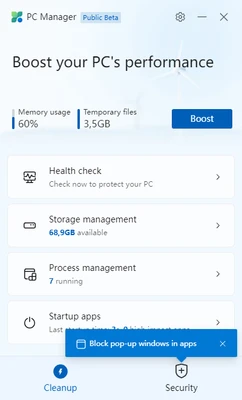
Microsoft PC Manager is a free PC optimization and maintenance utility developed by Microsoft. It provides a simple dashboard for Windows users to monitor system health, improve performance, manage storage, and access built-in Windows security tools.
Designed for Windows 10 and Windows 11 users, Microsoft PC Manager combines several existing Windows maintenance features into one easy-to-use application, helping users clean unnecessary files, manage startup programs, and optimize system performance.
Key Features
- One-click PC health check
- Temporary file cleanup
- Memory optimization
- Storage management
- Startup app management
- Background process control
- Windows Security integration
- Performance boost tools
- Simple and lightweight interface
Main Features Explained
PC Health Check
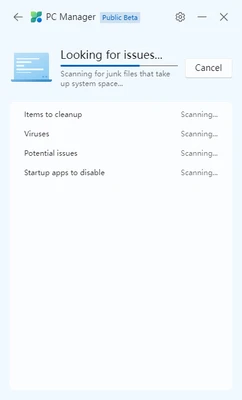
Microsoft PC Manager provides a quick system scan to identify potential issues affecting computer performance, including unnecessary files, security status, and startup applications.
Storage Management
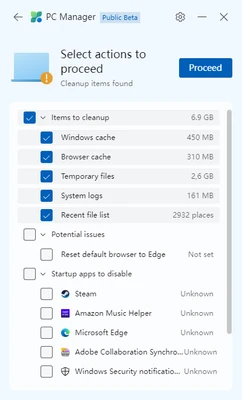
The software helps remove temporary files, Windows cache files, browser cache, and other unnecessary data to free up disk space.
Performance Optimization
Users can release memory resources, stop unnecessary background processes, and improve system responsiveness with built-in optimization tools.
Startup Management
The startup manager allows users to disable unnecessary applications that launch automatically when Windows starts, helping reduce boot time.
Security Management
Microsoft PC Manager works together with Windows Security and Microsoft Defender to help users monitor antivirus protection and system security status.
How to Use Microsoft PC Manager
- Download and install Microsoft PC Manager.
- Launch the application from the Start menu.
- Run the Health Check feature to scan your PC.
- Clean unnecessary files and optimize system settings.
- Manage startup applications and background processes.
- Use the security section to check Windows protection status.
System Requirements
- Operating System: Windows 11, Windows 10 version 1809 or newer
- Processor: Intel or AMD processor
- Memory: 2GB RAM or higher
- Storage: Minimal disk space required
- Internet: Required for updates and security features
Pros
- Developed by Microsoft
- Completely free to use
- Simple and beginner-friendly interface
- Uses built-in Windows optimization tools
- Lightweight and low resource usage
Cons
- Limited advanced optimization options
- Some features duplicate existing Windows tools
- Fewer customization options compared with third-party cleaners
Alternatives
- CCleaner – Popular system cleanup and optimization utility.
- Glary Utilities – All-in-one Windows maintenance tool.
- Advanced SystemCare – Provides system optimization and privacy tools.
Conclusion
Microsoft PC Manager is a lightweight and easy-to-use Windows maintenance tool for users who want a simple way to monitor and optimize their computers.
By combining storage cleanup, startup management, performance optimization, and Windows Security features into one dashboard, it provides a convenient alternative to manually managing Windows settings.
For everyday Windows users who need basic PC maintenance without complicated configuration, Microsoft PC Manager is a practical and reliable choice.