


Syncovery is a file synchronization and backup application for Windows that helps users synchronize files and folders between computers, external drives, network locations, servers, and supported cloud storage services. It is suitable for both personal and business use and provides flexible profiles, scheduling, file versioning, filtering, and unattended operation.
What's New
Syncovery continues to focus on reliable synchronization and backup workflows with flexible configuration options, improved compatibility, and support for modern storage environments. Specific changes depend on the installed version.
Key Features
-
Synchronizes files and complete folder structures between different locations, including PCs, laptops, servers, network drives, and cloud storage.
-
Supports large files through 64-bit file I/O.
-
Saves synchronization settings as reusable Profiles.
-
Runs multiple profiles together with a single command.
-
Detects moved or reorganized files and can reproduce those moves at the destination.
-
Includes a built-in scheduler for automated backups and synchronization.
-
Continues processing when some files are temporarily locked and retries them later.
-
Supports multiple backup versions instead of immediately overwriting older files.
-
Allows older file versions to be stored in the original folder or separate backup folders.
-
Provides database-aware file copying to reduce the risk of corruption when handling database files.
-
Can use the Windows Recycle Bin when replacing older files, making accidental recovery easier.
-
Supports inclusion and exclusion file masks for precise synchronization.
-
Allows users to synchronize only selected folders or items within a base folder.
-
Handles daylight-saving-time differences when comparing files between systems.
-
Can resume interrupted operations after a destination disk becomes full.
-
Supports unattended operation with predefined overwrite rules.
-
Can create exact mirrors of source data, including replacing or deleting files at the destination when required.
-
Supports scheduled and automated synchronization tasks.
User Interface
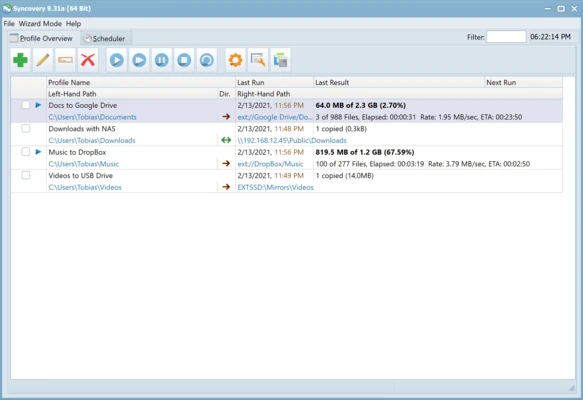
Syncovery uses a profile-based interface that organizes synchronization tasks into separate configurations. Users can select source and destination folders, define synchronization rules, configure filters, and set schedules from the profile settings.
The interface is designed for both simple synchronization jobs and more advanced backup configurations.
Installation and Setup
-
Download and install Syncovery on your Windows PC.
-
Launch the application.
-
Create a new synchronization profile.
-
Select the source and destination locations.
-
Choose the appropriate synchronization or backup mode.
-
Configure filters, file-version settings, and other options.
-
Add a schedule if automatic synchronization is required.
-
Save the profile and run a test synchronization.
The software can then run profiles manually or automatically according to the configured schedule.
How to Use
-
Open Syncovery and create a new Profile.
-
Select the folders or storage locations to synchronize.
-
Choose a synchronization mode, such as two-way synchronization or mirroring.
-
Configure file inclusion and exclusion rules.
-
Enable file versioning if previous versions need to be retained.
-
Set a schedule for recurring backups or synchronization.
-
Save the profile.
-
Run the profile and review the operation status.
-
Check the logs if any files cannot be synchronized.
-
Adjust the profile settings for future operations.
FAQ
Is Syncovery a backup program?
Yes. It can be used for both file synchronization and backup tasks, including scheduled backups and multiple backup versions.
Can Syncovery synchronize between two computers?
Yes. It can synchronize files between PCs, laptops, servers, network locations, and other supported storage destinations.
Can it keep older versions of files?
Yes. File versioning can preserve previous copies instead of immediately overwriting them.
Can Syncovery run automatically?
Yes. Its scheduler can run synchronization and backup profiles automatically at specified times.
Can it synchronize large files?
Yes. 64-bit file handling allows it to work with files larger than 4 GB.
Can interrupted transfers be resumed?
Yes. The software can resume operations after problems such as insufficient disk space, including continuing a partially copied file after additional space becomes available.
Alternatives
Resilio Sync is focused on peer-to-peer file synchronization and direct transfers.
SyncBack provides file backup and synchronization with a range of configuration options.
FreeFileSync is a free and open-source solution for comparing and synchronizing folders.
Acronis True Image combines backup, recovery, and additional security-oriented features.
Pricing
Syncovery is commercial software and provides a 30-day trial period. A license is required after the trial period.
System Requirements
-
OS: Windows 7, 8, 10, 11
-
Architecture: 32-bit and 64-bit
-
Processor: 1 GHz or faster
-
RAM: 2 GB minimum; 4 GB recommended
-
Disk Space: Approximately 50 MB for installation
-
Internet connection: Required for updates and certain cloud-storage features
Pros
-
Reliable file synchronization and backup capabilities
-
Flexible profile-based configuration
-
Supports local, network, server, and cloud storage
-
Advanced scheduling options
-
File versioning and recovery features
-
Can detect moved files
-
Supports unattended operation
-
Handles large files
Cons
-
Advanced configurations can take time to set up
-
Commercial software after the trial period
-
Large synchronization jobs may require significant system resources
-
The large number of configuration options may be overwhelming for beginners
Conclusion
Syncovery is a flexible file synchronization and backup solution for users who need more control than a basic folder-sync utility provides. Its profile system, scheduling, file versioning, moved-file detection, filtering, and mirror capabilities make it suitable for both routine backups and more complex synchronization tasks.