Epubor Ultimate eBook Converter is an eBook conversion and management tool for Windows that allows users to convert books between popular formats such as EPUB, PDF, MOBI, and AZW3.
The software supports batch conversion, metadata editing, and compatibility with popular e-readers including Kindle, Kobo, and Nook. Its drag-and-drop interface makes it easy to import books, select an output format, and convert multiple files at once.
Key Features
eBook Format Conversion
Convert eBooks between popular formats including EPUB, PDF, MOBI, AZW, AZW3, TXT, and HTML.
Batch Conversion
Convert multiple books simultaneously, making it convenient for users with large digital libraries.
DRM Management
Provides tools designed to process DRM-protected eBooks from supported platforms. DRM removal may be subject to the applicable laws and terms of the content provider.
Metadata Editor
Edit book information such as title, author, publisher, language, identifiers, publication information, ratings, and cover images.
Automatic Device Detection
The software can detect compatible connected e-readers and display available books for easier library management.
Drag-and-Drop Interface
Books can be imported by dragging them into the main window, making the conversion process straightforward.
eReader Compatibility
Supports popular devices and ecosystems including Kindle, Kobo, Nook, and other compatible e-readers.
High-Speed Processing
Designed to process multiple books efficiently while preserving the original content and formatting as much as possible.
User Interface
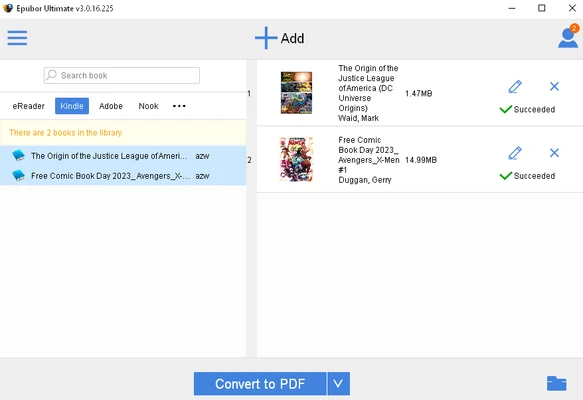
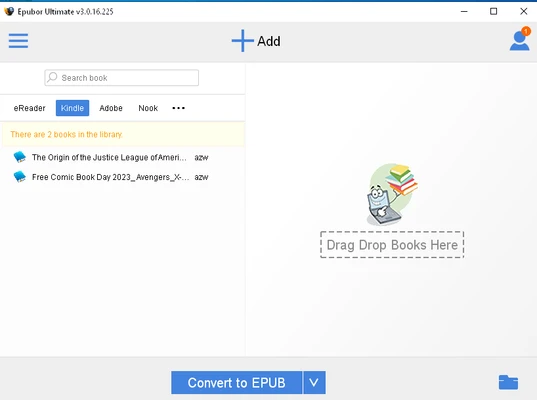
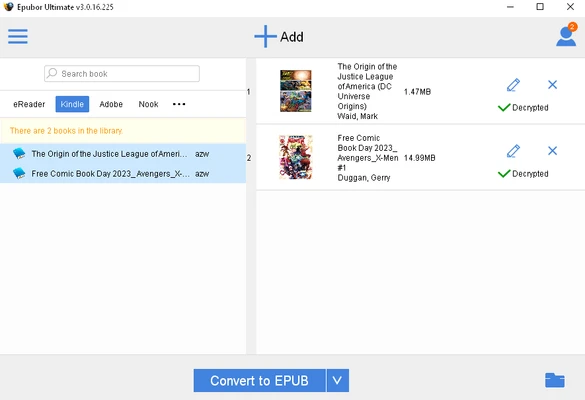
Epubor Ultimate features a simple and easy-to-understand interface. The main window separates the book library and conversion area, allowing users to quickly import books and select an output format.
The drag-and-drop workflow is particularly useful for batch processing. Metadata editing tools are also integrated directly into the main interface, so users can organize their digital library without switching to another application.
Installation and Setup
- Download and install Epubor Ultimate on your Windows PC.
- Run the installer and follow the on-screen instructions.
- Launch the application after installation.
- Activate the software with a license key or start the available trial version.
- Import eBooks from your computer or supported e-reader.
- Configure the output format and conversion settings.
How to Use
Import eBooks
Drag and drop books into the main interface or use the file selection option to add them manually.
Select Output Format
Choose the desired format, such as EPUB, PDF, MOBI, or AZW3.
Convert Books
Click the conversion button to begin processing. Multiple books can be converted in a batch.
Edit Metadata
Select a book and modify its title, author, cover, publisher, language, or other available metadata.
Organize Your Library
Use the available sorting and metadata options to keep your digital book collection organized.
FAQ
Is Epubor Ultimate free?
No. The software provides a trial version with limitations, while the full version requires a paid license.
What formats does Epubor Ultimate support?
It supports a wide range of common eBook formats, including EPUB, PDF, MOBI, AZW, AZW3, TXT, and HTML.
Can it convert multiple books at once?
Yes. Batch conversion allows multiple eBooks to be processed simultaneously.
Does it support Kindle books?
It supports compatible Kindle eBook files and devices. Support can depend on the book format, DRM scheme, and current software version.
Can I edit book information?
Yes. The built-in metadata editor allows users to modify information such as the title, author, publisher, language, and cover.
Does the trial version have limitations?
Yes. The trial version provides limited functionality and conversion capabilities compared with the full version.
Alternatives
Calibre – A free and open-source eBook management application with extensive library organization and conversion features.
Epubor eBook Manager – Designed for managing, organizing, and transferring digital books across supported devices.
Epubor Kindle Transfer – Focused on transferring Kindle books between compatible devices and computers.
Epubor Audible Converter – Designed for converting supported Audible audiobook files into other audio formats.
Pricing
Free Trial: Limited functionality and conversion restrictions.
1-Year License: Approximately $29.99 for a single-user license.
Lifetime License: Approximately $59.99 for a single-user license with lifetime updates and support.
Family License: Approximately $109.99 for use across multiple devices.
Pricing and license terms may change over time.
System Requirements
- Operating System: Windows 7, 8, 10, or 11
- Processor: 1 GHz or faster
- RAM: 512 MB or more
- Storage: At least 100 MB of free disk space
- Internet Connection: Required for activation and software updates
PROS
- Supports many popular eBook formats
- Simple drag-and-drop interface
- Batch conversion
- Built-in metadata editor
- Compatible with popular e-readers
- Easy to use
CONS
- Full functionality requires a paid license
- Trial version has conversion limitations
- Some DRM-protected content may not be supported
- Windows-focused software
Conclusion
Epubor Ultimate eBook Converter is a practical solution for users who need to convert, organize, and manage eBooks across different formats and devices.
Its batch conversion, metadata editing, broad format support, and straightforward interface make it particularly useful for users with large digital libraries. While the full version requires a paid license, the trial provides an opportunity to evaluate the software before purchasing.
Note: A trial version is available with limited conversion functionality.