


Insomnia Core is a powerful API client for developers who need to design, test, debug, and manage APIs. It supports REST, GraphQL, gRPC, SOAP, and WebSocket requests, with tools for authentication, environment variables, request organization, response inspection, and code generation.
The application is available for Windows, macOS, and Linux and provides a clean interface for working with APIs without requiring developers to build custom testing tools.
What's New
Recent versions of Insomnia have focused on API design, collaboration, protocol support, and workflow improvements.
- Expanded support for REST, GraphQL, gRPC, SOAP, and WebSockets
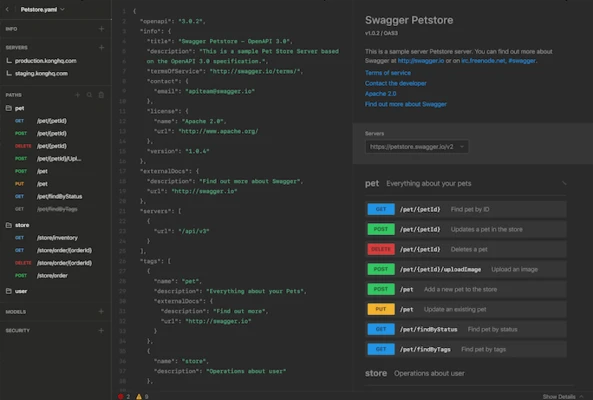
- Improved API design and OpenAPI validation
- Enhanced plugin support and customization
- Flexible local and Git-based storage options
- Improved collaboration and project synchronization
- Additional authentication and request-management capabilities
Key Features
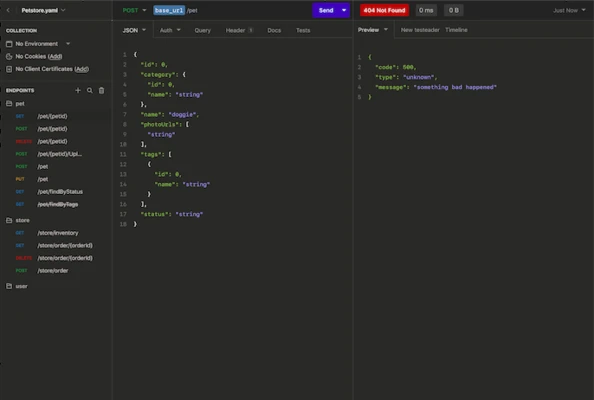
REST API Client: Create and send HTTP requests while configuring URLs, parameters, headers, authentication, and request bodies.
GraphQL Support: Build and test GraphQL queries and mutations with an integrated development environment.
Multiple Protocols: Supports REST, GraphQL, gRPC, SOAP, and WebSockets for working with different API architectures.
Environment Variables: Store reusable values such as API keys, URLs, session IDs, and credentials and switch between development, testing, and production environments.
Authentication: Supports common authentication methods including OAuth 1.0/2.0, Basic, Digest, NTLM, AWS authentication, and client SSL certificates.
Request Collections: Organize API requests into workspaces, folders, and collections for easier management.
Response Inspection: View HTTP status codes, response bodies, headers, cookies, and other response information.
Code Generation: Generate code snippets for APIs in languages and libraries such as cURL, Python, JavaScript, Go, Swift, and Java.
Import and Export: Import API definitions and requests from formats such as cURL, HAR, Swagger, and OpenAPI, and export project data when needed.
Plugin System: Extend the application with community-developed plugins and additional functionality.
OpenAPI Validation: Validate API specifications and identify potential issues during API development.
Custom Themes: Choose from multiple interface themes and customize the application's appearance.
User Interface
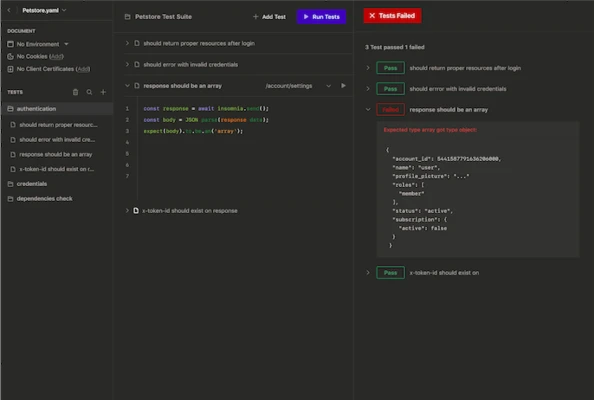
Insomnia uses a clean interface designed around API development and testing. The workspace provides access to requests, folders, environments, authentication settings, and response data without requiring complicated configuration.
Requests can be organized using folders and workspaces, while the response panel provides detailed information about each API call.
The interface is suitable for both individual developers and teams working with large API collections.
Installation and Setup
- Download the appropriate installer for Windows, macOS, or Linux.
- Install Insomnia by following the on-screen instructions.
- Launch the application after installation.
- Create or open a workspace.
- Create a new API request or import an existing API collection.
- Configure the required environment variables and authentication settings.
- Send a test request to verify the configuration.
How to Use
Create a Request: Create a new request and select the required HTTP method, such as GET, POST, PUT, or DELETE.
Enter the Endpoint: Enter the URL of the API endpoint you want to test.
Configure Parameters: Add query parameters, headers, authentication information, and request data as required.
Send the Request: Click the Send button to execute the request.
Inspect the Response: Review the status code, response body, headers, cookies, and other returned information.
Save the Request: Add frequently used requests to a workspace or folder for future testing.
Configure Environments: Create environment variables for values that change between development, testing, and production environments.
Generate Code: Use the code-generation tools to convert an API request into code suitable for your preferred programming language.
FAQ
What is Insomnia Core?
Insomnia Core is an API client used to design, test, debug, and manage APIs. It supports REST, GraphQL, gRPC, SOAP, and WebSocket APIs.
Is Insomnia free?
Yes. Insomnia offers a free Hobby plan with core API development and testing features. Paid plans provide additional collaboration, Git, access control, and enterprise capabilities.
Which operating systems does Insomnia support?
Insomnia is available for Windows, macOS, and Linux.
Does Insomnia support GraphQL?
Yes. GraphQL is supported alongside REST and several other API protocols.
Can Insomnia generate code?
Yes. Insomnia can generate code snippets for various programming languages and HTTP libraries.
Can I import cURL requests?
Yes. cURL commands can be imported and converted into Insomnia requests.
Can Insomnia work with environment variables?
Yes. Environment variables can be used to store reusable values such as API endpoints, authentication tokens, and session IDs.
Does Insomnia support authentication?
Yes. It supports several authentication methods, including OAuth, Basic, Digest, NTLM, AWS authentication, and client certificates.
Alternatives
Postman: A popular API development and testing platform with extensive collaboration, automation, and API management features.
Hoppscotch: A lightweight web-based API testing tool supporting REST, GraphQL, WebSocket, and other protocols.
SoapUI: A testing platform focused on SOAP and REST APIs with advanced testing capabilities.
HTTPie: A simpler API client designed for making HTTP requests through a user-friendly interface and command-line tools.
Pricing
Hobby – Free
- API design and debugging
- API mocking
- Collaboration
- 1 project
- Unlimited collaborators
- Unlimited collection runs
- Limited free mock requests
- Limited AI Runner requests
Pro – $12/user/month
Includes the Hobby features plus:
- Unlimited collaborators and organizations
- Native Git support
- Role-based access control
- Additional mock requests
- Additional AI Runner requests
Enterprise – $45/user/month
Includes Pro features plus:
- Enterprise SSO with SAML and OIDC
- SCIM support
- Advanced RBAC
- Cloud, local, or Git storage controls
- Self-hosted API mocking
- Enterprise support
- Professional services
- Additional enterprise administration features
Pricing and available features may vary depending on the subscription and billing period.
System Requirements
- Operating System: Windows 10 or later, macOS, or Linux
- Processor: Intel Core i3 or equivalent
- RAM: 4 GB minimum
- Storage: 500 MB of available disk space
- Internet Connection: Required for online API testing and synchronization features
PROS
- Clean and intuitive interface
- Supports REST, GraphQL, gRPC, SOAP, and WebSockets
- Advanced authentication options
- Environment variable management
- Code generation
- API import and export
- Plugin support
- Available on Windows, macOS, and Linux
- Free plan available
CONS
- Some advanced collaboration features require a paid plan
- Large API projects can consume significant system resources
- Advanced workflows may require additional configuration
- Enterprise features can be expensive for small teams
Conclusion
Insomnia Core is a capable API client that provides developers with a convenient environment for designing, testing, and debugging APIs. Its support for REST, GraphQL, gRPC, SOAP, and WebSockets makes it suitable for a wide range of development workflows.
With environment variables, authentication tools, code generation, request collections, API import and export, and OpenAPI support, Insomnia is a practical choice for developers who need a flexible alternative to traditional API testing tools.
Note: Some advanced features and collaboration capabilities require a paid plan.