

KiCad for Windows Download – Professional Open-Source PCB Design Software
KiCad for Windows is a powerful and open-source electronic design automation (EDA) tool designed to help users create schematics, design printed circuit boards (PCBs), and manage electronic projects efficiently. It is ideal for engineers, hobbyists, and students who want a complete solution for PCB design.
Design complex circuits and professional PCBs effortlessly with KiCad!
Schematic Capture and PCB Layout
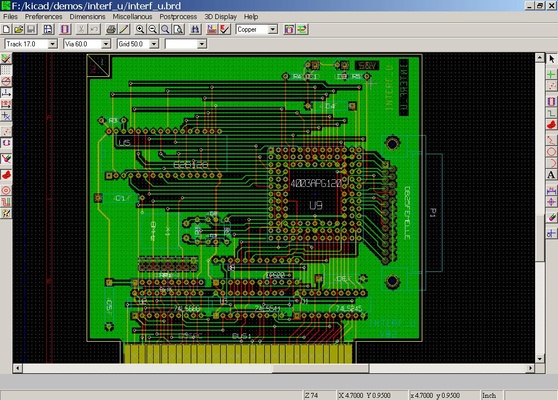
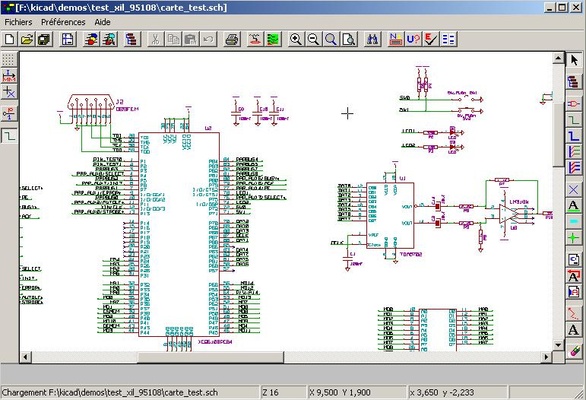
KiCad allows users to create detailed schematics and translate them into PCB layouts, providing full control over circuit design and board structure.
Multi-Layer PCB Support
The software supports multi-layer PCB designs, including advanced routing and footprints, making it suitable for both simple and complex electronic projects.
3D Visualization
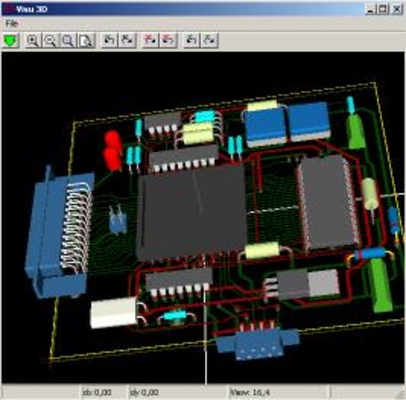
Users can view PCBs in 3D, helping to inspect board components, layouts, and design accuracy before production.
Extensive Library and Custom Components
KiCad includes a large library of components and symbols, and users can create custom parts, allowing flexible and precise circuit designs.
Cross-Platform and Open-Source
Being open-source, KiCad is freely available and extensible, working on Windows, macOS, and Linux, making it accessible for a wide range of users.
User-Friendly Interface
With an intuitive interface, KiCad enables users to navigate schematic capture, PCB layout, and 3D visualization easily, whether they are beginners or experienced engineers.
Final Overview
KiCad for Windows is a complete solution for PCB design and electronic project management. With features like schematic capture, multi-layer PCB support, 3D visualization, extensive component libraries, open-source flexibility, and a user-friendly interface, KiCad empowers users to design professional-quality PCBs efficiently. Download KiCad today and bring your electronic projects to life!