


LibreOffice is a free and open-source office productivity suite for Windows developed by The Document Foundation.
It provides a complete set of applications for word processing, spreadsheets, presentations, drawing, databases, and mathematical formulas. LibreOffice is available for Windows, macOS, and Linux and can open, edit, and save documents in a wide range of formats, including Microsoft Office formats and OpenDocument Format (ODF).
LibreOffice is suitable for personal, educational, and professional use and works fully offline without requiring a subscription.
What’s New
Recent LibreOffice releases include improvements to Microsoft Office document compatibility, application performance, PDF export, accessibility, and user interface consistency. Writer, Calc, Impress, and other components also receive regular feature updates, bug fixes, and stability improvements.
Key Features
-
Writer – Create and edit documents, reports, letters, books, and other text-based content.
-
Calc – Create spreadsheets, use formulas, analyze data, and generate charts.
-
Impress – Create presentations with animations, multimedia, and slide layouts.
-
Draw – Create diagrams, flowcharts, technical drawings, and other vector-based content.
-
Base – Create and manage databases and database-related documents.
-
Math – Create mathematical and scientific formulas.
-
Microsoft Office Compatibility – Open and save DOC, DOCX, XLS, XLSX, PPT, and PPTX files.
-
OpenDocument Support – Uses ODT, ODS, ODP, and other OpenDocument formats as native formats.
-
PDF Export – Export documents, spreadsheets, and presentations directly to PDF.
-
Templates – Provides templates for documents, spreadsheets, presentations, and other projects.
-
Extensions – Supports extensions for adding functionality and customizing the suite.
-
Offline Operation – Core applications work without an internet connection.
-
Cross-Platform Support – Available for Windows, macOS, and Linux.
-
Customization – Customize toolbars, menus, keyboard shortcuts, and interface layouts.
User Interface
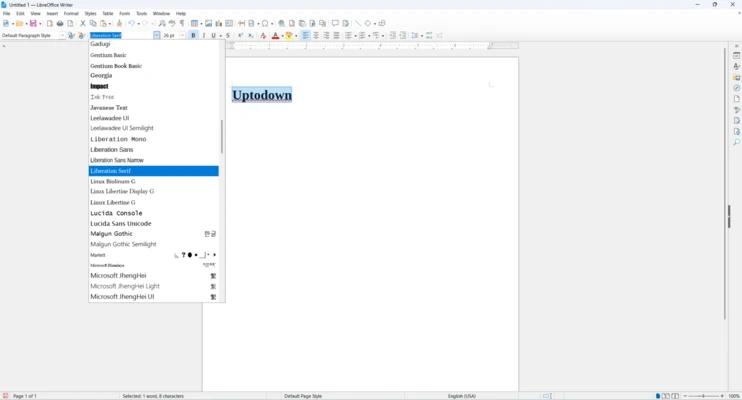
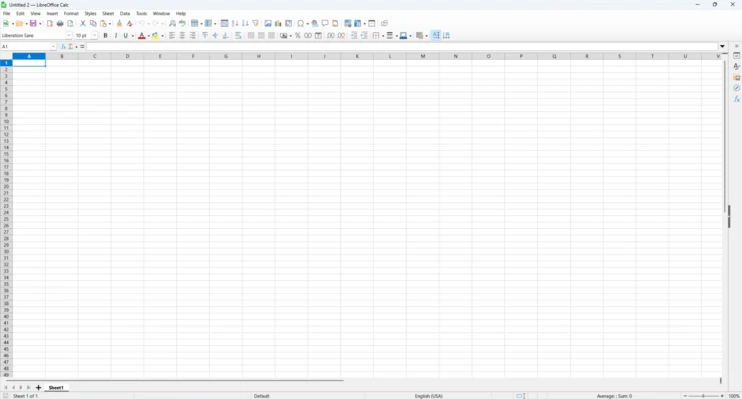
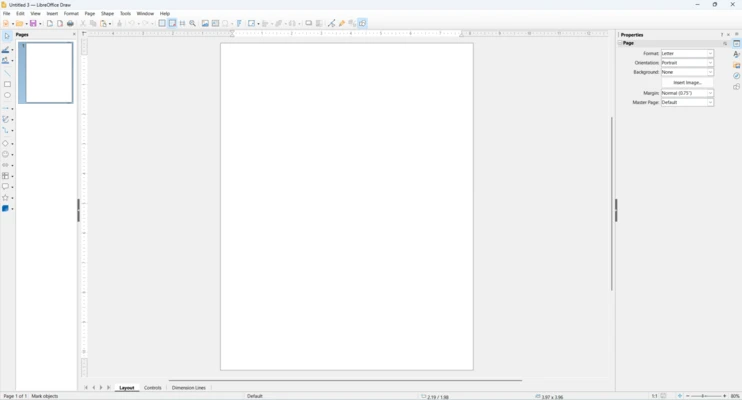
LibreOffice uses a traditional desktop interface with menus, toolbars, sidebars, and customizable panels. Users who prefer a ribbon-style layout can enable the optional Tabbed interface.
Each application uses a similar interface, making it easier to switch between Writer, Calc, Impress, and the other components.
The interface can be customized with different toolbar configurations, keyboard shortcuts, themes, and layout options.
Installation and Setup
-
Download the latest Windows installer.
-
Run the installer and follow the setup instructions.
-
Choose a Typical or Custom installation.
-
Select the components and optional features you want to install.
-
Complete the installation and launch LibreOffice from the Start Menu.
-
Choose the default file formats and other preferences if required.
How to Use
Create a Document
Open Writer, Calc, Impress, or another LibreOffice application and create a new document from a blank file or template.
Open Existing Files
Use the Open command to load documents created with LibreOffice or compatible Microsoft Office formats.
Edit Documents
Use the available formatting, editing, calculation, presentation, drawing, and database tools depending on the application.
Save and Export Files
Save files in their native OpenDocument formats or choose compatible Microsoft Office formats when necessary. Documents can also be exported directly to PDF.
Use Templates and Extensions
Browse available templates and install supported extensions to add features or customize the applications.
FAQ
Is LibreOffice free?
Yes. LibreOffice is free and open-source software and can be used for personal, educational, and commercial purposes.
Can LibreOffice open Microsoft Office files?
Yes. LibreOffice can open and edit many Microsoft Office formats, including DOCX, XLSX, and PPTX.
Can LibreOffice save files as Microsoft Office formats?
Yes. Writer, Calc, and Impress can save documents in compatible Microsoft Office formats.
Does LibreOffice work offline?
Yes. The main LibreOffice applications are desktop programs and can be used without an internet connection.
Can LibreOffice create PDF files?
Yes. LibreOffice includes built-in PDF export functionality.
Can LibreOffice be used for business?
Yes. Its open-source license allows organizations to use LibreOffice for commercial and business purposes.
Does LibreOffice require Java?
Java is not generally required for the core LibreOffice applications. Some optional features or specific database-related functionality may use Java.
Can LibreOffice replace Microsoft Office?
For many users, yes. Writer, Calc, and Impress cover most common word processing, spreadsheet, and presentation tasks. However, highly complex Microsoft Office documents or workflows may still have compatibility differences.
Alternatives
Microsoft 365: A comprehensive office suite with strong Microsoft Office compatibility, cloud storage, and real-time collaboration features.
WPS Office: A commercial office suite with a familiar interface and strong compatibility with Microsoft Office formats.
ONLYOFFICE: An office suite focused on Microsoft Office compatibility and document collaboration.
Apache OpenOffice: A free and open-source office suite with similar applications and functionality.
Google Workspace: A cloud-based productivity platform designed for online document creation and real-time collaboration.
Pricing
LibreOffice is completely free to download and use.
There are no subscription fees or activation charges for the standard desktop suite. Because it is open-source software, users can install and use LibreOffice on supported computers without purchasing a commercial license.
System Requirements
-
Operating System: Windows 10 or Windows 11 (64-bit)
-
Processor: 64-bit Intel or AMD processor
-
Memory: 2 GB RAM minimum
-
Storage: Approximately 1.5 GB of available disk space
-
Display: 1024 × 768 resolution or higher
-
Additional requirements may apply for specific features or optional components
Pros
-
Free and open-source.
-
Complete office productivity suite.
-
Supports Microsoft Office formats.
-
Native OpenDocument Format support.
-
Built-in PDF export.
-
Works offline.
-
Cross-platform compatibility.
-
Extensive customization and extension support.
Cons
-
Compatibility can vary with complex Microsoft Office documents.
-
Interface may feel less modern than some commercial alternatives.
-
No built-in real-time cloud collaboration comparable to Microsoft 365 or Google Workspace.
-
Some advanced features can have a steeper learning curve.
-
Large or complex documents may require more system resources.
Conclusion
LibreOffice is a capable free and open-source office suite that provides essential tools for documents, spreadsheets, presentations, databases, drawings, and mathematical formulas.
Its broad file-format support, offline functionality, and compatibility with Microsoft Office documents make it a practical alternative to paid office software. Although it lacks some of the cloud collaboration and integration features found in commercial suites, LibreOffice remains an excellent choice for users who want a complete office package without subscription fees.